$ cat job-board-api/part-02.md
Building a Job Board API, Part 2: The Data Model
Where we are
In Part 1, I built the foundation of my Job Board API: a Django project managed with uv, settings that come only from environment variables, a Dockerfile, and Docker Compose with PostgreSQL 17. The app was running, but it had no data of its own.
In this part, I build the data model: the tables that hold users, companies, candidates, jobs and applications.
This sounds like the easy part. You write a few Python classes, run a command, and the tables appear. But the data model is the hardest thing to change later. Once real data exists, every change needs a careful migration. So I tried to make every decision here on purpose, and I want to explain each one.
The main idea of this part is simple: design the data so that some bugs are impossible, instead of writing code to catch them later.
Also, I had to delete my whole database to make this work. I will explain why, and why it was safe that time.
The data model
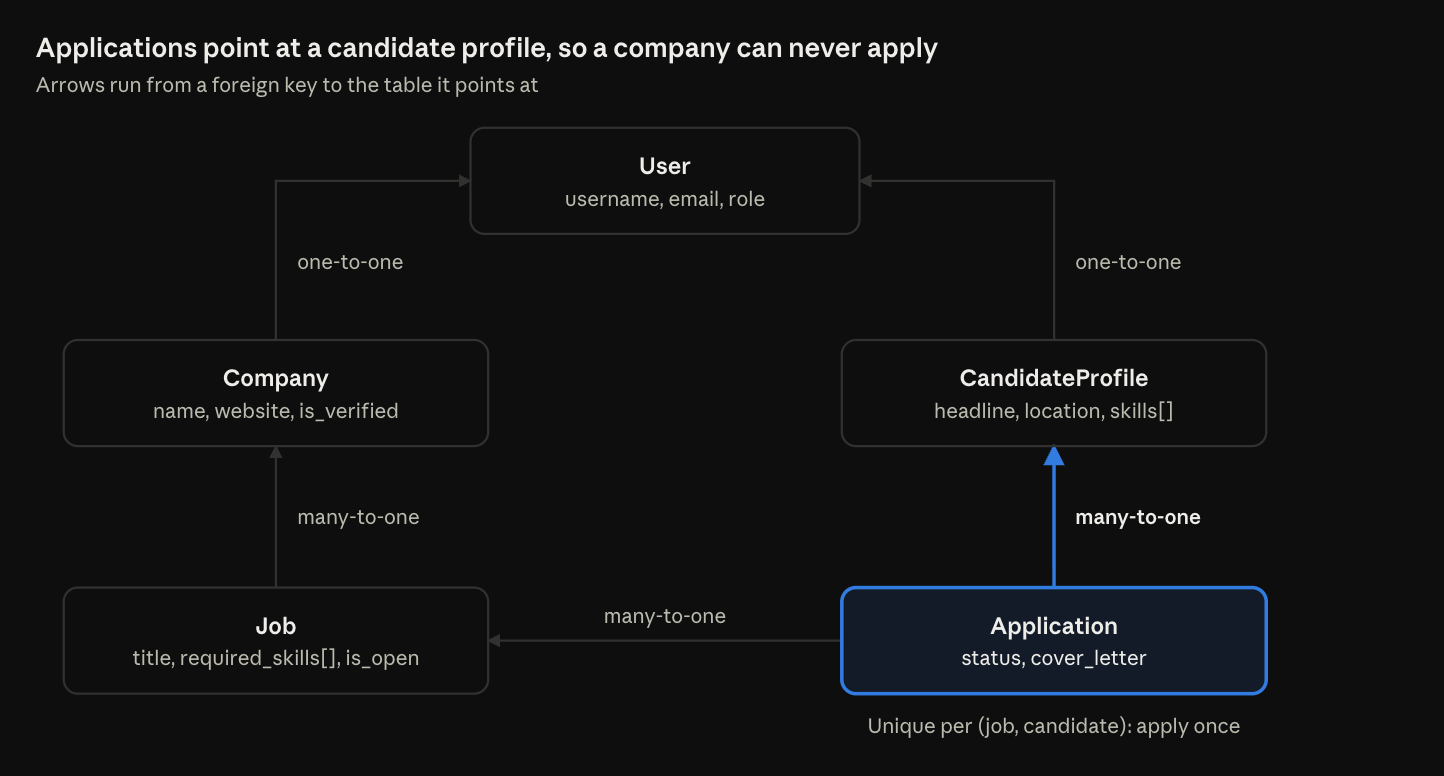
Five tables: a User for login, one profile per role, and the jobs and applications that connect them. The rest of this article explains each one.
Step 1: A custom User model, and why I deleted my database
My app has two kinds of users: companies and candidates. Django comes with a built-in User model, but it has no idea about roles. So I created my own.
First, the app that holds all the models:
docker compose exec api python manage.py startapp jobs
I ran this inside the container on purpose. In Part 1, I made the container run as a user with UID 1000, the same as my user on the server. So the new files belong to me, not to root. This is exactly the reason I did the non-root user early.
The model
class User(AbstractUser):
    class Role(models.TextChoices):
        COMPANY = "company", "Company"
        CANDIDATE = "candidate", "Candidate"

    email = models.EmailField(unique=True)
    role = models.CharField(max_length=20, choices=Role.choices)
Let me go line by line:
- User(AbstractUser) uses inheritance. My class gets everything from Django’s user: username, password hashing, staff flags and permissions. I only add what is new.
- Role(models.TextChoices) is a small enum: a fixed list of allowed values. Each line has two parts: the value stored in the database (“company”) and the label people see (“Company”).
- I put Role inside User, so code reads User.Role.COMPANY. This has a real benefit. If I make a typo like User.Role.COMPNAY, Python crashes immediately. If I used a plain string like “compnay”, nothing would crash. It would just never match, and I would find the bug much later.
- email overrides Django’s email field. In Django’s default user, email is optional and not unique. Two accounts with one email would break password reset, so I added unique=True. This creates a unique index in PostgreSQL.
- role has no default, on purpose. Every signup must choose a role explicitly. If I wrote default=”candidate”, a bug that forgets the role would silently create candidates.
One honest limit: choices is checked by forms and serializers, not by PostgreSQL itself. Code that writes to the database directly could still save a wrong value.
Two small helpers
@property
    def is_company(self):
        return self.role == self.Role.COMPANY

    @property
    def is_candidate(self):
        return self.role == self.Role.CANDIDATE
@property is a decorator that turns a method into an attribute. I can write user.is_company, without brackets.
Why not a real is_company column in the database? Because then I would have two sources of truth. One day, is_company could say True while role says “candidate”. A property is calculated from role every time, so the two can never disagree.
Telling Django to use it
AUTH_USER_MODEL = "jobs.User"
This one line in settings.py tells Django, the admin and every library (including the JWT library in Part 3) that this class is the user. Without it, Django keeps using its own auth.User, and my class is just an extra table nobody uses.
Why I had to delete the database
Here is the problem. In Part 1, I already ran migrate. That created Django’s built-in tables, including auth_user, and recorded that the admin app depends on it.
Django’s documentation is clear: you must set a custom user model before the first migrate. I set it after. When I ran makemigrations, Django raised InconsistentMigrationHistory. It saw that the admin’s migration was already applied, but its new dependency (my user table) was not.
The fix was to start again:
docker compose down -v
docker compose up -d
docker compose exec api python manage.py makemigrations jobs
docker compose exec api python manage.py migrate
docker compose exec api python manage.py createsuperuser
down -v stops the stack and deletes the named volume. That is the whole database.
Was that dangerous? This time, no. The database only had empty Django tables. There was zero data to lose. The other option was to edit migration files by hand to swap the user model. That is slow and easy to get wrong, with no benefit when there is no data.
But I want to be very clear: never run down -v once there is data you need. It does not ask “are you sure?”. This is the kind of command I want to remember the rule for, not just the syntax.
The lesson for future projects: if a Django project will ever need a custom user, create it first, before anything else touches the database. Changing it later, with real data, is a painful job.
One more detail: createsuperuser does not ask for a role. So my admin user has an empty role. That is actually correct. The admin is neither a company nor a candidate.
Step 2: One profile table per role
A company needs a name, a website and a “verified” flag. A candidate needs a headline, a location and a list of skills. Where do these fields go?
One option is to put them all on User. But then every company row would have empty candidate columns, and every candidate row would have empty company columns. Half of every row would be empty.
So I kept User about login only, and created one profile table per role.
Company
class Company(models.Model):
    user = models.OneToOneField(
        settings.AUTH_USER_MODEL,
        on_delete=models.CASCADE,
        related_name="company",
    )
    name = models.CharField(max_length=200)
    website = models.URLField(blank=True)
    description = models.TextField(blank=True)
    is_verified = models.BooleanField(default=False)
    created_at = models.DateTimeField(auto_now_add=True)
- OneToOneField means one company per user, and one user per company. In the database, it is a user_id column with a unique index.
- settings.AUTH_USER_MODEL is the Django way to point at the user model. If the user model ever moves, this reference still works.
- on_delete=models.CASCADE: if a user is deleted, their company is deleted too. A company without its login account means nothing.
- related_name=”company” gives me the reverse direction: user.company. If the user has no company row (for example, a candidate), this raises an error. Remember this. It causes a real bug in Part 4.
- blank=True means “optional in forms”. The database stores an empty string “”, not NULL. Django’s convention for text is to have only one kind of empty, so you never need to check for both.
- is_verified starts as False. New companies are not trusted yet. In Phase 2, a permission rule will block unverified companies from posting jobs. For now, I verify them by hand in the admin.
- auto_now_add=True sets the time once, when the row is created.
CandidateProfile
class CandidateProfile(models.Model):
    user = models.OneToOneField(
        settings.AUTH_USER_MODEL,
        on_delete=models.CASCADE,
        related_name="candidate_profile",
    )
    headline = models.CharField(max_length=200, blank=True)
    location = models.CharField(max_length=100, blank=True)
    skills = ArrayField(models.CharField(max_length=50), default=list, blank=True)
    created_at = models.DateTimeField(auto_now_add=True)
The same pattern. related_name=”candidate_profile” gives user.candidate_profile. Without it, Django’s default would be user.candidateprofile (all lowercase, no underscore). That is harder to read, and as you will see in Part 4, very easy to mistype.
The skills field is special. I explain it in Step 4.
Step 3: Jobs and applications
Job
class Job(models.Model):
    class JobType(models.TextChoices):
        FULL_TIME = "full_time", "Full-time"
        PART_TIME = "part_time", "Part-time"
        CONTRACT = "contract", "Contract"
        INTERNSHIP = "internship", "Internship"

    company = models.ForeignKey(Company, on_delete=models.CASCADE, related_name="jobs")
    title = models.CharField(max_length=200)
    description = models.TextField()
    location = models.CharField(max_length=100)
    job_type = models.CharField(max_length=20, choices=JobType.choices, default=JobType.FULL_TIME)
    required_skills = ArrayField(models.CharField(max_length=50), default=list, blank=True)
    is_open = models.BooleanField(default=True)
    created_at = models.DateTimeField(auto_now_add=True)
    updated_at = models.DateTimeField(auto_now=True)

    class Meta:
        ordering = ["-created_at"]
- ForeignKey means many-to-one: one company has many jobs. In the database, it is a company_id column. Django adds an index to every foreign key automatically.
- related_name=”jobs” lets me write company.jobs.all().
- The JobType values use snake_case with no spaces, like full_time. Later they will appear in URLs, like ?job_type=full_time, so they must be URL-safe.
- job_type has a default (FULL_TIME), but User.role does not. Why the difference? Most jobs are full-time, so a default makes sense here. For a user’s role, there is no safe guess.
- is_open defaults to True. To remove a job, a company sets is_open=False. There is no delete. Deleting a job would also delete all its applications (because of CASCADE), and the history would be lost.
- auto_now=True updates the time on every save. auto_now_add=True sets it only once, when the row is created.
- ordering = [“-created_at”]: the – means newest first, which is what a job list should show.
Application, and the bug I made impossible
class Application(models.Model):
    class Status(models.TextChoices):
        SUBMITTED = "submitted", "Submitted"
        REVIEWING = "reviewing", "Reviewing"
        INTERVIEW = "interview", "Interview"
        OFFERED = "offered", "Offered"
        REJECTED = "rejected", "Rejected"

    job = models.ForeignKey(Job, on_delete=models.CASCADE, related_name="applications")
    candidate = models.ForeignKey(CandidateProfile, on_delete=models.CASCADE, related_name="applications")
    cover_letter = models.TextField(blank=True)
    status = models.CharField(max_length=20, choices=Status.choices, default=Status.SUBMITTED)
The Status values are the hiring pipeline. In later phases, a company will change the status, and each change will send an email through a background worker.
Now look carefully at this line:
candidate = models.ForeignKey(CandidateProfile, ...)
The application points at CandidateProfile, not at User.
This is the most important decision in the whole data model. Only candidates have a CandidateProfile row. Companies don’t. So it is structurally impossible for a company to apply for a job. There is no row to point at.
If I had pointed at User, every piece of code that creates an application would need to remember to check the role. One forgotten check, and a company could apply to its own job. With this design, there is nothing to forget.
“Apply once” in the database, not in Python
 class Meta:
        ordering = ["-created_at"]
        constraints = [
            models.UniqueConstraint(fields=["job", "candidate"], name="unique_application_per_job"),
        ]
A candidate should apply to each job only once. The simple way is a Python check: “does an application already exist? If not, create one.”
But that check has a race condition. Imagine two identical requests arriving at the same moment, for example from a double-click. Both ask “does it exist?”, both get “no”, and both create a row. Now there are two applications.
A UniqueConstraint moves the rule into PostgreSQL. The database itself rejects a second row with the same job and candidate. A database constraint cannot be raced, because PostgreSQL checks it at the moment of the write.
In Part 4, the API will also check in Python, but only to give the user a friendly error message. The real protection is the constraint. And in Part 4, you will see that this constraint was the only thing that worked while my Python checks were broken.
Step 4: Skills as PostgreSQL arrays
Both CandidateProfile.skills and Job.required_skills use the same field:
ArrayField(models.CharField(max_length=50), default=list, blank=True)
ArrayField is a PostgreSQL-only list column. One row stores a whole list, like {python,django,docker}. The inner field says what each item is: a string of up to 50 characters.
The real value is the lookups. PostgreSQL has operators for arrays, and Django exposes them:
- skills__contains=[“django”] means “the list includes django”. In SQL, this is the @> operator.
- required_skills__overlap=candidate.skills means “the two lists share at least one item”. In SQL, this is &&.
The second one is the base for the match score in Phase 2: compare a job’s required skills with a candidate’s skills. That is why both fields have exactly the same shape.
I considered two other options:
- A separate Skill table with a many-to-many relation. This is the “textbook” design. It gives a clean list of skills and no duplicates like “Python” and “python”. But it means more tables and more joins, for a portfolio app.
- A JSONField. Flexible, but its lookups are weaker for this use.
The array is simple and fast. The cost is that it ties my app to PostgreSQL. That is fine: every environment in my portfolio uses PostgreSQL, from the local container to RDS on AWS and Azure Database for PostgreSQL.
I also wrote down a known gap: skills are not normalised. “Python” and “python” are different values right now. The matching code in Phase 2 must lowercase and trim both lists.
The default=[] trap
Look at default=list, with no brackets. This is not a typo.
If I wrote default=[], Python would create one list object when the class is loaded. Every new row would share that same list. Add a skill to one candidate in memory, and it could appear in another one. This is the classic mutable default bug in Python, and Django even shows a warning for it.
default=list passes the function itself. Django calls list() for each new row, so every row gets its own new, empty list.
Step 5: The admin, and my first N+1 problem
The Django admin is a ready-made internal web page for managing data. For now, it is the only way to verify a company. So I set it up properly.
The user admin must handle passwords
@admin.register(User)
class JobBoardUserAdmin(UserAdmin):
    list_display = ("username", "email", "role", "is_staff")
    list_filter = ("role", "is_staff")
    fieldsets = UserAdmin.fieldsets + (("Job board", {"fields": ("role",)}),)
    add_fieldsets = UserAdmin.add_fieldsets + (("Job board", {"fields": ("email", "role")}),)
I extend Django’s UserAdmin, not the plain ModelAdmin. This matters. A plain ModelAdmin saves whatever you type into the password field as raw text. Django expects a hashed password, so that user could never log in. UserAdmin hashes the password and has the proper “change password” form.
A small Python detail in this code: (“role”,) has a comma at the end. That makes it a tuple with one item. Without the comma, (“role”) is just the string “role”, and Django would read it as four fields: r, o, l, e.
Verifying companies in one click
@admin.register(Company)
class CompanyAdmin(admin.ModelAdmin):
    list_display = ("name", "user", "is_verified", "created_at")
    list_editable = ("is_verified",)
    search_fields = ("name", "user__email")
list_editable puts a checkbox right in the list page, so I can verify companies without opening each one. user__email searches the linked user’s email. The double underscore __ follows a relation. The same syntax works in database filters, and later in API filters.
One thing I left out on purpose: I did not add skills to the candidate search fields. Admin search uses a “contains text” lookup, and array columns don’t support it. The page would crash.
The N+1 problem
@admin.register(Application)
class ApplicationAdmin(admin.ModelAdmin):
    list_display = ("job", "candidate", "status", "created_at")
    list_select_related = ("job__company", "candidate__user")
This is where I met a famous performance problem: N+1 queries.
The application list shows a job and a candidate in every row. To show the job’s name, Django needs the job, and the job’s text includes the company name. To show the candidate, Django needs the candidate’s username, which lives on the user.
Without help, Django runs 1 query to get the applications, then extra queries for every row to load the related objects. With 50 rows, that is roughly 150 extra queries for one page. That is the N+1 problem: one query for the list, plus N more for the rows.
list_select_related fixes it. Django uses a SQL JOIN and loads everything in one query. The path job__company follows two steps: application to job, then job to company.
I will use the same idea in the API in Part 4, where it matters even more.
Step 6: Testing it in the shell
There is no pytest yet. That comes in Phase 5. For now, my tests are small scripts in the Django shell. Every check here will become a real test later.
First, is Django using my user model?
docker compose exec api python manage.py shell -c "from django.contrib.auth import get_user_model; print(get_user_model())"
# <class 'jobs.models.User'>
get_user_model() is how libraries find the user model. So this proves my setting works everywhere, not only in my own code. I also checked the tables with psql: jobs_user was there, and the old auth_user was gone.
Then, the full data flow
docker compose exec -T api python manage.py shell <<'EOF'
from django.db import IntegrityError, transaction
from jobs.models import Application, CandidateProfile, Company, Job

acme = Company.objects.get(name="Acme")
dana = CandidateProfile.objects.get(user__username="dana")

job = Job.objects.create(
    company=acme,
    title="Junior DevOps Engineer",
    description="Run our Kubernetes platform.",
    location="Vancouver, BC",
    required_skills=["python", "docker", "kubernetes"],
)
app = Application.objects.create(job=job, candidate=dana, cover_letter="Hi!")
print(app, app.status)
print(acme.jobs.count(), job.applications.count(), dana.applications.count())

try:
    with transaction.atomic():
        Application.objects.create(job=job, candidate=dana)
except IntegrityError as e:
    print("Duplicate blocked:", type(e).__name__)

print(Job.objects.filter(required_skills__overlap=dana.skills).count())
EOF
Before this, I created two test users with create_user: a company called Acme and a candidate called dana with the skills python, django and docker. I used create_user because it hashes the password. User.objects.create(password=…) would store raw text, and login would fail.
A small bash detail: -T turns off the terminal so the heredoc (<<‘EOF’) can be piped into the shell. The quotes around ‘EOF’ stop bash from changing anything inside.
The output, and what each line proves:
- dana -> Junior DevOps Engineer (Acme) submitted: both foreign keys work, the status default works, and all the __str__ methods connect correctly.
- 1 1 1: every related_name works in the reverse direction (company.jobs, job.applications, candidate.applications).
- Duplicate blocked: IntegrityError: this is a negative test. I tried to break the rule on purpose, and PostgreSQL refused.
- 1: the array overlap works. dana has python and docker, the job needs python, docker and kubernetes, so they share at least one skill.
Why transaction.atomic() around the duplicate?
This is a PostgreSQL detail worth knowing. When one SQL statement fails inside a transaction, PostgreSQL marks the whole transaction as broken. Every query after it fails too, until a rollback.
transaction.atomic() wraps the failing insert in its own small block (a savepoint). The failure stays inside that block, and the next query (the overlap check) still runs. I will use exactly the same pattern in the API in Part 4.
What I learned, and what comes next
No real errors happened in this step. The database reset was planned, not a mistake. But I learned more here about design than in any other step.
The ideas I will take into every project:
- Make wrong states impossible. An application points at a candidate profile, so a company cannot apply. No check to forget.
- Put important rules in the database. A UniqueConstraint cannot be raced. A Python check can.
- One source of truth. is_company is calculated from role, so they can never disagree.
- Some decisions must come first. A custom user model belongs at the very start. Changing it later costs much more.
- Know your dangerous commands. docker compose down -v deletes the database without asking. It was safe once. It will not always be.
- Watch your query count. One innocent list page can run 150 queries. select_related turns them into one.
Right now, all of this works in the shell. But nobody can use it through the API yet. A company cannot sign up, and a candidate cannot log in.
In Part 3, I add login with JWT. I will show why a JWT is signed but not encrypted (I decode my own token to prove it), and how I built signup so that a user cannot choose their own role.