$ cat job-board-api/part-03.md
Building a Job Board API, Part 3: JWT Login and Signup
In Part 2, I built the data model: a custom User with a role, one profile table per role, and the tables for jobs and applications. Everything worked in the Django shell. But nobody could use it through the API.
In this part, I add two things:
- Login with JWT. A user sends a username and password and gets back a token. After that, the user sends the token with every request.
- Signup. Two public endpoints: one for companies and one for candidates. Each one creates a user and its profile in one step.
The main security idea of this part: the client never chooses its own role. The role comes from which signup URL you call, not from anything you send in the request body.
I will also decode one of my own tokens, to show something many people get wrong: a JWT is signed, but it is not encrypted. Anyone can read it.
How a request is checked, at a glance
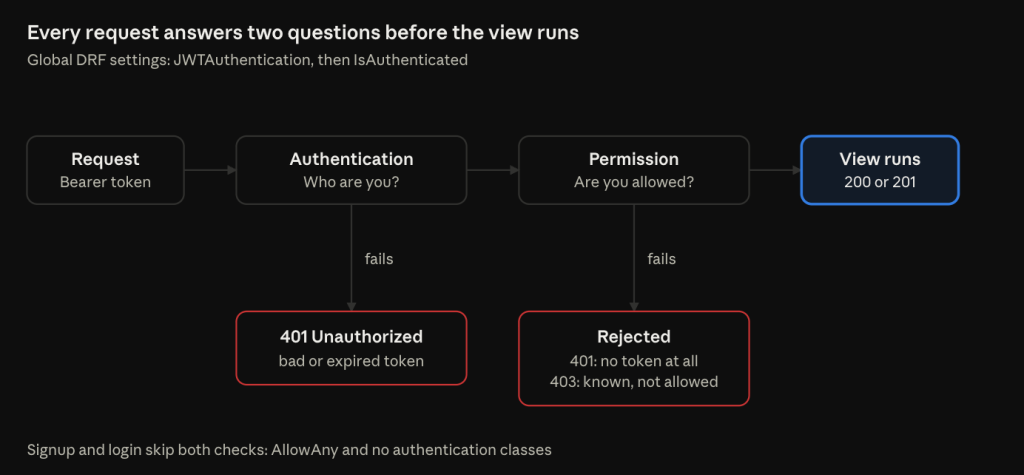
Every request must pass two checks before my code runs. The rest of this article builds them, and then opens two public doors for signup.
Step 1: Installing SimpleJWT, and the rebuild rule
uv add djangorestframework-simplejwt
docker compose up -d --build
djangorestframework-simplejwt is the standard JWT package for Django REST Framework. It gives me the login endpoints and the class that checks tokens on every request.
The –build flag is not optional here, and it took me a moment to understand why.
In Part 1, I put the virtual environment at /opt/venv inside the image. Packages are installed there by uv sync when the image is built. The bind mount only brings in my code, not my packages. So if I add a package and don’t rebuild, the container still has the old packages, and the import fails with ModuleNotFoundError.
The simple rule I now follow:
- Dependency change: rebuild the image.
- Code change: no rebuild. runserver reloads by itself.
To be sure the package was really inside the container (not just on my server), I checked its version from inside:
docker compose exec api python -c "from importlib.metadata import version; print(version('djangorestframework-simplejwt'))"If this printed PackageNotFoundError, it would mean I forgot to rebuild.
Step 2: The global settings
DRF reads all its global settings from one dictionary in settings.py:
REST_FRAMEWORK = {
    "DEFAULT_AUTHENTICATION_CLASSES": (
        "rest_framework_simplejwt.authentication.JWTAuthentication",
    ),
    "DEFAULT_PERMISSION_CLASSES": (
        "rest_framework.permissions.IsAuthenticated",
    ),
}
These two keys answer two different questions. Mixing them up is very common, so I want to be precise.
Authentication: who are you?
DEFAULT_AUTHENTICATION_CLASSES decides who is calling. On every request, JWTAuthentication does three things:
- It reads the header Authorization: Bearer <token>.
- It checks the token’s signature and expiry time.
- It loads the user with that ID from the database into request.user.
If there is no header, the user becomes AnonymousUser. If the token is bad or expired, the request fails with 401 Unauthorized.
Step 3 has a nice side effect. Because the user is loaded from the database on every request, a change to a user (for example, disabling the account) takes effect on the very next request, even if they still have an old token.
A small Python trap in this code: the comma after the class name. (“…”,) is a tuple with one item. Without the comma, it is just a string, and DRF would loop over its characters and try to import a class called “r”.
Permission: are you allowed?
DEFAULT_PERMISSION_CLASSES decides if the caller is allowed. IsAuthenticated means: only real, logged-in users.
I set this as the default for the whole API. Every endpoint is locked unless it clearly says otherwise. If I forget to set permissions on a new endpoint one day, it stays locked. It fails closed, not open. This is what people mean by “secure by default”.
The status codes make the difference easy to remember:
- 401: “I don’t know who you are.” No token, or a bad token.
- 403: “I know who you are, and the answer is no.” A valid token, but not allowed.
Token lifetimes
SIMPLE_JWT = {
    "ACCESS_TOKEN_LIFETIME": timedelta(minutes=15),
    "REFRESH_TOKEN_LIFETIME": timedelta(days=1),
}
Login gives you two tokens:
- The access token is sent with every request. I gave it 15 minutes. If someone steals it, it is useful for 15 minutes at most. The library default is 5 minutes. That is safer, but very annoying when you test with curl.
- The refresh token is used for one thing only: getting a new access token, without the password. I gave it 1 day. That is how long a user stays logged in.
My original plan only had the login endpoint. But login returns a refresh token, and a refresh token is useless without an endpoint to use it. So I added POST /api/auth/token/refresh/ and noted the change in my project plan.
One more important detail: I did not set a separate signing key, so SimpleJWT signs tokens with Django’s SECRET_KEY. That means anyone who has SECRET_KEY can create a valid token for any user. This is one more reason why that key lives only in .env now, and in Vault when I deploy to EKS.
Step 3: Signed, not encrypted. I decoded my own token
The URLs for login are short, because the views come ready-made from SimpleJWT:
path("auth/token/", TokenObtainPairView.as_view(), name="token_obtain_pair"),
path("auth/token/refresh/", TokenRefreshView.as_view(), name="token_refresh"),
I logged in as my test candidate, dana, and got back something like {“refresh”: “eyJ…”, “access”: “eyJ…”}.
A JWT has three parts separated by dots: header.payload.signature. Each part is base64url-encoded. That is an encoding, not encryption. It only turns data into safe text characters. Anyone can turn it back.
So I did exactly that. I took the middle part of my access token and decoded it with a short Python one-liner. (JWTs remove the = padding at the end, so I had to add it back first.) This is what was inside:
{"token_type": "access", "exp": 1792732571, "iat": 1792731671, "jti": "...", "user_id": "3"}Three things I learned from this small test:
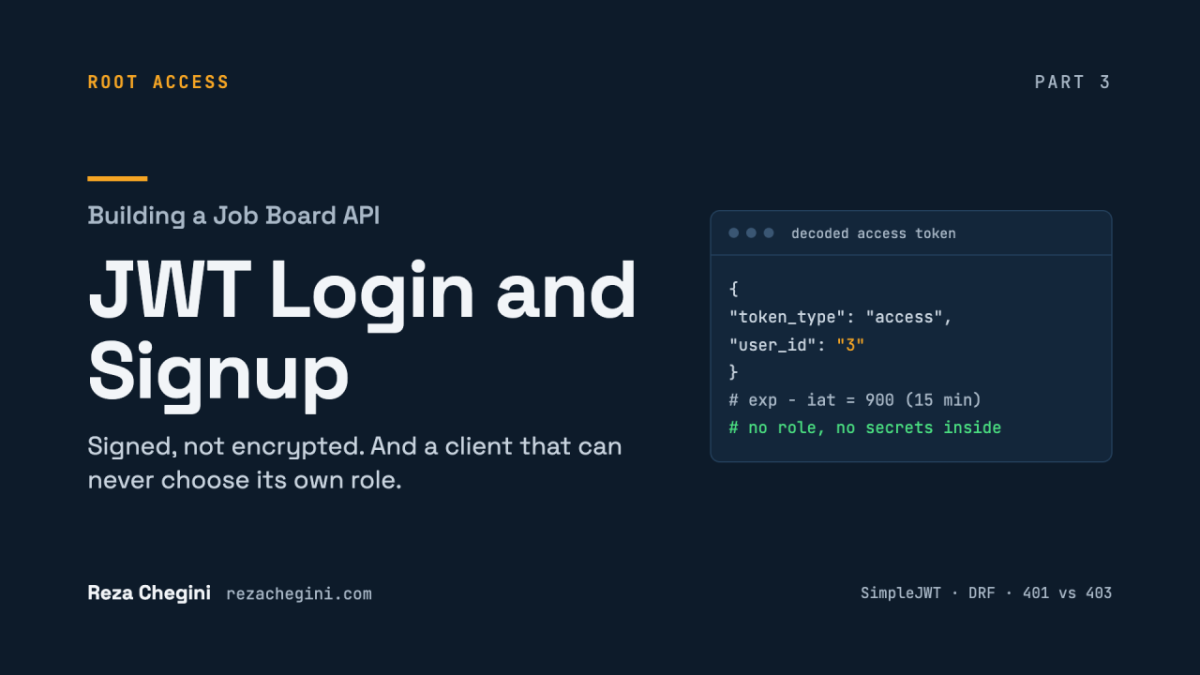
- The lifetime setting works. exp – iat = 900 seconds, which is exactly 15 minutes. iat is “issued at” and exp is “expires at”.
- The token only carries the user ID. “3” is dana. There is no role inside. The role is read from the database on every request. So if I change a user’s role, old tokens can’t keep the old one.
- I could read everything without any key.
That last point is the most important. The signature proves that nobody changed the payload. If someone edits user_id from 3 to 1, the signature no longer matches, and the server rejects the token. But the signature does not stop anyone from reading the payload.
The rule: never put secrets or private data in a JWT payload. Treat it like a postcard. Anyone who holds it can read it. They just can’t change it.
I also tested a wrong password. It returned 401 with the message No active account found with the given credentials. Notice that the message does not say which part was wrong. If it said “wrong password”, an attacker would learn that the username exists. A general message gives them nothing.
Step 4: Signup where the client cannot choose its role
I had two options for signup:
- One endpoint, /register/, with a role field in the body.
- Two endpoints, /register/company/ and /register/candidate/, with no role field at all.
I chose two endpoints. With one endpoint, the client sends its own role, and I need extra code to check it. With two endpoints, the role is decided by the URL. There is nothing for the client to change. The cost is two very similar views instead of one. That is a small price.
A base serializer for the shared fields
A serializer in DRF does two jobs: it validates the JSON that comes in, and it turns Python objects into JSON that goes out. It is the border between untrusted input and my models.
class BaseRegistrationSerializer(serializers.Serializer):
    username = serializers.CharField(max_length=150, validators=[UnicodeUsernameValidator()])
    email = serializers.EmailField()
password = serializers.CharField(write_only=True)- I used a plain Serializer, not a ModelSerializer. A ModelSerializer maps to one model. My signup writes to two tables (the user and the profile), so I declare the fields myself.
- max_length=150 matches Django’s username column. Without it, a 200-character username would pass validation and then crash in PostgreSQL as a 500 error.
- UnicodeUsernameValidator is the same rule the Django admin uses: letters, digits and @ . + – _. No spaces.
- write_only=True on the password means it is accepted as input but never included in the response.
- And notice what is not here: there is no role field. On purpose.
Validators for each field
DRF automatically calls any method named validate_<fieldname>.
def validate_username(self, value):
    if User.objects.filter(username__iexact=value).exists():
        raise serializers.ValidationError("This username is already taken.")
    return value
__iexact is a case-insensitive match. So if sam exists, SAM is rejected too. Without it, two accounts could differ only by capital letters, which confuses users. .exists() is cheap: it only asks the database “is there at least one row?”.
def validate_email(self, value):
    value = value.lower()
    if User.objects.filter(email__iexact=value).exists():
        raise serializers.ValidationError("An account with this email already exists.")
    return value
The email is saved in lowercase, so HR@Globex.test becomes hr@globex.test. This keeps the database’s unique rule (which is case-sensitive) in line with my check (which is not).
def validate_password(self, value):
    password_validation.validate_password(value)
    return value
This runs Django’s built-in password rules: at least 8 characters, not a common password, not only numbers. When I tested 12345, I got a 400 with several messages at once: too short, too common, entirely numeric.
I also wrote down a known race condition here. Two signups with the same username at the exact same moment can both pass validate_username. The database unique index still blocks the second one, but as an unhandled error, which means a 500 instead of a 400. It is acceptable at this stage. In Part 4, you will see the pattern that fixes this kind of problem.
Step 5: Two tables in one request
A shared helper to create the user
def create_user(self, validated_data, role):
    return User.objects.create_user(
        username=validated_data.pop("username"),
        email=validated_data.pop("email"),
        password=validated_data.pop("password"),
        role=role,
    )
Two details here are easy to miss:
- create_user hashes the password. If I used User.objects.create(password=…), the raw password would be saved as plain text, and login would always fail. (And storing plain passwords is a serious security problem.)
- dict.pop(key) returns the value and removes the key from the dictionary. After this helper runs, validated_data only contains the profile fields. This makes the next step very clean.
The company serializer
class CompanyRegistrationSerializer(BaseRegistrationSerializer):
    company_name = serializers.CharField(max_length=200)
    website = serializers.URLField(required=False, allow_blank=True)
    description = serializers.CharField(required=False, allow_blank=True)

    @transaction.atomic
    def create(self, validated_data):
        user = self.create_user(validated_data, role=User.Role.COMPANY)
        Company.objects.create(user=user, name=validated_data.pop("company_name"), **validated_data)
        return user
Line by line:
- It inherits from the base class, so it gets username, email, password, all three validators and the helper for free.
- I called the field company_name, not name. In a signup form, name is unclear: is it the person’s name or the company’s?
- required=False means the key can be missing. allow_blank=True means the key can be there with an empty value “”. These are two different settings, and optional text fields usually need both.
- role=User.Role.COMPANY is set here, in the code. The client never touches it.
- **validated_data unpacks the remaining dictionary into keyword arguments. {“website”: “https://globex.test”} becomes website=”https://globex.test”. Because pop already removed the user fields, only profile fields are left.
Why @transaction.atomic matters
This method writes two rows: first the user, then the company. What if the second insert fails?
Without a transaction, the user row would stay in the database with no company. That user would have the “company” role but no Company row. Every later access to user.company would crash. This is called an orphan row.
@transaction.atomic runs the whole method inside one database transaction. Both inserts succeed, or both are rolled back. There is no state in between.
Mass assignment: the attack that did nothing
Notice that there is no is_verified field in the company serializer. That is not an accident. It is the defence against mass assignment.
Mass assignment is when a client sets a field it should not control. For example, a new company could try to send “is_verified”: true to skip the manual review.
DRF silently ignores any input key that is not declared in the serializer. So I tested it. I registered a company called Globex and added “is_verified”: true to the request. Then I checked the database in the shell:
company Globex https://globex.test FalseFalse. The attack did nothing. Only declared fields can be set, so the safe way is to declare only what the client is allowed to send.
The response
def to_representation(self, user):
    return {"id": user.id, "username": user.username, "email": user.email, "role": user.role}
By default, DRF builds the response by reading every declared field from the returned object. But company_name and website are not attributes of User, so the default would crash with an AttributeError. I override to_representation to return exactly four safe fields. No password, nothing sensitive.
The candidate serializer follows the same pattern. Its extra fields are headline, location and skills. skills is a ListField, so it only accepts a JSON array of strings. Sending “skills”: “python” (a single string) gets a 400.
Step 6: The views, and the expired-token trap
class CompanyRegisterView(generics.CreateAPIView):
    serializer_class = CompanyRegistrationSerializer
    permission_classes = [AllowAny]
    authentication_classes = []
CreateAPIView is a ready-made view for POST only. It does the whole flow for me:
- Build the serializer with the request data.
- Validate it. If something is wrong, return 400 with the errors, grouped by field name.
- Call serializer.save(), which calls my create().
- Return 201 Created with the response body.
Any other HTTP method (like GET) returns 405 Method Not Allowed.
The next two lines are where the interesting part is.
permission_classes = [AllowAny] opens this one endpoint to everyone. Remember, the whole API is locked by default. But signup must work without an account. You can’t need a token to create the account that gives you a token.
authentication_classes = [] is the line most people forget. Here is the problem it solves.
Imagine a user whose old access token expired. Their app still sends Authorization: Bearer <old token> with every request, including signup. JWTAuthentication runs before the permission check. It sees an expired token and returns 401, even on a public endpoint. The user can’t sign up, and the error makes no sense to them.
With an empty list of authentication classes, this view ignores the Authorization header completely. Expired token or not, signup works.
The candidate view is exactly the same, with the candidate serializer. Two small views instead of one with a ?role= parameter: each URL does exactly one thing, and the role cannot be changed by the client.
Checking that it all works
After registering Globex (a company) and sam (a candidate), I checked:
- Signup returns 201 with “role”: “company” or “role”: “candidate”, decided by the URL.
- The new users can log in. This proves create_user hashed the passwords correctly.
- Both rows exist for each user: the user and the matching profile, from one request.
- Bad input returns 400, grouped by field. A duplicate username in different case (SAM), a weak password (12345) and a missing company_name each gave a clear 400. Errors grouped by field name let a frontend show each message next to its input.
Why 400 for all of these, and not 401 or 403? Because the client sent bad data. Nobody is logging in, so it is not 401. Nothing is forbidden, so it is not 403.
Problems I hit
1. A 500 error on company signup.
The server log (docker compose logs api) showed this:
AttributeError: type object 'Role' has no attribute 'Company'
"POST /api/auth/register/company/ HTTP/1.1" 500 109484
I had written User.Role.Company. The correct name is User.Role.COMPANY, in capitals. TextChoices members keep the exact case you declare them with.
I fixed the name, runserver reloaded, and the next request returned 201.
Two good things came out of this small bug:
- The nested enum did its job. In Part 2, I explained why I put Role inside User: a typo crashes loudly. That is exactly what happened. If I had used a plain string like “Company”, Python would have saved a role that matches nothing, silently.
- No orphan user was created. The error happened while Python was preparing the arguments, before any INSERT ran. I confirmed this in the database: user IDs 1 to 5 had no gaps.
And one lesson I did not expect: look at the size of that 500 response. 109,484 bytes. That was Django’s debug page, with the full traceback and my settings. This is exactly why DJANGO_DEBUG must be False anywhere outside my own machine, and why my config makes False the default.
2. The duplicate-username check seemed to print nothing.
This was not a code problem. The output was lost when I copied it from my terminal. The server log showed 400 with a size of 48 bytes, which was exactly the size of the expected error message.
I ran the request again with curl -i, which also shows the status line and headers:
HTTP/1.1 400 Bad Request
{"username":["This username is already taken."]}
The lesson: when output looks wrong, add -i and check the server log before you change any code. The bug might not be in the code at all.
What I learned, and what comes next
The ideas from this part that I will use again:
- Authentication and permission are different questions. Who are you (401) is not the same as are you allowed (403).
- Lock everything by default. Open only what must be public, one endpoint at a time.
- A JWT is a postcard, not a sealed letter. Signed means nobody can change it. It does not mean nobody can read it.
- Never let the client choose its own privileges. Not its role, not its verified flag. Decide them on the server.
- Declare only what the client may send. Undeclared fields are ignored, and that is your defence against mass assignment.
- Two writes that belong together go in one transaction. Otherwise, one failure leaves orphan data behind.
- Debug mode leaks. A 109 KB error page with my settings in it is a good reminder.
Companies and candidates can now sign up and log in over HTTP. But they still can’t do anything. There are no endpoints for jobs or applications yet.
In Part 4, the last part of Phase 1, I build those endpoints. And I tell the story of my favourite bug so far: my validators never ran, and the only thing that stopped bad data was the database constraint from Part 2. I found it by reading the shape of an error message, not its text.