$ cat job-board-api/part-04.md
Building a Job Board API, Part 4: My Validators Never Ran
Where we are
In Part 3, I added JWT login and two signup endpoints. Companies and candidates could create accounts and log in. But they could not do anything useful yet.
This is the last part of Phase 1. I build the endpoints for jobs and applications, so that a company can post a job and a candidate can apply. That is the goal of the whole phase.
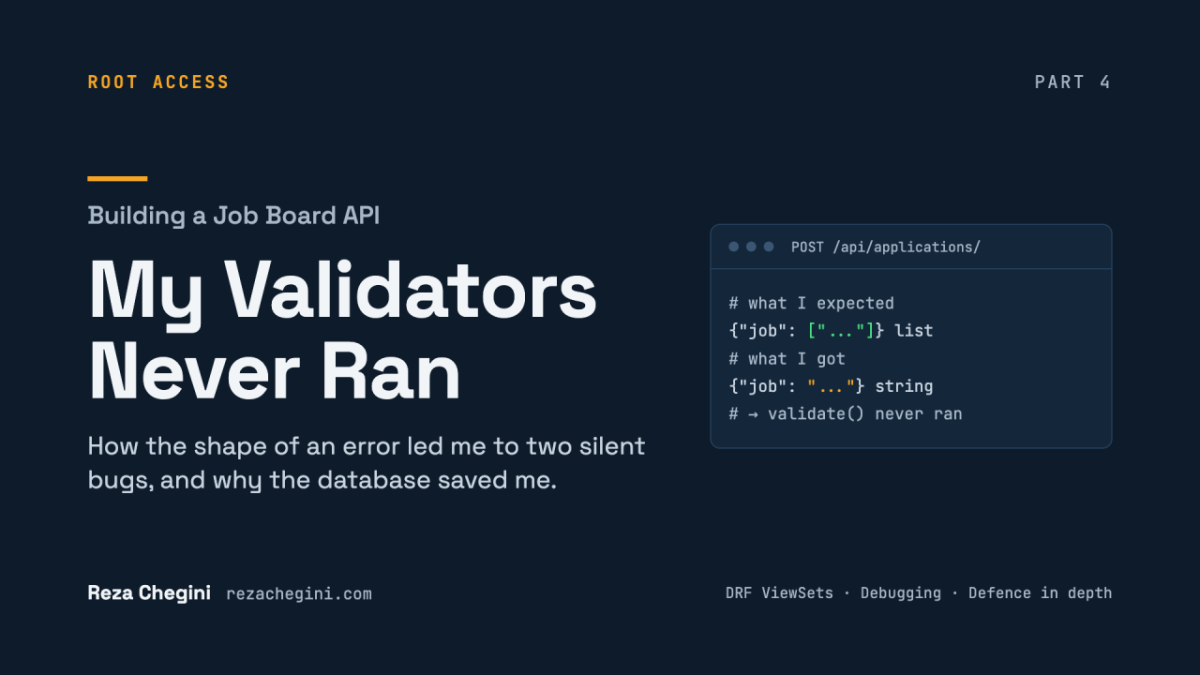
But the main story of this part is a bug. For a while, my Python validators never ran at all. Candidates could apply to closed jobs. The only thing that stopped duplicate applications was the database constraint I wrote back in Part 2.
I did not find the bug by reading the error message. I found it by reading the error’s shape. I think this is the most useful debugging lesson I have learned so far, so I will explain it step by step.
The endpoints I built
Jobs:
- GET /api/jobs/: list open jobs, 20 per page. Any logged-in user.
- POST /api/jobs/: post a job. Company users only.
- GET /api/jobs/{id}/: one job, including closed ones.
- PUT or PATCH /api/jobs/{id}/: update a job.
- GET /api/jobs/{id}/applications/: list the applicants for a job.
Applications:
- POST /api/applications/: apply for a job. Candidate users only.
- GET /api/applications/{id}/: one application.
Everything else (like DELETE, or listing all applications) returns 405 Method Not Allowed, on purpose. My plan doesn’t include those actions, so the API doesn’t offer them.
One rule applies to everything here: the company of a job and the candidate of an application always come from the login token, never from the request body. This is the same idea as the role in Part 3. The client cannot claim to be someone else.
Step 1: Pagination first, and a read-only company
Pagination before any client exists
REST_FRAMEWORK = {
    # ... auth settings from Part 3 ...
    "DEFAULT_PAGINATION_CLASS": "rest_framework.pagination.PageNumberPagination",
    "PAGE_SIZE": 20,
}
With pagination, every list response looks like this:
{"count": 42, "next": "http://.../api/jobs/?page=2", "previous": null, "results": [ ... ]}count is the total, next and previous are links to the other pages, and results holds up to 20 items.
Why add this now, before I even have a frontend? Because it changes the shape of the response, from a plain JSON list to an object. If a client already depended on the old shape, turning on pagination later would break it. Today, there are no clients, so the change is free.
There is also a scaling reason. Without pagination, /api/jobs/ returns every row. As the data grows, the response size and the database work grow with it, without any limit.
The job serializer
class JobSerializer(serializers.ModelSerializer):
    company = serializers.CharField(source="company.name", read_only=True)

    class Meta:
        model = Job
        fields = ["id", "company", "title", "description", "location",
                  "job_type", "required_skills", "is_open", "created_at", "updated_at"]
read_only_fields = ["id", "created_at", "updated_at"]- This time I used ModelSerializer. It builds the fields from the model and copies its rules: max_length, allowed choices, required or optional. (In Part 3 I couldn’t use it, because signup wrote to two tables.)
- The company line overrides the automatic field. The automatic version would be a writable ID, like “company”: 5. Then anyone could post a job under any company, just by sending a different number.
- source=”company.name” follows the relation and shows the company’s name, like “Acme”.
- read_only=True means it appears in the response, but any value the client sends is ignored.
- fields is an explicit allow-list. I never use “__all__”. With “__all__”, every field I add to the model in the future would appear in the API automatically, including fields that should stay internal.
I tested this directly. I posted a job as Acme and sent “company”: “Globex” in the body. The response said “company”: “Acme”. The fake value was ignored.
Step 2: The job ViewSet
Building exactly the API the plan asks for
class JobViewSet(
    mixins.ListModelMixin,
    mixins.CreateModelMixin,
    mixins.RetrieveModelMixin,
    mixins.UpdateModelMixin,
    viewsets.GenericViewSet,
):
    serializer_class = JobSerializer
A ViewSet is one class for one resource, with several actions. GenericViewSet gives the plumbing but no actions. Each mixin adds actions:
- ListModelMixin adds GET /jobs/.
- CreateModelMixin adds POST /jobs/.
- RetrieveModelMixin adds GET /jobs/{id}/.
- UpdateModelMixin adds PUT and PATCH /jobs/{id}/.
There is no DestroyModelMixin, so DELETE returns 405. This is also why I didn’t use ModelViewSet, which includes delete. A job is closed with is_open=False, which keeps its applications (as I explained in Part 2).
One Python detail: GenericViewSet must be last. Python looks for methods from left to right, so the mixins’ actions must come first.
Which rows can this view see?
def get_queryset(self):
    queryset = Job.objects.select_related("company")
    if self.action == "list":
        queryset = queryset.filter(is_open=True)
return queryset- get_queryset() runs on every request and decides which rows the view can see.
- select_related(“company”) fixes the N+1 problem from Part 2. The serializer shows the company name for every job. Without this line, a page of 20 jobs would run 1 + 20 queries. With it, one query with a SQL JOIN.
- self.action tells me which action is running. Only the list hides closed jobs. The detail page and the update still find a closed job, so its company can reopen it or review its applicants.
Setting the company from the token
def perform_create(self, serializer):
    if not self.request.user.is_company:
        raise PermissionDenied("Only company users can create jobs.")
    serializer.save(company=self.request.user.company)
perform_create is a hook: DRF calls it after validation passes, to do the save. It is the standard place to add server-side values.
serializer.save(company=…) adds the company to the data before saving. So the company comes from the logged-in user, not from the body.
Why the role check? Look at the next line: request.user.company. In Part 2, I said that this raises an error if the user has no company. For a candidate, that would be a 500 crash. The check turns a crash into a correct 403. In Phase 2, a proper permission class will replace it.
The applicants of a job
@action(detail=True, methods=["get"])
def applications(self, request, pk=None):
    job = self.get_object()
    queryset = job.applications.select_related("job__company", "candidate__user")
    page = self.paginate_queryset(queryset)
    serializer = ApplicationSerializer(page, many=True, context=self.get_serializer_context())
    return self.get_paginated_response(serializer.data)
@action adds an extra route to the ViewSet. detail=True means it works on one job, so the URL is /jobs/{id}/applications/. The method name becomes the URL. Keep that in mind for later in this article.
Custom actions don’t paginate automatically, so I call paginate_queryset and get_paginated_response myself. And again, select_related loads the job, the company, the candidate and the user in one query.
Step 3: Applications
This is the code after all the fixes. Keep it in mind, because in Step 5 I show you what the first version looked like.
The serializer fields
class ApplicationSerializer(serializers.ModelSerializer):
    job = serializers.PrimaryKeyRelatedField(queryset=Job.objects.all())
    job_title = serializers.CharField(source="job.title", read_only=True)
    candidate = serializers.CharField(source="candidate.user.username", read_only=True)

    class Meta:
        model = Application
        fields = ["id", "job", "job_title", "candidate", "cover_letter",
                  "status", "created_at", "updated_at"]
        read_only_fields = ["id", "status", "created_at", "updated_at"]
validators = []- PrimaryKeyRelatedField: the client sends “job”: 1, and DRF looks up job 1. If it doesn’t exist, the client gets a 400 with Invalid pk “99999” – object does not exist.
- Why Job.objects.all() and not only open jobs? If I filtered to open jobs, a closed job would give “object does not exist”. That is not true, and it is confusing. I check “closed” separately, with a clearer message.
- candidate is read-only. The view sets it from the token.
- status is read-only too. I tested this: a candidate who sends “status”: “offered” still gets “status”: “submitted”. Only the company will change the status, in Phase 2.
- validators = [] turns off a validator that DRF creates automatically from my UniqueConstraint. That automatic validator expects both job and candidate in the input. But candidate is read-only and set later by the view, so it can’t work here. I do the duplicate check myself instead.
Important: class Meta holds only configuration. Nothing else belongs inside it. Remember this sentence.
Rule 1: you can’t apply to a closed job
def validate_job(self, job):
    if not job.is_open:
        raise serializers.ValidationError("This job is no longer accepting applications.")
    return job
DRF calls validate_<field> automatically, after the field’s own checks. So job here is already the Job object, not just the ID.
Rule 2: you can apply only once
def validate(self, attrs):
    profile = getattr(self.context["request"].user, "candidate_profile", None)
    if profile and Application.objects.filter(job=attrs["job"], candidate=profile).exists():
        raise serializers.ValidationError({"job": "You have already applied for this job."})
    return attrs
validate() runs after all the field checks. I need it here because the rule combines two things: the job and the current user.
getattr(user, “candidate_profile”, None) reads the user’s candidate profile. If the user has no profile (for example, a company), Django raises an error. But that error is a kind of AttributeError, so getattr catches it and returns None instead.
That sounds safe. But it has a hidden danger, and it hurt me. getattr with a default returns None for any missing attribute, including a typo. More on this in Step 5.
The view
class ApplicationViewSet(mixins.CreateModelMixin, mixins.RetrieveModelMixin, viewsets.GenericViewSet):
    serializer_class = ApplicationSerializer
    queryset = Application.objects.select_related("job__company", "candidate__user")

    def perform_create(self, serializer):
        if not self.request.user.is_candidate:
            raise PermissionDenied("Only candidate users can create applications.")
        try:
            with transaction.atomic():
                serializer.save(candidate=self.request.user.candidate_profile)
        except IntegrityError:
            raise ValidationError({"job": "You have already applied for this job."})
Only two actions: apply and read one application. The role check has the same reason as before: a company has no candidate_profile, so without the check, a company applying would cause a 500.
The try/except block is the second layer of protection. I explain it in the next section.
Step 4: Defence in depth
I protect “apply only once” with two layers. This is called defence in depth: if one layer fails, the next one still holds.
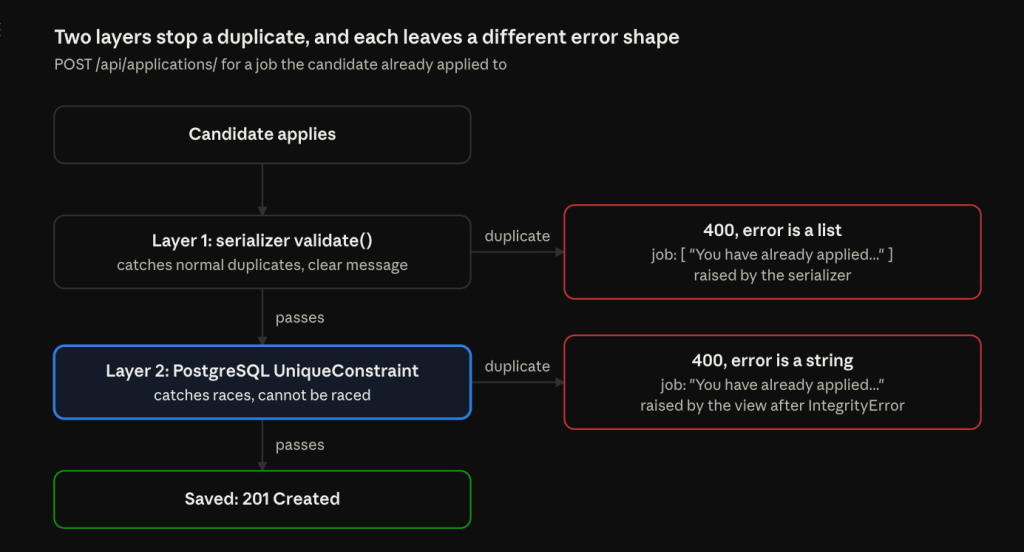
Layer 1 is the validate() method in the serializer. It catches normal duplicates and returns a clear 400 error. But remember the race condition from Part 2: two identical requests at the same moment can both pass this check.
Layer 2 is the UniqueConstraint in PostgreSQL. The database rejects the second insert with an IntegrityError. My view catches that error and turns it into a 400. Without the try/except, the user would get a 500.
transaction.atomic() around the save is the same trick as in Part 2: it keeps the failed insert inside its own small block, so the database connection doesn’t stay broken for the rest of the request.
Now look at the two red boxes in the diagram. They look almost the same. But there is one small difference, and it is the key to the whole bug story:
- An error raised by the serializer is always wrapped in a list: {“job”: [“…”]}.
- An error raised by my view keeps the shape I give it. I gave it a string: {“job”: “…”}.
Same message, same status code, different shape. So by looking at the shape alone, I can tell which layer stopped the request.
Step 5: The bug. My validators never ran
What I saw
I started testing the application endpoint with my two test candidates, dana and sam. Two things looked wrong:
- dana applied to job 2, which was closed. The response was 201 Created, and the application was saved. My closed-job check had not worked.
- When sam applied to the same job twice, the second request was correctly blocked with a 400. But the error looked like this: {“job”: “You have already applied for this job.”}.
The second one looked like a success. The duplicate was blocked, and the message was correct. Most people would move on. But something about it was strange.
The clue: the shape of the error
Look at the diagram in Step 4 again. If the serializer’s validate() had caught the duplicate, the error would be a list: {“job”: [“…”]}. But I got a string: {“job”: “…”}.
A string can only come from one place: the except IntegrityError block in my view. That meant:
- The serializer did not catch the duplicate.
- The request went all the way to the database.
- PostgreSQL rejected it, and my view turned the database error into a 400.
In other words, layer 1 was not working at all. Layer 2 was doing all the work alone. And the closed-job bug told the same story: validate_job was not running either.
To be sure, I checked two more things. The server log (docker compose logs api) showed the real status code of every request. And a quick query of the applications table showed which applications were actually saved. Both confirmed it: dana’s application to the closed job was in the database.
Bug 1: methods inside the wrong class
This is what my first version looked like:
class ApplicationSerializer(serializers.ModelSerializer):
    # ... fields ...

    class Meta:
        model = Application
        fields = [...]
        read_only_fields = [...]
        validators = []

        def validate_job(self, job):      # WRONG: inside Meta
            ...

        def validate(self, attrs):         # WRONG: inside Meta
            ...
Can you see it? Both methods were indented one level too far. They were inside class Meta, not inside ApplicationSerializer.
In Python, indentation decides which class owns a method. These two methods belonged to the Meta class. DRF never looks for validators inside Meta. So it simply never called them. No error, no warning. The code looked fine, and it did nothing.
This is why I wrote in Step 3 that class Meta holds only configuration.
The fix was to move both methods four spaces to the left, to the same level as class Meta. I also deleted dana’s wrongly saved application to the closed job.
Bug 2: a typo that getattr hid
After the first fix, the closed-job check worked. But I tested duplicates again, and the error was still a string. So validate() was running now, but its duplicate check still did nothing.
The problem was in this line:
profile = getattr(self.context["request"].user, "candidateprofile", None)The correct name is candidate_profile, with an underscore. That is the related_name I chose in Part 2. candidateprofile (no underscore) is Django’s default name, which I did not use.
Normally, a wrong attribute name crashes with an AttributeError, and you find it immediately. But getattr with a default catches that error and returns None. So profile was always None, the if profile and … check was always false, and the duplicate check silently never ran.
I fixed the name. Then I tested again, and finally the error was a list: {“job”: [“You have already applied for this job.”]}. That list was my proof that layer 1 was working.
What this bug taught me
- Read the shape of an error, not only its text. The message was correct the whole time. Only the shape told me something was wrong.
- Defence in depth is not theory. While both bugs were in my code, the database constraint from Part 2 was the only thing preventing duplicate applications. And it held.
- Some mistakes fail silently. Wrong indentation and getattr with a default both give no error. These are exactly the paths my tests in Phase 5 must cover.
- Check the server log and the database, not only the terminal output.
One small extra detail. After all this debugging, my test application got ID 10, not 6. IDs 6 to 9 were used by duplicate inserts that PostgreSQL rejected. In PostgreSQL, sequences don’t roll back when an insert fails. So gaps in IDs after errors are normal, and not a sign of a problem.
Two smaller bugs
1. The applicants URL returned 404, as an HTML page.
GET /api/jobs/1/applications/ returned a 404. And it was an HTML page, not JSON, so python3 -m json.tool failed with Expecting value.
The cause: I had named the method application, without the “s”. With @action, the method name is the URL. So my route was /jobs/{id}/application/, and the URL I called did not exist. I renamed the method to applications, and it worked.
2. Python’s PermissionError is not DRF’s PermissionDenied.
In JobViewSet.perform_create, I first wrote:
raise PermissionError("Only company users can create jobs.")The names are very similar, but they are completely different things:
- PermissionError is a built-in Python exception. It is for operating system problems, like file permissions.
- PermissionDenied is DRF’s exception. DRF knows how to turn it into a proper 403 JSON response.
DRF only converts its own exceptions into HTTP responses. Anything else becomes a 500. So a candidate trying to post a job would have crashed the request. I changed it to PermissionDenied, tested again, and got 403 Forbidden.
And one thing that fixed itself. At one point, the server failed to start with NameError: name ‘ApplicationViewSet’ is not defined. I had saved urls.py (which registers the ViewSet) before I wrote the class in views.py. runserver reloads on every save, so it tried to load an unfinished project. Once the class existed, the error was gone. No code change needed.
Done when: the end-to-end test
The goal of Phase 1 was: a company can post a job and a candidate can apply, locally.
To prove it honestly, I did not use any users or data I had created in the shell. I registered brand-new users and did everything over HTTP, like a real client would:
== 1. Company registers ==          {"id":6,"username":"initech",...,"role":"company"}
== 2. Company logs in ==            token: eyJhbGciOiJIUzI1NiIs...
== 3. Company posts a job ==        {'id': 3, 'company': 'Initech', 'title': 'Platform Engineer I', ...}
== 4. Candidate registers ==        {"id":7,"username":"riya",...,"role":"candidate"}
== 5. Candidate logs in ==          token: eyJhbGciOiJIUzI1NiIs...
== 6. Candidate sees the job ==     ['Platform Engineer I', 'Junior DevOps Engineer']
== 7. Candidate applies ==          {"id":10,"job":3,"job_title":"Platform Engineer I","candidate":"riya","status":"submitted",...}
== 8. Company sees the applicant == 1 ['riya']
Every step worked. Phase 1 is done.
The gaps I left on purpose
I want to be honest about what is not safe yet. My project plan puts all permission rules in Phase 2, so in Phase 1 I only added the role checks needed to avoid 500 errors. Right now:
- Any company can post a job, even one that is not verified yet. Phase 2 adds an IsVerifiedCompany permission.
- Any logged-in user can update any job. There is no owner check yet. Phase 2 adds IsJobOwner.
- Any logged-in user can see any job’s applicants. Also fixed by IsJobOwner.
- Any logged-in user can read any application. Phase 2 adds IsApplicationOwner: only the candidate who applied, or the job’s company.
- Role checks run after validation. So a company sending a bad job ID gets a 400 (bad data) before it gets a 403 (wrong role). Permission classes in Phase 2 run before validation, which fixes the order.
- No status endpoint yet. A company can’t move an application from “submitted” to “interview”. That comes in Phase 2, and in Phase 3 each change will send an email through a background worker.
- No filters on the job list (type, location, skills). Phase 2.
I wrote these down in my notes as a list, so none of them gets forgotten. Knowing your gaps, and saying them out loud, is better than pretending they don’t exist.
What Phase 1 taught me
Looking back at all four parts, these are the lessons I will carry into every project:
- Make the safe option the default. Debug off, every endpoint locked, every list paginated.
- Never trust the client with identity. The role, the company and the candidate all come from the server, never from the request body.
- Make wrong states impossible. An application points at a candidate profile, so a company simply cannot apply.
- Put the most important rules in the database. When my Python checks were broken, the database constraint was the only thing that held.
- Read the shape of an error, not only its message. A list or a string told me exactly which layer had stopped the request.
- Silent failures are the dangerous ones. A misspelled environment variable, a method indented too far, a getattr hiding a typo. None of them gave an error.
- Check the real system. The server log, the database, curl -i. Not only what the terminal seems to show.
There is no automated test suite yet. Every check in this series was done by hand with curl and the Django shell. That is the next big gap: in Phase 5, each of these checks becomes a pytest test, and the bugs from this part are the first ones I will write tests for.
What comes next
The next series will cover Phase 2: business logic and permissions. I will close every gap from the list above with four permission classes, add the skill match score using the PostgreSQL array overlap from Part 2, and upload resumes to S3 (through LocalStack on my machine, so it costs nothing).