$ cat job-board-api/part-07.md
Building a Job Board API, Part 7: Resume Uploads to S3
Why not just save the file to disk?
In this part, candidates must attach a resume when they apply. That sounds like a normal file upload, one form field and a save. But a file has to live somewhere.
Why not save the file to disk and be done? In my home lab series, the application ran on Kubernetes. A container’s disk is not designed to hold important data: when a container restarts or moves to another machine, its local files can disappear. And with more than one copy of the application running, each copy has a different disk; a file uploaded to one copy does not exist on another. So files do not belong inside the application. They belong in file storage built for this, where every copy of the application can reach them and they survive a restart of anything.
And you cannot fix this with a shared folder on every machine, one settings change at a time. The answer is a different architecture: send the files to object storage, a service built to store files, from the beginning. In this project, that service is Amazon S3.
So this part is about three pieces:
- LocalStack, a fake S3 – on my own server, for zero cost.
- Checking the file by its content – extension, size and magic bytes.
- Presigned URLs – letting the client download straight from S3, with a link that dies in five minutes.
LocalStack setup took a small amount of extra time, but I hit nine problems this time. Two of them taught me something I will not forget: a negative test can give the right result for the wrong reason, and my own settings were 403-ing every real link.
Step 1: A fake AWS on my server
I do not want to pay AWS for files forgotten by a test at 1 AM, so this project develops against a fake. LocalStack runs one small local program that pretends to be AWS. It answers the same API calls as real S3, but nothing leaves my server and nothing costs money.
The new service in my docker-compose.yml, next to PostgreSQL and the API, is a new service called localstack:
localstack:
    image: localstack/localstack:2026.10.4
    ports:
      - "127.0.0.1:4566:4566"
    environment:
      - SERVICES=s3
      - AWS_STORAGE_BUCKET_NAME=${AWS_STORAGE_BUCKET_NAME:?AWS_STORAGE_BUCKET_NAME is not set}
      - LOCALSTACK_AUTH_TOKEN=${LOCALSTACK_AUTH_TOKEN:?LOCALSTACK_AUTH_TOKEN is not set}
      - S3_SKIP_SIGNATURE_VALIDATION=0
    volumes:
      - ./localstack/init-s3.sh:/etc/localstack/init/ready.d/init-s3.sh:ro
    healthcheck:
      test: ["CMD-SHELL", "awslocal s3api head-bucket --bucket $$AWS_STORAGE_BUCKET_NAME"]
      interval: 5s
      timeout: 5s
      retries: 12
Reading that block line by line:
- image: pinned to the exact version, localstack/localstack:2026.10.4, not latest.
- ports: “127.0.0.1:4566:4566”. The 127.0.0.1 matters: it means the port only exists on this server itself, not on the internet. Without it, anyone who found my server could use my fake AWS.
- environment: SERVICES=s3, so LocalStack only starts S3, not all of AWS. Faster to start, less to go wrong.
- LOCALSTACK_AUTH_TOKEN: LocalStack requires a token now, and the dollar-brace form with 😕 makes docker compose stop with a clear error if the variable is missing, instead of starting a broken container and letting me debug it for an hour.
- volumes: my bucket creation script, mounted read-only into the folder LocalStack runs when it is ready.
- healthcheck: it asks S3 “does my bucket exist?” – head-bucket fails if the bucket is missing, which means the check only passes once the init script ran. My Django service waits for this check before it starts, so the API never starts against an S3 with no bucket.
The volume mount needs one decision: a bucket has to come from somewhere. LocalStack forgets everything when it restarts, a known limit I mention again below, so the bucket must be created again on every start. That is what the init script does:
#!/bin/bash
set -euo pipefail
awslocal s3 mb "s3://${AWS_STORAGE_BUCKET_NAME}"
The set -euo pipefail is there so a failing script stops loudly instead of leaving the bucket creation half-done and silent.
LocalStack
The API also needs a library that knows how to talk to S3. Django stores files through a “storage” class; the default one writes to a local folder. The django-storages package adds an S3 class. Installing it with uv, including its S3 extra, looks like this:
uv add "django-storages[s3]"django-storages
Then I tell Django to use S3 for uploads but keep static files, like CSS, on the local disk, with the STORAGES setting:
STORAGES = {
    "default": {"BACKEND": "storages.backends.s3.S3Storage"},
    "staticfiles": {"BACKEND": "django.contrib.staticfiles.storage.StaticFilesStorage"},
}

AWS_S3_ENDPOINT_URL = env("AWS_S3_ENDPOINT_URL", "") or None
AWS_S3_CUSTOM_DOMAIN = env("AWS_S3_CUSTOM_DOMAIN", "") or None
AWS_QUERYSTRING_AUTH = True
AWS_DEFAULT_ACL = None
AWS_S3_FILE_OVERWRITE = False
What this code does, line by line:
- STORAGES splits Django’s two file jobs: “default” handles the resumes users upload, so it points at the S3 class. “staticfiles” handles my own CSS and similar files, so it stays on disk.
- AWS_QUERYSTRING_AUTH = True: uploaded files are private, so Django adds a signature to the file URLs it builds.
- AWS_DEFAULT_ACL = None means S3 uses the bucket’s default. My bucket is private, so the files are private too.
- AWS_S3_FILE_OVERWRITE = False: if two files ever get the same key, S3 must not silently replace the first one.
There are no AWS keys in the settings at all. boto3, the AWS library under the hood, reads the credentials from the environment by itself. The settings only say where S3 lives: one address for the Django container, which reaches LocalStack at localstack:4566, and one for the client, which reaches it at localhost:4566. That difference matters a lot later, in Step 4.
Step 2: Is this file really a resume?
The user picks a file in the browser, types the name and picks anything. The browser sends the file name exactly as the user gave it; that name was never checked. If the API accepts anything, anyone can upload an executable script renamed to .pdf and store it on my server.
So the API checks three things about every upload, in jobs/validators.py:
MAX_RESUME_SIZE = 5 * 1024 * 1024  # 5 MB
RESUME_SIGNATURES = {
    ".pdf": b"%PDF-",
    ".docx": b"PK\x03\x04",
}


def validate_resume(file):
    extension = Path(file.name).suffix.lower()
    expected = RESUME_SIGNATURES.get(extension)
    if expected is None:
        raise ValidationError("Only PDF and DOCX files are allowed.")
    if file.size > MAX_RESUME_SIZE:
        raise ValidationError("Resume file size should not exceed 5 MB.")
    header = file.read(len(expected))
    file.seek(0)
    if not header.startswith(expected):
        raise ValidationError("Invalid file signature.")
Three checks, cheapest first
First check: the extension. Path(file.name).suffix.lower() takes the part after the last dot, so “Resume.PDF” becomes “.pdf”. If the extension is not in the dictionary, the file stops here, before anything else runs.
Second check: the size. MAX_RESUME_SIZE is 5 MB, written as 5 * 1024 * 1024 so the number in the code shows its own meaning. A resume is a document, not a video; anything bigger is either a mistake or an attempt to fill storage at my cost.
The third check is the interesting one: the file’s own first bytes.
Magic bytes
Most file formats start with the same fixed bytes. A PDF always starts with %PDF-. A DOCX is really a zip file, so it starts with PK and bytes 03 04. These first bytes are called the file’s magic bytes or signature.
The validator reads only the first bytes:
- file.read(len(expected)) reads exactly as many bytes as the expected signature of that file type – 5 for PDF, 4 for DOCX.
- If those bytes do not match, the file is rejected: the name says PDF, but the content is something else.
One honest limit: magic bytes only prove the start of the file is right. The content after that could still be anything broken; a file can start like a PDF and still not be a PDF you can open.
The seek(0) trap
Reading a file moves a cursor forward. After file.read(5), the next read starts at byte 5, not at the beginning. If I check the header and forget to move the cursor back, Django saves the file starting from byte 5: the stored file loses its first bytes and arrives in S3 broken.
file.seek(0) moves the cursor back to the start. My first version had the seek only after the signature check, on the path where the check passes – and not before the size error. I caught it because my test files came back two bytes short: the stored resume was 27 bytes where the file should be 32, and 29 where it should be 34. Once seek(0) went in both places, before the error and after the header, the sizes in S3 were exact.
One rule, one place
The validator is attached to the model field itself:
resume = models.FileField(upload_to=resume_upload_path, validators=[validate_resume], blank=True)Because the rule lives on the model, the same rule runs everywhere the model is saved: the API and the Django admin both use it. If later I let companies upload job descriptions too, the validator is right there, one line away.
Testing every branch
I made five tiny test files, each breaking a different rule:
- good.pdf and good.docx -> both returned 201 Created, and I found them in S3 with aws s3 ls.
- renamed.pdf, a text file wearing a PDF name -> 400, “Invalid file signature.”. You can make one yourself: echo “just text” > renamed.pdf. The name is a lie, the first bytes are not.
- notes.txt -> 400, only PDF and DOCX are allowed.
- big.pdf, over 5 MB -> 400, file size.
- an application with no file at all -> 400, because the API requires the field (Step 3 explains why).
And after all five tests, S3 held exactly two files: the good ones.
Step 3: Saving it safely
The server chooses the file name
The name a user gives a file is also a kind of input, and I do not store it. A small function decides where the file goes in the bucket:
def resume_upload_path(instance, filename):
    extension = Path(filename).suffix.lower()
    return f"resumes/{uuid.uuid4()}{extension}"
It reads the extension from the user’s name, then throws the name away and generates a random UUID instead. So every resume lives at a key like resumes/98abc…def.pdf, and the reasons matter:
- Nothing personal leaks: a file called “John Smith CV 2026.pdf” would put a person’s name inside the storage key.
- No path tricks: a name like ../../something cannot influence where the file is saved, because the name is never used.
- No collisions: two users uploading resume.pdf can never overwrite each other.
- uuid4 is random, so the keys are also unguessable – the only way to reach a file is through the API.
One small rule: the function must be defined in the models file as a plain function, not a lambda, because Django writes its name into migrations; a lambda would break them. And the FileField stores only the key, not the file itself – the database keeps resumes/98abc.pdf, the bytes live in S3.
Required in the API, optional in the table
Look again at the model line: blank=True. That means the database allows an application with no resume. That sounds wrong – the rule is that every application must have one. But applications created before this part have no resume, and there may be other paths that create an application record without a file. The database stays flexible, and the API is strict:
extra_kwargs = {"resume": {"required": True, "write_only": True}}required=True in the serializer means POST /applications without a file returns 400. Two different layers, two different jobs: the model allows history to exist, the API enforces today’s rule.
write_only: never show the file in normal responses
The second half of that line caused my first real bug in this part. In my first version, the resume field was not write_only. That meant GET /applications included the resume in the response. Serializing a FileField gives you a URL, and mine looked like a link on localstack:4566 with a signature that expires in one hour. Three problems with that:
- It leaks. Anyone who can view an application gets a download link to someone else’s resume. Part 5’s permission classes decide who views applications – the URL should not quietly bypass that decision.
- It is slow. Building a presigned URL for every application in a list is a signing operation per row, for links nobody asked for.
- The link points to a host the client cannot reach. localstack:4566 only exists inside the Docker network, so the URL was both leaked and useless.
The fix: the file is write_only – clients can send it, responses never include it. Instead, the serializer exposes a small boolean computed with a SerializerMethodField:
def get_has_resume(self, obj) -> bool:
    return bool(obj.resume)
obj.resume is the stored key; a non-empty key is True. This never talks to S3, costs nothing, and answers the only question a list view has: does this application have a file?
Step 4: Downloading it with a presigned URL
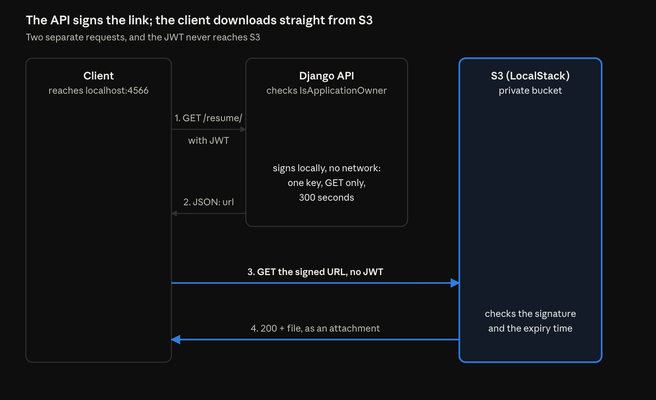
The bucket is private. There is no public link, no anonymous read, so a URL by itself is nothing: S3 answers 403 without a signature.
With a presigned URL, Django asks S3: “make me a temporary link to this exact file.”, and S3 creates a link with an expiry time and a signature attached to it. Anyone holding the link can download that one file until it expires – five minutes here. The signature covers the bucket, the key and the expiry, so changing any of them breaks the link.
The endpoint
The endpoint itself is small:
@action(detail=True, methods=["get"])
    def resume(self, request, pk=None):
        application = self.get_object()
        if not application.resume:
            raise NotFound("This application has no resume.")
        return Response({
            "url": resume_download_url(application),
            "expires_in": settings.RESUME_URL_EXPIRE_SECONDS,
        })
So GET /applications/12/resume/ returns JSON: {“url”: “http://localhost:4566/job-board-resumes/resumes/….pdf?…”, “expires_in”: 300}.
Why JSON, and not a redirect straight to the file? Because the client reaches this endpoint with its JWT in the Authorization header. A redirect to S3 would drop that header, and S3 does not understand my JWT anyway. Returning the link as data works for a web page, a mobile app, curl and everything else.
The permission story is Part 5’s work reused: the action lives on the viewset, so IsApplicationOwner applies as usual. The candidate who owns the application and the company that owns the job get links; everyone else gets 403.
The NotFound branch matters too: if the application has no resume, this returns 404 with a clear message, instead of signing a URL for a key that does not exist.
Signing the link
The signing happens in jobs/storage.py:
@lru_cache(maxsize=1)
def _public_s3_client():
    return boto3.client(
        "s3",
        endpoint_url=settings.AWS_S3_CUSTOM_DOMAIN,
        config=Config(signature_version="s3v4", s3={"addressing_style": "path"}),
    )


def resume_download_url(application):
    key = application.resume.name
    return _public_s3_client().generate_presigned_url(
        "get_object",
        Params={
            "Bucket": settings.AWS_STORAGE_BUCKET_NAME,
            "Key": key,
            "ResponseContentDisposition": f'attachment; filename="resume-{application.pk}.pdf"',
        },
        ExpiresIn=settings.RESUME_URL_EXPIRE_SECONDS,
    )
The most important idea in this code: there are two S3 clients in this project, and they talk to the same S3 from different addresses. Django’s storage uses the normal client, which reaches LocalStack at localstack:4566 inside the Docker network. This signing client is built separately for the client’s address, localhost:4566 – because the signature includes the host, a link signed for the internal address would be useless in a browser.
Other details:
- @lru_cache(maxsize=1): the client is built once and cached. Creating a boto3 client does setup work on every call; with the cache, all requests share one. Remember this cache – Problem 1 is about it.
- ResponseContentDisposition tells S3 to answer with Content-Disposition: attachment and a clean file name – resume-12.pdf – instead of the storage key. The browser gets a download with a friendly name, and passing the pk means the downloaded name shows the application ID, not a UUID.
- ExpiresIn is RESUME_URL_EXPIRE_SECONDS = 300, which is 5 minutes. Long enough to click the link, short enough that a leaked link is soon worthless.
- Addressing style “path”: the URL is host/bucket/key. LocalStack is happiest with this style, and it keeps the host localhost.
- Signing is local. generate_presigned_url does math on the key and the expiry using the AWS secret key; it does not call S3. The request to S3 only happens when the client uses the link, and S3 checks the signature then.
Did it work?
- As the owner and as the company: 200, and the JSON has a url and expires_in: 300.
- As another candidate, another company, or staff: 403.
- An application without a resume: 404.
- No token: 401.
- Using the link with curl: 200, and the response headers show Content-Disposition: attachment; filename=”resume-12.pdf”.
Problems I hit
1. Every download link returned 403
The resume link endpoint worked. It returned a URL. And every single URL, followed with curl or a browser, returned the same answer: 403 with a SignatureDoesNotMatch error. The uploads worked fine, so S3 was reachable and the bucket was fine. Only signing was broken.
The cause was my environment file. When I set the project up in Part 1, I put placeholder values in .env: AWS_ACCESS_KEY_ID=change-me and AWS_SECRET_ACCESS_KEY=change-me. Uploads never complained, because LocalStack accepts almost any access key for normal S3 calls – it does not verify that the key pair is real. But a presigned URL is different: the signature is calculated from the secret key, and S3 verifies it using the keys. When the secret is a placeholder, the verification fails, because the signature was made with different key material than S3 expects.
I found it by checking what the container actually had in its environment, without printing any secrets. I printed only its length with bash’s ${#VAR}: secret_key length: 4. Four characters: test. That was old – I had set the values to test on my machine earlier and never changed them in .env. Uploads forgave it; signing did not.
The fix had three steps:
- In .env, set both AWS keys to test, the matching pair LocalStack expects by default.
docker compose up -d --force-recreate api- Recreate, not just restart, the api container, so it reads the new environment. A restart keeps the old values. I used force-recreate because a normal up can decide nothing changed and leave the container alone.
- Sign a new link and follow it: 200.
And this connects directly to the @lru_cache you saw in storage.py. The client that signs URLs is built once and kept. If credentials ever change while the container is running, a cached client would keep the old ones until it restarts – one more reason recreating the container was the safe move.
2. The negative test that lied
This is the one I will remember. While debugging Problem 1, I tested that a tampered link is rejected: I changed a few bytes in the link’s signature and followed it. It returned 403, exactly as expected. Test passed. Security confirmed.
Except at that moment, the real link also returned 403. My negative test could not tell the difference between “the tampered link failed because the signature is wrong” and “every link fails because signing is broken”. The test gave the right result for the wrong reason, and it told me nothing.
The rule I work by now: every “this must fail” test gets a twin “this must succeed” test on the same inputs. A tampered signature is only proved rejected when the untampered link, from the same response, returns 200.
3. A 500 that waited for the right moment
The first time I called the resume endpoint on an application, the server crashed with:
AttributeError: 'Settings' object has no attribute 'AWS_S3_PRESIGNED_URL_EXPIRATION'My storage.py imported settings and referenced settings.AWS_S3_PRESIGNED_URL_EXPIRATION, but the setting I defined in settings.py was called RESUME_URL_EXPIRE_SECONDS. Two names for the same idea – one in the settings file, one in the code, and Python only complains when the line actually runs. Uploads, signing a link inside a shell test, everything passed – the bug waited until the endpoint itself ran.
The fix was one name. The lesson is about my testing: I had tested the pieces, but not the whole path, and a typo like this only exists at runtime, on that path.
4. LocalStack forgets everything when it restarts
I recreated the LocalStack container, and the bucket came back empty, because LocalStack keeps its S3 data in memory by default. The database still had applications pointing at resumes/ keys – files that no longer exist. Asking for a link signs a URL for a missing key, and S3 answers 404 at download time.
For development this is survivable: re-upload the resume. And in a way it taught the right lesson – the database and object storage are two systems, and they can disagree. A production setup would persist LocalStack’s data or, more realistically, use real S3, where the file does not disappear when a container restarts.
5. Smaller ones
- A deprecation warning in the init logs: the script folder I used, /etc/localstack/init/ready.d/, is the current one; the log line was LocalStack noting an old hook name somewhere in its own examples, not my script failing. I verified by the bucket existing.
- My first check of the URL’s host claimed the link pointed at localstack – the check itself was wrong (it searched for the wrong thing), and the URL was already localhost. A test of a test, again.
- There is no curl inside the LocalStack container for debugging, so I used wget, or ran curl from the host.
- A bash one-liner where my ${} prints inside a loop showed empty values – a scoping mistake in my own shell snippet, not the application. I split it into separate commands.
Known limits
- No malware scanning. Magic bytes say a file starts like a PDF; they say nothing about what is inside it.
- LocalStack does not keep the bucket’s contents across restarts (Problem 4).
- The API gets the whole upload first, then checks the size. For very large uploads, rejecting early is another step.
What I learned
- Files do not belong in the application container: pods are temporary and copies do not share disks. Object storage exists for exactly this.
- LocalStack lets me build against the real S3 API for zero cost, and its healthcheck can wait for the bucket, not just the process.
- Never trust the file name: check the extension, the size, and the first bytes of the content itself.
- Reading a file moves a cursor: after checking a header, seek(0), or save a broken file.
- Let the server choose storage keys: random UUID keys leak nothing, collide with nothing, and cannot be guessed.
- write_only plus a has_resume boolean: never hand out signed URLs in list responses.
- A presigned URL is a small, temporary permission: one object, one action, five minutes.
- Sign for the address the client will use, not the one the server uses internally.
- A cached client caches its credentials too: recreate the container when keys change.
- A “must fail” test without a “must succeed” twin can pass while everything is broken.
What comes next
Phase 2’s checklist from Part 4 had four items. Permissions (Part 5) and match scores (Part 6) are done. This part adds file uploads to S3. One item is left: search and filters on the job list – find jobs by type, by location and by the other fields a candidate actually searches with. That is Part 8, and it closes Phase 2.