$ cat azure-arm-templates/part-05.md
Dynamic Resource Creation in ARM Templates: Making Unique Names Automatically
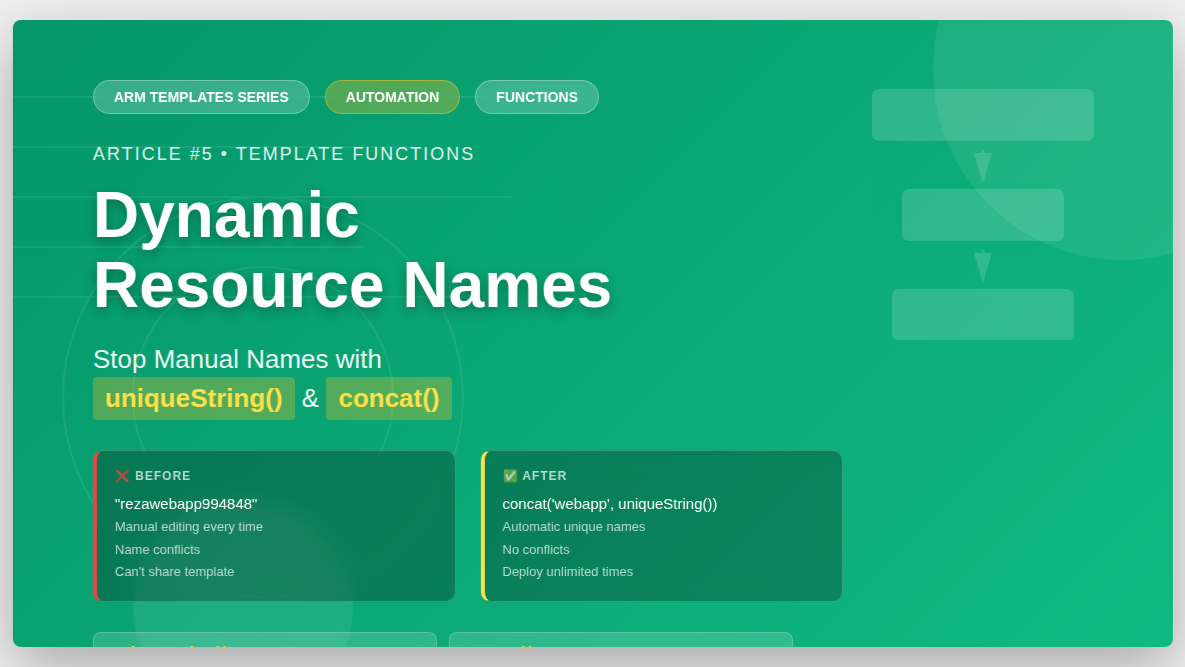
Hello everyone! Today I want to share something that saved me a lot of time – dynamic resource creation in ARM templates.
Before, I had a problem. Every time I deployed my template, Azure said “name already exists”. I had to manually change names in my template every time. This was annoying!
Then I learned about ARM template functions like uniqueString() and concat(). Now Azure creates unique names automatically. Let me show you!
My Problem with Hardcoded Names
Look at my old Web App template:
{
    "type": "Microsoft.Web/sites",
    "name": "rezawebapp994848",
    "properties": {
        "name": "rezawebapp994848"
    }
}
The problem: rezawebapp994848 is hardcoded!
What happened when I deployed again?
Error: “The website name ‘rezawebapp994848’ already exists”
What happened when my friend tried to use my template?
Error: “The website name ‘rezawebapp994848’ already exists”
I needed unique names every time!
Solution: Use Variables and Functions
Here’s my new template with dynamic names:
{
    "$schema": "https://schema.management.azure.com/schemas/2019-04-01/deploymentTemplate.json#",
    "contentVersion": "1.0.0.0",
    "parameters": {},
    "functions": [],
    "variables": {
        "web-app-name":"[concat('webapp',uniqueString(resourceGroup().id))]"
    },
    "resources": [
        {
            "type": "Microsoft.Web/serverfarms",
            "apiVersion": "2022-03-01",
            "name": "plan787878",
            "location": "[resourceGroup().location]",
            "sku": {
                "name":"F1",
                "capacity":1
            },
            "properties":{
                "name":"plan787878"
            }
        },
        {
            "type": "Microsoft.Web/sites",
            "apiVersion": "2022-03-01",
            "name": "[variables('web-app-name')]",
            "location": "[resourceGroup().location]",
            "properties":{
                "name":"[variables('web-app-name')]",
                "serverFarmId":"[resourceId('Microsoft.Web/serverfarms','plan787878')]"
            },
            "dependsOn":[
                "[resourceId('Microsoft.Web/serverfarms','plan787878')]"
            ]
        }
    ],
    "outputs": {}
}
Now look at the variables section:
"variables": {
    "web-app-name":"[concat('webapp',uniqueString(resourceGroup().id))]"
}
And how I use it in the resource:
"name": "[variables('web-app-name')]"What does this do? Let me explain!
Understanding uniqueString() Function
The uniqueString() function creates a unique hash from input.
uniqueString(resourceGroup().id)This takes the resource group ID and creates a unique string from it.
Example:
- Resource Group ID: /subscriptions/abc123/resourceGroups/my-rg
- uniqueString result: ghe7d4kj2p5a
The result is always:
- 13 characters long
- Only lowercase letters and numbers
- Same for same input (deterministic)
- Different for different input
So if I use resource group my-rg, I always get ghe7d4kj2p5a. If you use resource group your-rg, you get different string like k8j3h5m9n2p4.
This is perfect! Each person gets their own unique name.
Understanding concat() Function
The concat() function joins strings together.
concat('webapp', uniqueString(resourceGroup().id))This joins:
- webapp (my prefix)
- ghe7d4kj2p5a (unique string)
Result: webappghe7d4kj2p5a
Now every deployment gets unique name automatically!
Understanding Variables Section
"variables": {
    "web-app-name":"[concat('webapp',uniqueString(resourceGroup().id))]"
}
Variables are like shortcuts. I define the name once in variables, then use it many times in resources.
To use a variable:
"name": "[variables('web-app-name')]"Why use variables?
- Define once, use many times
- Easy to change later
- Makes template cleaner
- No copy-paste errors
Real Example: Web App with Linked SQL Template
Now I want to make BOTH Web App and SQL Server names unique. Here’s my complete example:
Main template:
{
    "$schema": "https://schema.management.azure.com/schemas/2019-04-01/deploymentTemplate.json#",
    "contentVersion": "1.0.0.0",
    "parameters": {},
    "functions": [],
    "variables": {
        "web-app-name":"[concat('webapp',uniqueString(resourceGroup().id))]"
    },
    "resources": [
        {
            "type": "Microsoft.Web/serverfarms",
            "apiVersion": "2022-03-01",
            "name": "plan787878",
            "location": "[resourceGroup().location]",
            "sku": {
                "name":"F1",
                "capacity":1
            },
            "properties":{
                "name":"plan787878"
            }
        },
        {
            "type": "Microsoft.Web/sites",
            "apiVersion": "2022-03-01",
            "name": "[variables('web-app-name')]",
            "location": "[resourceGroup().location]",
            "properties":{
                "name":"[variables('web-app-name')]",
                "serverFarmId":"[resourceId('Microsoft.Web/serverfarms','plan787878')]"
            },
            "dependsOn":[
                "[resourceId('Microsoft.Web/serverfarms','plan787878')]"
            ]
        },
        {
            "type":"Microsoft.Resources/deployments",
            "apiVersion": "2021-04-01",
            "name":"LinkedTemplate",
            "properties": {
                "mode": "Incremental",
                "templateLink": {
                    "uri": "https://templatestore465656.blob.core.windows.net/templates/sqldatabase.json",
                    "contentVersion":"1.0.0.0"
                },
                "parametersLink": {
                    "uri": "https://templatestore465656.blob.core.windows.net/templates/sqldatabase-parameters.json",
                    "contentVersion":"1.0.0.0"
                }
            }
        }
    ],
    "outputs": {
        "webappname": {
            "type": "string",
            "value":"[variables('web-app-name')]"
        },
        "sqlserverfqdn": {
            "type": "string",
            "value":"[reference('LinkedTemplate').outputs.sqlserverfqdn.value]"
        }
    }
}
SQL template (linked):
{
    "$schema": "https://schema.management.azure.com/schemas/2019-04-01/deploymentTemplate.json#",
    "contentVersion": "1.0.0.0",
    "parameters": {
        "SQLLogin": {
            "type":"string",
            "metadata":{
                "description":"The administrator user name"
            }
        },
        "SQLPassword": {
            "type":"secureString",
            "metadata":{
                "description":"The administrator password"
            }
        }
    },
    "functions": [],
    "variables": {
        "sql-server-name":"[concat('server',uniqueString(resourceGroup().id))]"
    },
    "resources": [
        {
            "type": "Microsoft.Sql/servers",
            "apiVersion": "2022-02-01-preview",
            "name": "[variables('sql-server-name')]",
            "location": "[resourceGroup().location]",
            "properties":{
                "administratorLogin": "[parameters('SQLLogin')]",
                "administratorLoginPassword": "[parameters('SQLPassword')]"
            }
        },
        {
            "type": "Microsoft.Sql/servers/databases",
            "apiVersion": "2022-02-01-preview",
            "name": "[format('{0}/{1}',variables('sql-server-name'),'appdb')]",
            "location": "[resourceGroup().location]",
            "sku":{
                "name":"Basic",
                "tier":"Basic"
            },
            "properties":{},
            "dependsOn":[
                "[resourceId('Microsoft.Sql/servers',variables('sql-server-name'))]"
            ]
        }
    ],
    "outputs": {
        "sqlserverfqdn": {
            "type": "string",
            "value":"[reference(variables('sql-server-name')).fullyQualifiedDomainName]"
        }
    }
}
Now both Web App and SQL Server get unique names automatically!
Understanding Outputs
Look at the outputs section in my templates:
In main template:
"outputs": {
    "webappname": {
        "type": "string",
        "value":"[variables('web-app-name')]"
    },
    "sqlserverfqdn": {
        "type": "string",
        "value":"[reference('LinkedTemplate').outputs.sqlserverfqdn.value]"
    }
}
In SQL template:
"outputs": {
    "sqlserverfqdn": {
        "type": "string",
        "value":"[reference(variables('sql-server-name')).fullyQualifiedDomainName]"
    }
}
Outputs let you get information AFTER deployment.
After I deploy, Azure CLI shows me:
{
  "outputs": {
    "webappname": {
      "type": "String",
      "value": "webappghe7d4kj2p5a"
    },
    "sqlserverfqdn": {
      "type": "String",
      "value": "serverghe7d4kj2p5a.database.windows.net"
    }
  }
}
Now I know:
- My Web App name: webappghe7d4kj2p5a
- My SQL Server: serverghe7d4kj2p5a.database.windows.net
I can use these in my CI/CD pipeline!
Getting Outputs from Linked Templates
This is the tricky part:
"value":"[reference('LinkedTemplate').outputs.sqlserverfqdn.value]"Let me break it down:
- reference(‘LinkedTemplate’) – Get the linked template deployment
- .outputs – Get the outputs section
- .sqlserverfqdn – Get the specific output
- .value – Get the actual value
So I can get data from linked template and pass it to main template outputs!
Using Outputs in Azure DevOps Pipeline
Here’s how I use ARM template outputs in my Azure DevOps pipeline. This is from my actual pipeline file:
# ASP.NET Core (.NET Framework)
# Build and test ASP.NET Core projects targeting the full .NET Framework.

trigger:
- main

pool:
  vmImage: 'windows-latest'

resources:
- repo: self

variables:
  solution: '**/*.sln'
  buildPlatform: 'Any CPU'
  buildConfiguration: 'Release'

stages:
- stage: Build
  displayName: Build stage
  jobs:
  - job: Build
    displayName: Build
    steps:
    - task: NuGetToolInstaller@1

    - task: NuGetCommand@2
      inputs:
        restoreSolution: '$(solution)'

    - task: DotNetCoreCLI@2
      displayName: Build
      inputs:
        command: build
        projects: '**/*.csproj'
        arguments: '--configuration $(buildConfiguration)'

    - task: DotNetCoreCLI@2
      inputs:
        command: publish
        publishWebProjects: True
        arguments: '--configuration $(BuildConfiguration) --output $(Build.ArtifactStagingDirectory)'
        zipAfterPublish: True

    - task: PublishPipelineArtifact@1
      inputs:
        targetPath: '$(Build.ArtifactStagingDirectory)'
        artifactName: 'sqlapp-artifact'

    - task: PublishPipelineArtifact@1
      inputs:
        targetPath: '$(Build.SourcesDirectory)/sqlapp/Templates'
        artifactName: 'template-artifact'

- stage: Deploy
  displayName: Deployment stage
  jobs:
  - job: Deploy
    displayName: Deploy
    steps:

    - download: current
      artifact: sqlapp-artifact

    - download: current
      artifact: template-artifact

    - pwsh: |
        Get-ChildItem -Path $(Pipeline.Workspace)\*.* -Recurse -Force | Out-String -Width 180
      errorActionPreference: continue
      displayName: 'List content'
      continueOnError: true
- task: AzureResourceManagerTemplateDeployment@3
displayName: 'ARM Template deployment: Resource Group scope'
inputs:
azureResourceManagerConnection: 'Azure subscription 1 (6912d7a0-bc28-459a-9407-33bbba641c07)'
subscriptionId: '6912d7a0-bc28-459a-9407-33bbba641c07'
resourceGroupName: 'template-grp'
location: 'North Europe'
csmFile: '$(Pipeline.Workspace)/template-artifact/main.json'
action: 'Create Or Update Resource Group'
deploymentMode: 'Incremental'
- task: SqlAzureDacpacDeployment@1
displayName: 'Azure SQL InlineSqlTask'
inputs:
azureSubscription: 'Azure subscription 1 (6912d7a0-bc28-459a-9407-33bbba641c07)'
ServerName: sqlserver8000505.database.windows.net
DatabaseName: appdb
SqlUsername: sqlusr
SqlPassword: 'Azure@123'
deployType: InlineSqlTask
SqlInline: |
IF (NOT EXISTS (SELECT *
FROM INFORMATION_SCHEMA.TABLES
WHERE TABLE_SCHEMA = 'dbo'
AND TABLE_NAME = 'Products'))
BEGIN
CREATE TABLE Products
(
ProductID int,
ProductName varchar(1000),
Quantity int
)
INSERT INTO Products(ProductID,ProductName,Quantity) VALUES (1,'Mobile',100)
INSERT INTO Products(ProductID,ProductName,Quantity) VALUES (2,'Laptop',200)
INSERT INTO Products(ProductID,ProductName,Quantity) VALUES (3,'Tabs',300)
END
IpDetectionMethod: IPAddressRange
StartIpAddress: 0.0.0.0
EndIpAddress: 0.0.0.0
DeleteFirewallRule: false
- task: AzureRmWebAppDeployment@4
displayName: 'Azure App Service Deploy'
inputs:
azureSubscription: 'Azure subscription 1 (6912d7a0-bc28-459a-9407-33bbba641c07)'
WebAppName: newapp1094848
Package: '$(Pipeline.Workspace)/sqlapp-artifact/**/*.zip'
- task: AzureAppServiceSettings@1
displayName: 'Azure App Service Settings: newapp1094848'
inputs:
azureSubscription: 'Azure subscription 1 (6912d7a0-bc28-459a-9407-33bbba641c07)'
appName: newapp1094848
resourceGroupName: 'template-grp'
connectionStrings: |
[
{
"name": "SQLConnection",
"value": "Server=tcp:sqlserver8000505.database.windows.net,1433;Initial Catalog=appdb;Persist Security Info=False;User ID=sqlusr;Password=Azure@123;MultipleActiveResultSets=False;Encrypt=True;TrustServerCertificate=False;Connection Timeout=30;",
"type": "SQLAzure",
"slotSetting": false
}
]In my pipeline, I deploy the ARM template in the Deploy stage.
The key task is:
- task: AzureResourceManagerTemplateDeployment@3
  displayName: 'ARM Template deployment: Resource Group scope'
  inputs:
    azureResourceManagerConnection: 'Azure subscription 1 (6912d7a0-bc28-459a-9407-33bbba641c07)'
    subscriptionId: '6912d7a0-bc28-459a-9407-33bbba641c07'
    resourceGroupName: 'template-grp'
    location: 'North Europe'
    csmFile: '$(Pipeline.Workspace)/template-artifact/main.json'
    action: 'Create Or Update Resource Group'
    deploymentMode: 'Incremental'
This task:
- Takes my main.json template from artifacts
- Deploys it to template-grp resource group
- Uses Incremental mode (safe!)
- Creates Web App with unique name
- Calls linked template for SQL Database
After ARM deployment finishes, I run SQL script to create tables, then deploy my application code to the Web App.
The pipeline works end-to-end:
- Build stage – Build .NET application
- Publish artifacts – Application code + ARM templates
- Deploy stage – Deploy ARM templates
- Create SQL tables with inline SQL script
- Deploy application to Web App
- Configure connection string
More Useful Functions
Let me show you other functions I use:
Using toLower():
"variables": {
    "storage-name":"[toLower(concat('storage',uniqueString(resourceGroup().id)))]"
}
This makes everything lowercase. Storage account names must be lowercase!
Using resourceGroup().location:
"location": "[resourceGroup().location]"This uses the resource group location automatically. I don’t need to type “North Europe” everywhere!
Using multiple concat():
"variables": {
    "vm-name":"[concat('vm-', parameters('environment'), '-', uniqueString(resourceGroup().id))]"
}
If environment parameter is “dev”, result: vm-dev-ghe7d4kj2p5a
If environment parameter is “prod”, result: vm-prod-ghe7d4kj2p5a
My Mistakes and Fixes
I forgot square brackets around function:
"name": "concat('webapp', uniqueString(resourceGroup().id))"This doesn’t work! ARM treats it as plain text, not a function.
Fix: Add square brackets:
"name": "[concat('webapp', uniqueString(resourceGroup().id))]"I used wrong variable name:
"variables": {
    "webappname": "..."
}

// Later in resource
"name": "[variables('web-app-name')]"  // Different name!
Error: “The template variable ‘web-app-name’ is not found”
Fix: Use exact same name everywhere.
I forgot single quotes in concat:
concat(webapp, uniqueString(resourceGroup().id)) // Wrong! Missing quotesFix: Add quotes around string:
concat('webapp', uniqueString(resourceGroup().id)) // Correct!I tried to use outputs before deployment finished:
In same template, I tried:
"resources": [
    {
        "name": "webapp",
        "type": "Microsoft.Web/sites",
        ...
    },
    {
        "name": "another-resource",
        "properties": {
            "value": "[reference('webapp').outputs.something]"  // Wrong!
        }
    }
]
This doesn’t work! I can only use outputs AFTER deployment, not during deployment.
Fix: Use dependsOn and reference() correctly, or use outputs only in pipeline steps after deployment.
What I Learned
- uniqueString() creates unique names – No more “name already exists” errors
- concat() joins strings – Easy to add prefixes
- Variables make code cleaner – Define once, use many times
- Outputs give information – Use in CI/CD pipelines
- Square brackets are required – For all ARM functions
- Linked templates can return outputs – Get data from child templates
- Azure DevOps can use ARM outputs – Connect templates to pipelines
Why This Matters
Before dynamic names:
- Manual work every deployment
- Name conflicts
- Hard to share templates
- Cannot automate
After dynamic names:
- Deploy unlimited times
- No conflicts
- Easy to share
- Full automation