$ cat job-board-api/part-08.md
Building a Job Board API, Part 8: Search and Filters
Where we are
This is the last part of Phase 2. Until now, GET /api/jobs/ returned every open job, 20 per page, newest first. That works for five jobs. It doesn’t work for five thousand.
Now a candidate can narrow the list down:
- ?job_type=full_time: only one type of job
- ?location=vancouver: only jobs in one city
- ?skills=python,docker: only jobs needing at least one of these skills
- ?search=platform engineer: free text, across title, description and company name
- ?ordering=title: sort by title instead of newest first
All of these combine, sit on top of the “open jobs only” rule, and the result is still paginated.
Why a library?
I could have read request.query_params by hand in my view. Instead, I installed django-filter:
uv add django-filter
docker compose up -d --build
Three reasons:
- It validates the input. ?job_type=freelance returns a 400 with a clear message. A hand-written filter would silently return zero jobs, and a typo in a client would look exactly like “there are no jobs”.
- All filters live in one class, not spread through if statements in a view.
- It documents itself. In Phase 5, drf-spectacular will read my filters and list every parameter in the API docs automatically.
One small trap: the package is called django-filter (hyphen, singular), but you import django_filters (underscore, plural). Mixing them up gives ModuleNotFoundError.
How a list request flows
In DRF, filters are filter backends: a chain of classes that each take a list of rows and return a smaller one. I set the chain on the job view:
    filter_backends = [DjangoFilterBackend, SearchFilter, OrderingFilter]
    filterset_class = JobFilter
    search_fields = ["title", "description", "company__name"]
    ordering_fields = ["created_at", "title"]
    ordering = ["-created_at"]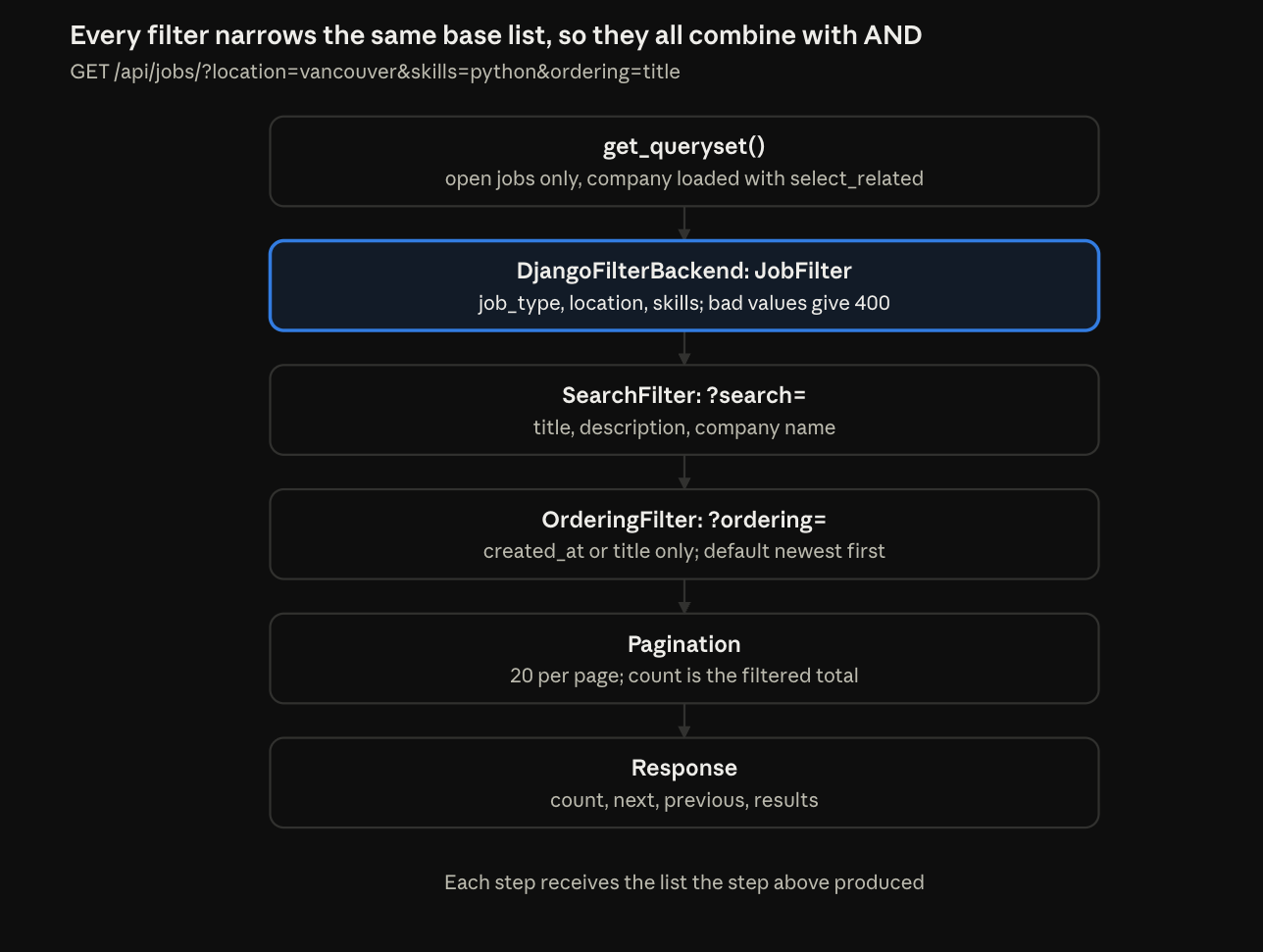
The important idea is in the first box. Every filter starts from get_queryset(), so every filter starts from open jobs only. The count in the response is the count after all the filters, not the count of all the jobs in the database.
I set the backends on this view only, not globally in settings, because no other view has a list worth filtering. If the application list in Part 7 needs filters later, I will add them there.
Step 1: The FilterSet
A FilterSet is to query parameters what a serializer is to a request body: one attribute per parameter, one type per attribute, one place to look. I made the file jobs/filters.py, and in it a single class:
class JobFilter(django_filters.FilterSet):
    location = django_filters.CharFilter(lookup_expr="icontains")
    skills = django_filters.CharFilter(method="filter_skills")

    class Meta:
        model = Job
        fields = ["job_type", "location", "skills"]

    def filter_skills(self, queryset, name, value):
        skills = [skill.strip().lower() for skill in value.split(",") if skill.strip()]
        if not skills:
            return queryset
        return queryset.filter(required_skills__overlap=skills)
job_type: free validation
I didn’t write anything for job_type. Because it is listed in Meta.fields, django-filter generates it for me, with a dropdown of the valid choices. The only special case is location.
?job_type=freelance
HTTP/1.1 400 Bad Request
{"job_type":["Select a valid choice. freelance is not one of the available choices."]}
location: lookup_expr
CharFilter(lookup_expr=”icontains”) builds filter(location__icontains=value). The filter’s name, location, is used as the model field, and lookup_expr is the part after __. icontains becomes SQL LIKE ‘%…%’, so the match is case-insensitive and works inside words.
skills: method
skills is different, for two reasons. There is no model field called skills (it’s required_skills), and the filter needs to split one text value into a list. So I wrote a method:
- value.split(“,”) makes a list from the text: “python, docker” becomes [“python”, “docker”].
- .strip() allows spaces after commas, and .lower() is essential: PostgreSQL array comparisons are case-sensitive, so Terraform would never match the stored terraform.
- if not skills: return queryset means ?skills= with nothing after it does not filter at all.
- required_skills__overlap is the PostgreSQL && operator: “the two arrays share at least one item”. It is the same lookup I tested back in Part 2, the day I chose array fields.
- The method must return a queryset. Returning nothing would break the list.
Why “at least one skill” and not “all skills”? With “all”, a candidate searching for python and docker would need a job that needs both, and the list would be nearly empty. Overlap means “at least one”, so ?skills=python,docker finds any job needing either skill.
lookup_expr vs method
These two arguments look almost the same, but do completely different things:
- lookup_expr=”icontains”: a built-in lookup. django-filter builds filter(location__icontains=value) for me.
- method=”filter_skills”: my own function. django-filter calls it with the queryset, the filter’s name, and the raw value.
Mixing them up was this part’s main bug. I’ll come back to it.
What I left out on purpose
- No is_open filter: the list already shows open jobs only.
- No company ID filter: it would expose internal database IDs. Candidates find a company’s jobs by name with ?search= instead.
Step 2: Search and ordering
Both come built into DRF. I only had to configure them.
Search: free text
Filters take exact, typed values. Search takes whatever the user types. Each listed field is searched with icontains:
search_fields = ["title", "description", "company__name"]- Between fields it is OR: a match in any one of the fields is enough. So ?search=Initech can match a job because of its company name.
- Between words it is AND: the words are combined with AND, so ?search=platform engineer matches jobs that contain both words.
- company__name follows the foreign key, so the candidate does not need to know the company’s ID.
My checks: initech found Initech’s job through the company name, django found two jobs through their description, and engineer found all three jobs through their titles. Each check proves a different field is in the list.
An honest note on speed: ILIKE ‘%…%’ can’t use a normal database index, so PostgreSQL reads every row. That’s fine for our seed data, and at real scale I’d use a full-text search index or a GIN index. And in Phase 3, search results will be cached in Redis.
Ordering: an allow-list
Ordering is an allow-list, not a free text field. I only allow ordering by created_at and title, and by default it orders by -created_at, so newest jobs come first.
ordering_fields = ["created_at", "title"]
ordering = ["-created_at"]- ?ordering=title sorts alphabetically, with -title for reverse. Anything else is ignored.
- ordering is the default sort when the client doesn’t ask for one. The – means descending: newest first. Remember that minus sign.
The silent fallback
What happens with ?ordering=password? It’s not in the allow-list, so DRF ignores it. No error, no warning, just the default order. That is DRF’s design, and it is low risk here, but it means a client with a typo in ?ordering= never finds out. If I need strict behaviour later, I can validate the parameter myself.
A side effect to know
The detail view also runs the filters. So GET /api/jobs/3/?skills=python returns 404, because job 3 doesn’t need python. Clients don’t normally send filters to a detail URL, so it hasn’t mattered. But it would be a very confusing bug to meet without knowing this.
Step 3: Cleaning skills on the way in
The skills filter lowercases the search input. But that only works if the stored skills are lowercase. A job saved with “Python” would never match python, because array comparisons are case-sensitive.
In Part 6, the match score cleaned skills when they were read. Now I also clean them when they are written. One line, in the job serializer:
    def validate_required_skills(self, value):
return list(dict.fromkeys(skill.strip().lower() for skill in value if skill.strip()))- validate_ is called by DRF after the field’s own checks, so it sees a real list.
- dict.fromkeys(…) is a neat Python trick. It builds a dictionary with each skill as a key. Keys are unique, so duplicates drop out, and the order stays as the client sent it.
- There are no square brackets inside fromkeys(…). That makes it a generator expression, so Python doesn’t build a list it throws away.
The test: Acme updates a job with [” Python “, “DOCKER”, “python”]. The saved value is [‘python’, ‘docker’]: trimmed, lowercased, no duplicate, order kept.
Some of my code does nothing
I found this by accident. When I added an empty string to that test, [” Python “, “DOCKER”, “python”, “”], I didn’t get a cleaned list. I got:
400 {"3": ["This field may not be blank."]}The 3 is the position of the bad item in the list. That’s how DRF reports errors inside a list field: by the item’s index. And that’s why I check the test data, not the code: the code did exactly what I asked.
It also revealed something. DRF validates each item before my method runs. A CharField already trims whitespace from a plain string, so “” becomes a fail for the ListField, not for my method.
And rejecting a blank skill with a 400 is the better behaviour anyway. A blank skill is a client mistake, and the fix belongs in the client, not in my serializer.
Did old data need fixing?
Only jobs saved after this change get cleaned. If an old row had “Python”, I would need a data migration to fix it, or a one-off script. I have not done either yet, and I am recording it here so I do not forget. So before deciding, I checked every existing job. All the skills were already lowercase, so no migration was needed. Check the data before you decide.
Problems I hit
1. Every skills search returned 500
My small helper that prints the result titles suddenly printed “not JSON”. curl -i showed a 500, and the last line of docker compose logs api said:
FieldError: Cannot resolve keyword 'skills' into field. Choices are: ... required_skills ...My first version had:
skills = django_filters.CharFilter(lookup_expr="filter_skills")lookup_expr instead of method. So django-filter didn’t call my method at all. It built filter(skills__filter_skills=value) from the filter’s name. There is no skills field, so Django crashed. My correctly written filter_skills method was never called.
The fix was one word: method=”filter_skills”. Every skills check passed after that. The error’s list of choices told me the field was really called required_skills, and it pointed straight at the real field name.
2. The newest jobs were at the bottom
This bug was hiding in plain sight. While I was testing ?ordering=password, I looked at the default order. The jobs were oldest first, and I had assumed newest first.
I checked the dates instead of guessing. Job 1 was created on October 24, and the two newest jobs on October 28. So the order really was wrong. Then I searched for every ordering line:
grep -n "ordering" jobs/views.py jobs/models.pyThe model said ordering = [“-created_at”], which is correct. But the view said ordering = [“created_at”], without the minus. One missing – and the default order flipped to oldest first.
Here is the part I didn’t know: OrderingFilter applies the view’s ordering as an explicit order_by(), and that replaces the model’s default. So that single missing character changed the order of every job list, with or without ?ordering=. One – fixed it.
I have to admit something here. My first explanation for this order was that job 1 “had been recreated when I reseeded the database.” It was a good story, and it was wrong. The timestamps proved it: job 1 was created on October 24, and the two newest jobs on October 28. The order was wrong because of one missing -.
3. Two tests where my expectation was wrong
Not every failure is a bug in the code. Twice in this step, the code was right and I was wrong:
- ?search=platform returned two jobs, and I expected one. But job 1’s description is “Run our Kubernetes platform.” Search covers descriptions, by design.
- My normalisation test returned a 400, because I included an empty string, and DRF correctly rejected it (Step 3).
When a test fails, the first question should be: is the code wrong, or is my expectation wrong?
The pattern, again
This series keeps finding the same kind of bug: a hook with the wrong name. get_permission, url_path and now lookup_expr are all hooks I had to learn by getting them wrong. Now I check the exact name before I write the code.
Did it work?
- ?location=vancouver&skills=python: 1 job. The Burnaby job also needs python, but it fails the location filter, so it is out.
- ?location=vancouver: 2 jobs, so the location filter alone works.
- ?skills=python,docker: 2 jobs, so the overlap is “at least one”, not “all”.
- ?search=platform: 2 jobs, so the description is searched.
- ?search=platform engineer: 1 job, so the words combine with AND.
- ?ordering=title: the jobs come back in title order, not date order.
- ?ordering=password: ignored, and the jobs come back newest first.
- An invalid ?job_type= returns 400, with a message that says which values are allowed.
- A filter of ?skills=python returns only jobs with that skill, in lower case.
What I learned
- A FilterSet is to query parameters what a serializer is to a request body: one attribute per parameter, one type per attribute, one place to look.
- lookup_expr and method are different arguments. One is a built-in lookup, the other is a function I write. Mixing them up gives a 500.
- Normalise in both places. Clean the search input and the stored data, because array lookups are case-sensitive.
- A missing – is a bug. Ordering by created_at is oldest first, and the default order is the one the client sees first.
- Know which line really does the work. Some of my code turned out to be dead, because DRF had already done the job.
- An allow-list is safer than a free text field. Anything not in the list is ignored.
- Check the data before you decide. A migration is only needed if the old rows are actually wrong.
- When a test fails, check the expectation first. The code might be right.
Phase 2 is complete
That was the last item on Phase 2’s checklist. Over four parts:
- Part 5 added permissions, so only the right user can see or change a job.
- Part 6 added the match score, so a candidate sees the best jobs first.
- Part 7 added resume uploads to S3, with presigned URLs for downloads.
- Part 8, this one, added search and filters, so a candidate can find the job.
The goal of the phase was “wrong user types get 403 and match scores return correctly”. Both are met. And the checklist I wrote in Part 4 said exactly that.
What comes next
Phase 3 adds two things the app is still missing: Redis, to cache job searches like the ones in this article, and a background worker that reads a queue and sends an email when an application’s status changes. The status endpoint from Part 5 is already waiting for it.