$ cat aws-with-terraform/part-06.md
Infrastructure as Code DevOps: Automated Multi-Environment Deployment with AWS CodePipeline
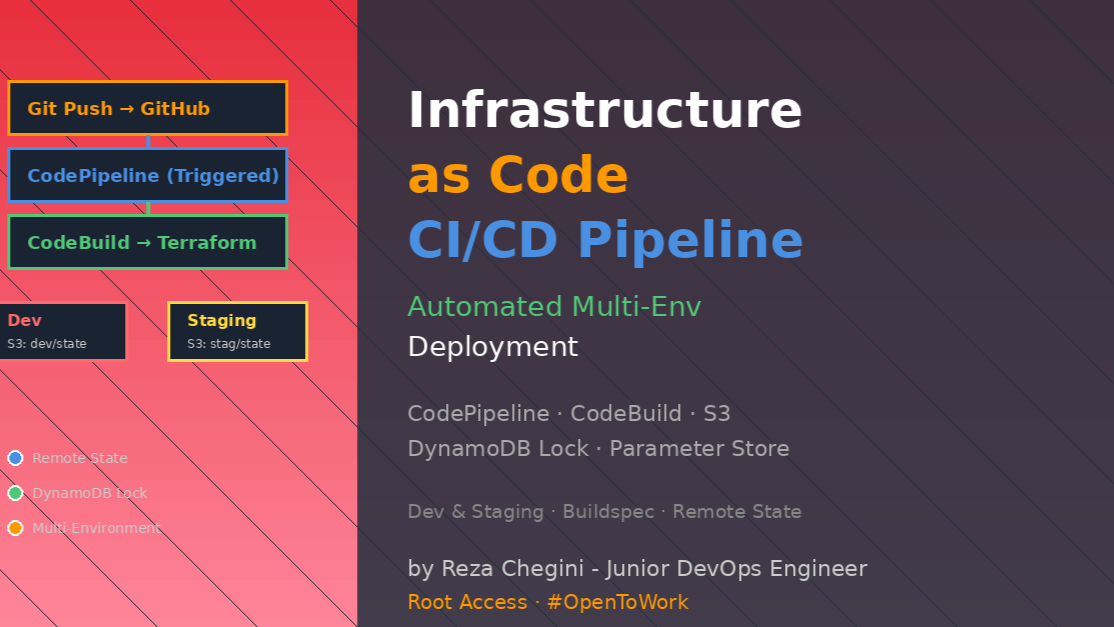
After building and manually deploying infrastructure, I faced the real DevOps question:
“How do I deploy infrastructure changes safely across multiple environments without manual terraform apply commands?”
This is where Infrastructure as Code meets DevOps automated, repeatable, multi-environment deployments with AWS CodePipeline.
What I Built
A complete CI/CD pipeline that automatically deploys Terraform infrastructure to Dev and Staging environments with:
- Automated deployments on git push
- Separate state management per environment
- Environment-specific configurations
- Remote state in S3 with DynamoDB locking
- Secrets managed via AWS Systems Manager Parameter Store
- CodeBuild for terraform execution
- Multi-environment support (dev, staging, production-ready)
CI/CD Pipeline Architecture
Developer → Git Push → GitHub
                          ↓
             AWS CodePipeline (triggered)
                          ↓
        ┌─────────────────┴─────────────────┐
        │                                   │
   Dev Branch                          Staging Branch
        │                                   │
        ↓                                   ↓
   CodeBuild (Dev)                    CodeBuild (Staging)
        │                                   │
   buildspec-dev.yml                   buildspec-stag.yml
        │                                   │
   terraform init                      terraform init
   -backend-config=dev.conf            -backend-config=stag.conf
        │                                   │
   terraform apply                     terraform apply
   -var-file=dev.tfvars                -var-file=stag.tfvars
        │                                   │
        ↓                                   ↓
   S3 State (Dev)                      S3 State (Staging)
   DynamoDB Lock (Dev)                 DynamoDB Lock (Staging)
        │                                   │
        ↓                                   ↓
   AWS Infrastructure (Dev)            AWS Infrastructure (Staging)
   devdemo5.rezaops.com                stagedemo5.rezaops.com
Multi-Environment Configuration Strategy
Environment Separation with Backend Configs
This is the key pattern – separate backend configs per environment:
dev.conf:
bucket = "terraform-on-aws-for-ec2-lowyi"
key = "iacdevops/dev/terraform.tfstate"
region = "us-east-1"
dynamodb_table = "iacdevops-dev-tfstate"
stag.conf:
bucket = "terraform-on-aws-for-ec2-lowyi"
key = "iacdevops/stag/terraform.tfstate"
region = "us-east-1"
dynamodb_table = "iacdevops-stag-tfstate"
Why separate state files?
Without separation:
Single state file: terraform.tfstate
Dev changes → Applies to production ✗
Staging changes → Overwrites dev state ✗
No rollback per environment ✗
With separation:
Dev state: iacdevops/dev/terraform.tfstate
Staging state: iacdevops/stag/terraform.tfstate
Production state: iacdevops/prod/terraform.tfstate

Dev changes → Only affects dev ✓
Staging is independent ✓
Can rollback each environment separately ✓
DynamoDB for state locking:
dynamodb_table = "iacdevops-dev-tfstate"What happens without locking:
User A runs: terraform apply
User B runs: terraform apply (simultaneously)

Both read same state file
Both make conflicting changes
State file corrupted ✗
With DynamoDB locking:
User A runs: terraform apply
  → Acquires lock in DynamoDB

User B runs: terraform apply
  → Waits for lock: "State locked by user A"

User A completes → Releases lock
User B acquires lock → Applies safely
DynamoDB table structure:
Table: iacdevops-dev-tfstate
Primary Key: LockID

Item when locked:
{
  "LockID": "terraform-on-aws-for-ec2-lowyi/iacdevops/dev/terraform.tfstate-md5",
  "Info": "user@hostname running terraform apply",
  "Digest": "abc123...",
  "Created": "2025-01-15T10:30:00Z"
}
Environment-Specific Variables
dev.tfvars:
environment = "dev"

vpc_availability_zones = ["us-east-1a", "us-east-1b", "us-east-1c"]
vpc_public_subnets = ["10.0.101.0/24", "10.0.102.0/24", "10.0.103.0/24"]

instance_type = "t2.micro"
dns_name = "devdemo5.rezaops.com"
stag.tfvars:
environment = "stag"

vpc_availability_zones = ["us-east-1a", "us-east-1b", "us-east-1c"]
vpc_public_subnets = ["10.0.101.0/24", "10.0.102.0/24", "10.0.103.0/24"]

instance_type = "t2.micro"  # Could be t3.small for staging
dns_name = "stagedemo5.rezaops.com"
How environment variable affects everything:
# Local values (c3-local-values.tf)
locals {
  environment = var.environment
  name = "${var.business_divsion}-${var.environment}"
  # name = "hr-dev" or "hr-stag"
}
This prefix propagates everywhere:
Resource names:
# VPC
name = "${local.name}-${var.vpc_name}"
# Result: "hr-dev-myvpc" or "hr-stag-myvpc"

# ALB
name = "${local.name}-alb"
# Result: "hr-dev-alb" or "hr-stag-alb"

# Security Groups
name = "${local.name}-public-bastion-sg"
# Result: "hr-dev-public-bastion-sg"

# Launch Template
name = "${local.name}"
# Result: "hr-dev" or "hr-stag"
Benefits:
Easy identification:
aws ec2 describe-vpcs --filters "Name=tag:environment,Values=dev"
# Shows only dev VPCs
No naming conflicts:
Dev VPC: hr-dev-myvpc
Staging VPC: hr-stag-myvpc
Both exist simultaneously ✓
Resource tagging:
common_tags = {
  owners = "hr"
  environment = "dev"  # or "stag"
}
AWS CodeBuild Buildspec Files
Dev Environment Buildspec
buildspec-dev.yml:
version: 0.2

env:
  variables:
    TERRAFORM_VERSION: "1.9.0"
    TF_COMMAND: "apply"
    #TF_COMMAND: "destroy"
  parameter-store:
    AWS_ACCESS_KEY_ID: "/CodeBuild/MY_AWS_ACCESS_KEY_ID"
    AWS_SECRET_ACCESS_KEY: "/CodeBuild/MY_AWS_SECRET_ACCESS_KEY"

phases:
  install:
    runtime-versions:
      python: 3.11
    on-failure: ABORT
    commands:
      - tf_version=$TERRAFORM_VERSION
      - wget https://releases.hashicorp.com/terraform/"$TERRAFORM_VERSION"/terraform_"$TERRAFORM_VERSION"_linux_amd64.zip
      - unzip terraform_"$TERRAFORM_VERSION"_linux_amd64.zip
      - mv terraform /usr/local/bin/

  pre_build:
    on-failure: ABORT
    commands:
      - echo terraform execution started on `date`

  build:
    on-failure: ABORT
    commands:
      - cd "$CODEBUILD_SRC_DIR/terraform-manifests"
      - ls -lrt "$CODEBUILD_SRC_DIR/terraform-manifests"
      - terraform --version
      - terraform init -input=false --backend-config=dev.conf
      - terraform validate
      - terraform plan -lock=false -input=false -var-file=dev.tfvars
      - terraform $TF_COMMAND -input=false -var-file=dev.tfvars -auto-approve

  post_build:
    on-failure: CONTINUE
    commands:
      - echo terraform execution completed on `date`
Buildspec Phases Explained
Phase 1: Install
install:
  runtime-versions:
    python: 3.11
  commands:
    - wget https://releases.hashicorp.com/terraform/1.9.0/terraform_1.9.0_linux_amd64.zip
    - unzip terraform_1.9.0_linux_amd64.zip
    - mv terraform /usr/local/bin/
What happens:
- CodeBuild starts Ubuntu container
- Downloads Terraform binary from HashiCorp
- Extracts and moves to PATH
- Makes Terraform available globally
Why not use pre-installed Terraform?
CodeBuild may have:
- Outdated Terraform version
- No Terraform at all
- Wrong version for your code
Downloading specific version:
- Guarantees consistent version
- Works with your Terraform code
- Prevents version mismatch issues
Phase 2: Pre-build
pre_build:
  commands:
    - echo terraform execution started on `date`
Simple logging for CloudWatch. Could add:
- aws sts get-caller-identity  # Verify credentials
- terraform --version  # Log Terraform version
Phase 3: Build (Main Phase)
build:
  commands:
    - cd "$CODEBUILD_SRC_DIR/terraform-manifests"
    - terraform init -input=false --backend-config=dev.conf
    - terraform validate
    - terraform plan -lock=false -input=false -var-file=dev.tfvars
    - terraform $TF_COMMAND -input=false -var-file=dev.tfvars -auto-approve
$CODEBUILD_SRC_DIR explained:
CODEBUILD_SRC_DIR=/codebuild/output/src123456789/srcCodeBuild clones your git repo here. We need to navigate to terraform-manifests folder.
terraform init -input=false –backend-config=dev.conf:
# In c1-versions.tf:
backend "s3" {}  # Empty! No hardcoded values
Backend config provided at runtime:
terraform init --backend-config=dev.confThis pattern allows:
- Same Terraform code for all environments
- Backend configuration determined by buildspec
- No environment-specific code branches
-lock=false in terraform plan:
terraform plan -lock=falseplan doesn’t modify state, so locking is optional. Skipping lock:
- Allows parallel plan operations
- Prevents unnecessary DynamoDB writes
- Speeds up pipeline
Important: apply ALWAYS uses locking (can’t disable).
-auto-approve:
terraform apply -auto-approveWithout -auto-approve:
Do you want to perform these actions?
  Terraform will perform the actions described above.
  Only 'yes' will be accepted to approve.

  Enter a value: _
CodeBuild can’t interactively respond! Build would hang forever.
Phase 4: Post-build
post_build:
  on-failure: CONTINUE  # Don't fail build if this fails
  commands:
    - echo terraform execution completed on `date`
on-failure: CONTINUE means:
- If post_build fails, mark build as succeeded anyway
- Useful for non-critical cleanup or notifications
- Logging should never fail the build
Environment Variables and Secrets
Variables in buildspec:
env:
  variables:
    TERRAFORM_VERSION: "1.9.0"
    TF_COMMAND: "apply"
These are plain text, visible in:
- Buildspec file
- CodeBuild logs
- Build history
Secrets from Parameter Store:
env:
  parameter-store:
    AWS_ACCESS_KEY_ID: "/CodeBuild/MY_AWS_ACCESS_KEY_ID"
    AWS_SECRET_ACCESS_KEY: "/CodeBuild/MY_AWS_SECRET_ACCESS_KEY"
How Parameter Store secrets work:
Store secrets:
aws ssm put-parameter \
  --name "/CodeBuild/MY_AWS_ACCESS_KEY_ID" \
  --value "AKIAIOSFODNN7EXAMPLE" \
  --type "SecureString"

aws ssm put-parameter \
  --name "/CodeBuild/MY_AWS_SECRET_ACCESS_KEY" \
  --value "wJalrXUtnFEMI/K7MDENG/bPxRfiCYEXAMPLEKEY" \
  --type "SecureString"
CodeBuild fetches at runtime:
Build starts → CodeBuild IAM role → Parameter Store
            → Decrypt SecureString → Inject as environment variable
Available in build:
echo $AWS_ACCESS_KEY_ID
# AKIAIOSFODNN7EXAMPLE

terraform plan  # Uses credentials automatically
Benefits:
✓ Credentials not in code ✓ Not visible in logs (masked) ✓ Rotatable without code changes ✓ IAM-controlled access ✓ Audit trail in CloudTrail
Alternative: Secrets Manager
env:
  secrets-manager:
    AWS_ACCESS_KEY_ID: "my-secret:access_key_id"
    AWS_SECRET_ACCESS_KEY: "my-secret:secret_access_key"
Parameter Store vs Secrets Manager:
Parameter Store:
- Free (up to 10,000 parameters)
- Simple key-value
- Good for config values

Secrets Manager:
- $0.40 per secret per month
- Automatic rotation support
- Better for database passwords, API keys
Terraform Backend Configuration
Backend Declaration
c1-versions.tf:
terraform {
  required_providers {
    aws = {
      source = "hashicorp/aws"
      version = "5.70.0"
    }
  }

  backend "s3" {}  # Empty backend block!
}
Why empty backend?
Traditional approach (hardcoded):
backend "s3" {
  bucket = "my-terraform-state"
  key = "dev/terraform.tfstate"
  region = "us-east-1"
  dynamodb_table = "terraform-state-lock"
}
Problems:
- Dev and staging need different configurations
- Must maintain separate code branches
- Can’t use same code for multiple environments
Dynamic backend configuration:
# Dev environment
terraform init -backend-config=dev.conf

# Staging environment
terraform init -backend-config=stag.conf -reconfigure
-reconfigure flag:
terraform init -backend-config=stag.conf -reconfigureWhat -reconfigure does:
Without -reconfigure:
  Backend already configured for dev
  Error: Backend configuration changed

With -reconfigure:
  Detected configuration change
  Migrating state from dev backend to staging backend
  Asking: Do you want to copy state? (must type 'yes')

In CodeBuild with -reconfigure:
  Skips migration questions
  Configures new backend
  No interactive prompts ✓
State File Organization in S3
s3://terraform-on-aws-for-ec2-lowyi/
├── iacdevops/
│   ├── dev/
│   │   └── terraform.tfstate       # Dev environment state
│   │   └── terraform.tfstate.backup
│   ├── stag/
│   │   └── terraform.tfstate       # Staging environment state
│   │   └── terraform.tfstate.backup
│   └── prod/
│       └── terraform.tfstate       # Production environment state (future)
│       └── terraform.tfstate.backup
State file versions:
S3 versioning MUST be enabled:
aws s3api put-bucket-versioning \
  --bucket terraform-on-aws-for-ec2-lowyi \
  --versioning-configuration Status=Enabled
Why versioning matters:
Scenario: Accidental terraform destroy
Without versioning:
  terraform destroy -auto-approve
  State file deleted
  No record of infrastructure ✗
  Must rebuild from scratch ✗
With versioning:
  terraform destroy -auto-approve
  State file deleted → S3 creates delete marker
  Previous versions preserved
  Can restore previous state:
    aws s3api list-object-versions --bucket ... --prefix ...
    aws s3api get-object --version-id ...
  Infrastructure recoverable ✓
AWS CodePipeline Setup
Pipeline Stages
Stage 1: Source
  ↓
  GitHub repository (on push)
  ↓
Stage 2: Build (Dev)
  ↓
  CodeBuild project (Dev)
  ↓
  Buildspec: buildspec-dev.yml
  ↓
Stage 3: Build (Staging)
  ↓
  CodeBuild project (Staging)
  ↓
  Buildspec: buildspec-stag.yml
Pipeline Triggers
Automatic trigger on git push:
# Developer workflow
git add terraform-manifests/c10-02-ALB-application-loadbalancer.tf
git commit -m "Updated ALB listener rules"
git push origin main

# Pipeline triggered automatically:
  1. Source stage: Downloads latest code
  2. Dev build: Deploys to dev environment
  3. Staging build: Deploys to staging environment
Manual approval (optional):
For production:
Stage 1: Source
  ↓
Stage 2: Build (Dev) - Automatic
  ↓
Stage 3: Manual Approval
  ↓
Stage 4: Build (Staging) - After approval
  ↓
Stage 5: Manual Approval
  ↓
Stage 6: Build (Production) - After approval
CodeBuild IAM Permissions
Required IAM policy for CodeBuild:
{
  "Version": "2012-10-17",
  "Statement": [
    {
      "Effect": "Allow",
      "Action": [
        "ec2:*",
        "elasticloadbalancing:*",
        "autoscaling:*",
        "route53:*",
        "acm:*",
        "sns:*",
        "s3:*"
      ],
      "Resource": "*"
    },
    {
      "Effect": "Allow",
      "Action": [
        "s3:GetObject",
        "s3:PutObject"
      ],
      "Resource": "arn:aws:s3:::terraform-on-aws-for-ec2-lowyi/*"
    },
    {
      "Effect": "Allow",
      "Action": [
        "dynamodb:GetItem",
        "dynamodb:PutItem",
        "dynamodb:DeleteItem"
      ],
      "Resource": "arn:aws:dynamodb:*:*:table/iacdevops-*-tfstate"
    },
    {
      "Effect": "Allow",
      "Action": [
        "ssm:GetParameter",
        "ssm:GetParameters"
      ],
      "Resource": "arn:aws:ssm:*:*:parameter/CodeBuild/*"
    }
  ]
}
Why these permissions?
- ec2:* – Create VPCs, instances, security groups
- elasticloadbalancing:* – Create ALBs, target groups
- autoscaling:* – Create launch templates, ASGs
- route53:* – Create DNS records
- acm:* – Request and validate certificates
- s3:* (state bucket) – Read/write state files
- dynamodb:* (lock table) – State locking
- ssm:GetParameter – Fetch secrets
Principle of Least Privilege:
For production, restrict further:
{
  "Effect": "Allow",
  "Action": "ec2:*",
  "Resource": "*",
  "Condition": {
    "StringEquals": {
      "ec2:ResourceTag/Environment": "dev"
    }
  }
}
This limits EC2 actions to resources tagged with Environment=dev.
Deploying Infrastructure via Pipeline
Deployment Workflow
1. Developer makes change:
   ├─ Modify: c10-02-ALB-application-loadbalancer.tf
   └─ Change: Add new listener rule

2. Commit and push:
   git add .
   git commit -m "Add /api path routing"
   git push origin main

3. CodePipeline triggered automatically:
   ├─ Source stage: Downloads code
   └─ Status: Source Complete

4. Dev Build (CodeBuild):
   ├─ Start time: 14:30:00
   ├─ Install: Download Terraform
   ├─ Pre-build: Log start time
   ├─ Build:
   │  ├─ terraform init -backend-config=dev.conf
   │  │  Backend initialized: s3://.../ iacdevops/dev/terraform.tfstate
   │  ├─ terraform validate
   │  │  Success! Configuration is valid.
   │  ├─ terraform plan -var-file=dev.tfvars
   │  │  Plan: 1 to add, 2 to change, 0 to destroy.
   │  └─ terraform apply -var-file=dev.tfvars -auto-approve
   │     Apply complete! Resources: 1 added, 2 changed, 0 destroyed.
   ├─ Post-build: Log completion time
   ├─ Duration: 3 minutes 45 seconds
   └─ Status: Build Complete

5. Staging Build (CodeBuild):
   ├─ Start time: 14:35:00
   ├─ [Same steps as dev build]
   ├─ backend-config: stag.conf
   ├─ var-file: stag.tfvars
   ├─ Duration: 3 minutes 50 seconds
   └─ Status: Build Complete

6. Total Pipeline Duration: ~8 minutes

7. Verification:
   Dev: https://devdemo5.rezaops.com
   Staging: https://stagedemo5.rezaops.com
   Both updated with new listener rule ✓
Viewing Build Logs
CloudWatch Logs:
Log Group: /aws/codebuild/terraform-dev-build
Log Stream: abc123-def456-789012
[Container] 2025/01/15 14:30:15 Running command terraform init -backend-config=dev.conf
Initializing the backend...

Successfully configured the backend "s3"! Terraform will automatically
use this backend unless the backend configuration changes.

[Container] 2025/01/15 14:30:45 Running command terraform validate
Success! The configuration is valid.

[Container] 2025/01/15 14:31:00 Running command terraform plan -var-file=dev.tfvars
...
Plan: 1 to add, 2 to change, 0 to destroy.
...

[Container] 2025/01/15 14:31:30 Running command terraform apply -var-file=dev.tfvars -auto-approve
module.alb.aws_lb_listener_rule.myapp1-rule: Modifying...
module.alb.aws_lb_listener_rule.myapp1-rule: Modifications complete
Apply complete! Resources: 1 added, 2 changed, 0 destroyed.
Destroying Infrastructure via Pipeline
To destroy environment:
Update buildspec:
env:
  variables:
    TF_COMMAND: "destroy"  # Changed from "apply"
Commit and push:
git add buildspec-dev.yml
git commit -m "Destroy dev environment"
git push origin main
Pipeline executes:
terraform destroy -input=false -var-file=dev.tfvars -auto-approveResult:
Destroy complete! Resources: 45 destroyed.Warning for production:
For production, never use auto-approve for destroy!
Better approach:
# Add manual approval before destroy
- TF_COMMAND: "destroy"
- Require manual confirmation in pipeline
- Send SNS notification before destroy
Real-World Scenarios
Scenario 1: Update ALB Listener Configuration
Change required: Add new health check path
File: c10-02-ALB-application-loadbalancer.tf
# Before:
health_check = {
  path = "/app1/index.html"
  interval = 30
}

# After:
health_check = {
  path = "/health"  # New health check endpoint
  interval = 15      # Faster checks
}
Deployment:
git add c10-02-ALB-application-loadbalancer.tf
git commit -m "Update ALB health check path and interval"
git push origin main
Pipeline execution:
14:00:00 - Source stage triggered
14:00:30 - Dev build started
14:01:15 - terraform plan output:
  module.alb.aws_lb_target_group.mytg1: will be updated in-place

14:02:00 - terraform apply:
  module.alb.aws_lb_target_group.mytg1: Modifying...
  module.alb.aws_lb_target_group.mytg1: Modifications complete

14:02:45 - Dev build complete
14:03:00 - Staging build started
14:05:45 - Staging build complete

Total time: 5 minutes 45 seconds
Verification:
# Check dev environment
aws elbv2 describe-target-groups \
  --names hr-dev-mytg1 \
  --query 'TargetGroups[0].HealthCheckPath'
# Output: "/health"

# Check staging environment
aws elbv2 describe-target-groups \
  --names hr-stag-mytg1 \
  --query 'TargetGroups[0].HealthCheckPath'
# Output: "/health"
Scenario 2: Scale Up Auto Scaling Group
Change required: Increase ASG capacity for load testing
File: dev.tfvars
# Before:
desired_capacity = 2
max_size = 5

# After:
desired_capacity = 5  # Scale up for load test
max_size = 10
Deployment:
git add terraform-manifests/dev.tfvars
git commit -m "Scale up dev ASG for load testing"
git push origin main
What happens:
terraform plan output:
  # aws_autoscaling_group.my_asg will be updated in-place
  ~ resource "aws_autoscaling_group" "my_asg" {
      ~ desired_capacity = 2 -> 5
      ~ max_size         = 5 -> 10
    }

terraform apply:
  aws_autoscaling_group.my_asg: Modifying...
  aws_autoscaling_group.my_asg: Still modifying... [10s elapsed]

ASG launches 3 new instances:
  Instance 1: i-0abc123 launching...
  Instance 2: i-0def456 launching...
  Instance 3: i-0ghi789 launching...

Health checks:
  All instances healthy after 2 minutes

Load balancer:
  Target group now has 5 healthy targets
Impact: Only dev environment scaled, staging unchanged!
Scenario 3: Pipeline Failure – Terraform Validation Error
Bad change committed:
# c13-06-autoscaling-ttsp.tf
resource "aws_autoscaling_policy" "avg_cpu_policy" {
  name = "cpu-policy"
  target_value = "invalid"  # Should be number, not string!
}
Pipeline execution:
Source stage: ✓ Complete
Dev build: Started
  terraform validate:
    Error: Invalid value for target_value
    Expected number, got string

  Build status: FAILED
  Duration: 45 seconds
Staging build: Never runs! (Dev failed)
Result:
- Dev environment unchanged (apply never ran)
- Staging environment unchanged
- Infrastructure protected from bad configuration
Fix:
target_value = 50.0  # Correct: number
git add c13-06-autoscaling-ttsp.tf
git commit -m "Fix: target_value should be number"
git push origin main
Pipeline re-runs successfully!
Lessons Learned
1. State Locking Failed – DynamoDB Table Missing
Error:
Error acquiring state lock
Error: Error locking state: ResourceNotFoundException
Cause: DynamoDB table doesn’t exist!
Solution:
aws dynamodb create-table \
  --table-name iacdevops-dev-tfstate \
  --attribute-definitions AttributeName=LockID,AttributeType=S \
  --key-schema AttributeName=LockID,KeyType=HASH \
  --billing-mode PAY_PER_REQUEST
2. CodeBuild Can’t Access Parameter Store
Error:
Error retrieving value from parameter store
AccessDeniedException: User is not authorized
Cause: CodeBuild IAM role missing SSM permissions.
Solution: Add to CodeBuild service role:
{
  "Effect": "Allow",
  "Action": "ssm:GetParameter",
  "Resource": "arn:aws:ssm:*:*:parameter/CodeBuild/*"
}
3. Terraform Version Mismatch
Error:
Error: state file format version 4 is too new
This version of Terraform requires state file version 3
Cause: State created with Terraform 1.0, buildspec uses 1.9.0
Solution: Update buildspec:
TERRAFORM_VERSION: "1.0.0" # Match state file version4. Backend Initialization in Wrong Directory
Error:
terraform init
Error: No configuration files
Cause:
# Missing this:
cd "$CODEBUILD_SRC_DIR/terraform-manifests"
Terraform ran in root directory, no .tf files found!
5. ACM Certificate Validation Timeout in Pipeline
Problem: Pipeline takes 20+ minutes, times out waiting for ACM validation.
Cause: ACM DNS validation requires Route53 records, takes 5-10 minutes.
Solution 1: Increase CodeBuild timeout:
# In CodePipeline build stage:
timeout_in_minutes: 30
Solution 2: Pre-create and reuse ACM certificate:
# Instead of creating new cert:
data "aws_acm_certificate" "existing" {
  domain = "*.rezaops.com"
}

# Use existing cert:
certificate_arn = data.aws_acm_certificate.existing.arn
6. Auto-Approve Destroyed Wrong Environment
Horror story:
Updated wrong buildspec:
# In buildspec-PROD.yml (!!!)
TF_COMMAND: "destroy"
Pushed to main → Pipeline destroyed production!
Prevention:
Never auto-approve destroy in production
Use branch protection:
main branch:
  - Requires pull request
  - Requires approvals: 2
  - No direct push
Add confirmation comment:
TF_COMMAND: "apply"
# To destroy, MUST manually edit this to "destroy" AND commit message MUST contain "DESTROY-CONFIRMED"
Separate pipelines:
dev-pipeline: Auto-deploys on push to dev branch
stag-pipeline: Auto-deploys on push to staging branch
prod-pipeline: Manual approval required, no auto-destroy
7. Concurrent Builds Caused State Lock Conflict
Problem: Pushed 2 commits quickly:
Commit 1: Update ALB → Pipeline starts
Commit 2: Update ASG → Pipeline starts immediately
Both tried to acquire state lock:
Build 1: Acquired lock at 14:00:00
Build 2: Waiting for lock... timeout after 5 minutes
Solution:
# In CodePipeline:
concurrent_build_limit: 1
Or better – queue builds:
Build 1 running → Build 2 queued
Build 1 completes → Build 2 starts
What I Learned
- Separate state files are essential – Never share state between environments
- DynamoDB locking prevents disasters – Concurrent applies can corrupt state
- Backend configs enable multi-env – Same code, different backends
- Parameter Store for secrets – Never hardcode credentials
- Buildspec phases matter – Install, pre-build, build, post-build structure
- Auto-approve is dangerous – Especially for destroy commands
- Version consistency critical – Terraform version must match state file
- CodeBuild IAM needs careful setup – Must have all necessary permissions
- Pipeline feedback is fast – See failures in minutes, not hours
- Infrastructure as Code is powerful – Click a button, deploy entire environment