$ cat job-board-api/part-11.md
Building a Job Board API, Part 11: Sending the Status Emails
The worker does real work now
In Part 10, I built a queue and a background worker. When a company changed an application’s status, a message went onto SQS, and the worker received it. But the worker only logged the message.
Now it does what it was built for: it sends the candidate an email.
From: Job Board <no-reply@jobboard.test>
To: sam@example.test
Subject: Your application for Junior DevOps Engineer: Interview

Hi sam,

The status of your application for Junior DevOps Engineer at Acme has changed.

New status: Interview
This is the first time the project talks to a user from the outside. Until now, everything stayed inside the project: the API, the queue, the worker, the database. An email leaves the project and lands in someone’s inbox. That changes the stakes. A bug in the API returns an error code. A bug in an email is read by a human.
It also creates a new risk, and I want to be honest about it from the start. The worker sends the email first and deletes the message after. If the worker crashes between those two steps, SQS will deliver the message again, and the candidate will get two emails. That is the problem I fix in the next part.
The email part looks trivial until you write it down. There is a subject line, a template, an email backend, and a failure path. Each one has a trap.
Step 1: Where does the email go?
First, the email needs a sender. I put it in settings.py, but the value comes from the environment, not from a hardcoded string:
EMAIL_BACKEND = env("EMAIL_BACKEND", "django.core.mail.backends.console.EmailBackend")
DEFAULT_FROM_EMAIL = env("DEFAULT_FROM_EMAIL", "Job Board <no-reply@jobboard.test>")
Django sends every email through an email backend. The backend decides where the email actually goes.
- The console backend prints the whole email to the program’s output. In the worker container, that means docker compose logs worker.
- It’s the default on purpose. If someone forgets this variable, emails are printed, never delivered. A missing EMAIL_BACKEND falls back to the console backend, not to a real SMTP server. Django’s own default would be different: if EMAIL_BACKEND is not set at all, Django uses the SMTP backend and tries localhost:25.
- DEFAULT_FROM_EMAIL uses the standard Name <address> format, so it shows as “Job Board” in an inbox.
- .test is a reserved domain name. An address there can never receive real email, which makes it perfect for a sender that only exists in development.
In production, one environment variable will point this at a real service. My plan says “console locally, Amazon SES later”.
Step 2: A plain-text template
The email body lives in a template file, jobs/templates/emails/status_changed.txt, not in Python code. The function renders it with render_to_string, which takes the template name and a dictionary of values.
{% autoescape off %}Hi {{ name }},

The status of your application for {{ job_title }} at {{ company }} has changed.

New status: {{ status }}

Good luck,
The Job Board team
{% endautoescape %}- {{ name }} inserts a value from the data I pass in.
- Django finds the file automatically, because startproject set APP_DIRS = True, which tells Django to look inside every app’s templates folder.
- The emails/ subfolder is a namespace. Django searches all apps’ template folders as one big folder, so another app’s status_changed.txt can’t replace mine by accident.
The autoescaping trap
The first and last lines, {% autoescape off %} and {% endautoescape %}, are the interesting part.
By default, Django templates escape special characters: & becomes &, and < becomes <. That is a very good default for web pages, because it stops someone from injecting their own HTML into your site.
But this is a plain-text email, not a web page. Nothing will ever turn & back into &. So a job called ‘R&D Engineer’ would arrive as ‘R&D Engineer’. Turning autoescaping off is correct here, and only here. In an HTML email, it must stay on.
A tiny detail: {% autoescape off %} sits on the same line as Hi, so the email doesn’t start with an empty line.
Step 3: Building the email
This function does one job: build the email and send it. It doesn’t touch the queue, and it doesn’t know what a worker is. That separation matters when I test it.
def _one_line(text):
    return " ".join(text.split())


def send_status_changed_email(application, new_status):
    candidate = application.candidate.user
    status_label = Application.Status(new_status).label
    subject = _one_line(f"Your application for {application.job.title}: {status_label}")
    context = {
        "name": candidate.first_name or candidate.username,
        "job_title": application.job.title,
        "company": application.job.company.name,
        "status": status_label,
    }
    body = render_to_string("emails/status_changed.txt", context)
    send_mail(subject, body, settings.DEFAULT_FROM_EMAIL, [candidate.email], fail_silently=False)
What happened vs what is true now
One design choice runs through this function:
- The status comes from the message. The email describes this change. If the status changed again before the worker ran, the email would still say what happened at that moment, not the latest state.
- Everything else comes from the database. The current job title, company name and email address, never copied into the message.
Application.Status(new_status).label turns the stored value “interview” into the readable text “Interview”. That matters, because the email should read like a sentence, not a database row.
first_name or username: Python’s or returns the first value that isn’t empty. My test users have no first name set, so the email starts with “Hi sam”, their username.
Header injection
An email’s subject is a header, and headers are separated by line breaks. So imagine a company names its job like this:
Line one
Bcc: attacker@evil.test
If that newline reached the email headers, the second line could become a real Bcc: header, and a copy of every candidate’s email would go to the attacker. This is called header injection, and the fix is one line of Python.
Django already protects against this: it refuses a subject with a newline. But “refuses” means it raises an error. In my worker, that error would cause three retries, a message in the dead-letter queue, and no email for the candidate. The job would stay broken until someone fixed the title by hand.
So _one_line() removes the problem before it starts. text.split() with no argument splits on any whitespace, including newlines, and ” “.join puts it back together with single spaces. The title ‘Line one\nBcc: attacker@evil.test’ becomes ‘Line one Bcc: attacker@evil.test’. A header injection that becomes plain text.
fail_silently=False
This is already Django’s default, but I wrote it out on purpose, because it matters. If sending fails, send_mail raises. The worker then skips the delete, and SQS retries the message. With fail_silently=True, a failed email would look exactly like a success: the message would be deleted, and the email lost without a trace.
Step 4: In the worker: retry, drop or park
The worker already knows how to read a message. Now it calls send_status_changed_email. But sending an email can fail, and a failed email is not a failed application.
def handle_status_changed(body):
    try:
        application = Application.objects.select_related(
            "job__company", "candidate__user"
        ).get(id=body["application_id"])
        new_status = body["new_status"]
        send_status_changed_email(application, new_status)
        logger.info(
            "Emailed user %s about application %s: %s -> %s (event %s)",
            application.candidate.user_id,
            application.id,
            body["old_status"],
            body["new_status"],
            body["event_id"],
        )
    except Application.DoesNotExist:
        logger.warning(
            "Application %s no longer exists; skipping(event %s)",
            body["application_id"],
            body["event_id"],
        )
return- select_related(“job__company”, “candidate__user”) loads the application, job, company, candidate and user in one SQL query. Without it, Django would make a separate query for each one.
- handle() is now a small dispatcher: it only decides which function handles a message type. Each handler does one job.
The most important design question in this step: when an error happens, should the message be retried, dropped or parked?
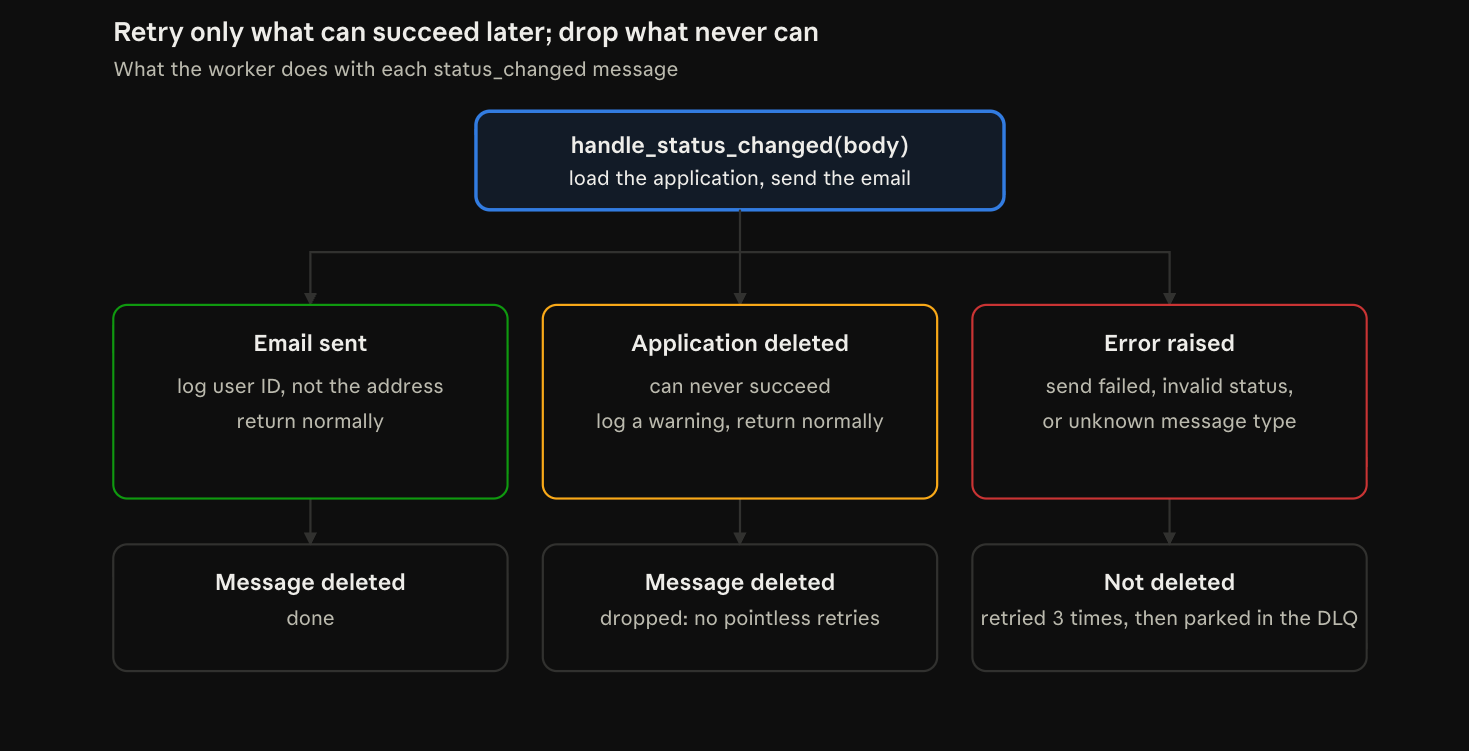
Retry only what could succeed later.
- A deleted application can never succeed. It can happen, for example, when a company is deleted and its applications go with it. I log a warning and drop the message, on purpose. The user is gone, so there is nobody to tell. Retrying a deleted row forever would only fill the log.
- A bug is different. An unknown message type or an invalid status means my code is wrong. Those must not be dropped silently: they raise, the worker retries them three times, and then they land in the dead-letter queue. A bug should be visible, not hidden.
- A failed send is retried too, thanks to fail_silently=False. A mail server that is briefly down may answer the second time. Nothing is deleted until the email is sent, so no email is ever lost silently.
Too many attempts? Park it. Some messages fail again and again. A dead-letter queue holds them: a table with the payload, the error, the number of attempts and a ‘failed at’ timestamp. When a message fails too many times, the worker moves it there instead of requeueing it forever. I can look at it later, fix the problem and resend it by hand.
The rule is simple: retry what might work later, drop what never will, and park what keeps failing. Requeueing a message forever is a busy loop. It wastes CPU and blocks the messages behind it. After three attempts, it goes to the dead-letter queue. Max attempts: 3.
No personal data in logs
The success line logs user_id, the user’s number, and not their email address. Logs get copied everywhere: later into Loki, maybe into other tools. An email address in a log is personal data in a place it doesn’t belong.
Step 5: Testing it
All tests use the console backend: the real send_mail call runs, but the email is printed instead of sent. The worker reads real messages from the real queue, and the assertions read what the worker actually logged and printed. Nothing is faked except the delivery itself.
1. The real email
Acme moved sam’s application from “reviewing” to “interview”. The worker log showed the complete email, exactly as the candidate would receive it:
Emailed user 5 about application 3: reviewing -> interview (event 354e6984-...)The whole path works end to end: API, then SQS, then the worker, then the database, the template and the email. That is the part worth testing, because a test that only calls the function would miss the queue in the middle.
2. The & test
To prove the autoescaping fix, I renamed the job to Junior DevOps & SRE <Engineer> and changed the status. The email body showed the line:
The status of your application for Junior DevOps & SRE <Engineer> at Acme has changed.&, < and > arrived exactly as typed. Without {% autoescape off %}, it would have said & and <Engineer>. The test proves the fix, not just the theory.
3. The Bcc attack
This test runs in the Django shell, with two test tools: override_settings swaps the email backend for locmem, which keeps sent emails in mail.outbox instead of printing them, and my own handler runs directly on a fake message.
app = Application.objects.select_related("job__company", "candidate__user").get(id=3)
app.job.title = "Line one\nBcc: attacker@evil.test"
with override_settings(EMAIL_BACKEND="django.core.mail.backends.locmem.EmailBackend"):
    handle_status_changed({"application_id": 3, "old_status": "reviewing", "new_status": "Offered", "event_id": "test-bcc"})
    email = mail.outbox[-1]
    print("subject:", repr(email.subject))
    print("bcc:", email.bcc)
    print("one line:", "\n" not in email.subject)
I changed the title in memory only, without save(), so the real job was never touched. The result:
subject: 'Your application for Line one Bcc: attacker@evil.test: Offered'
bcc: []
one line: True
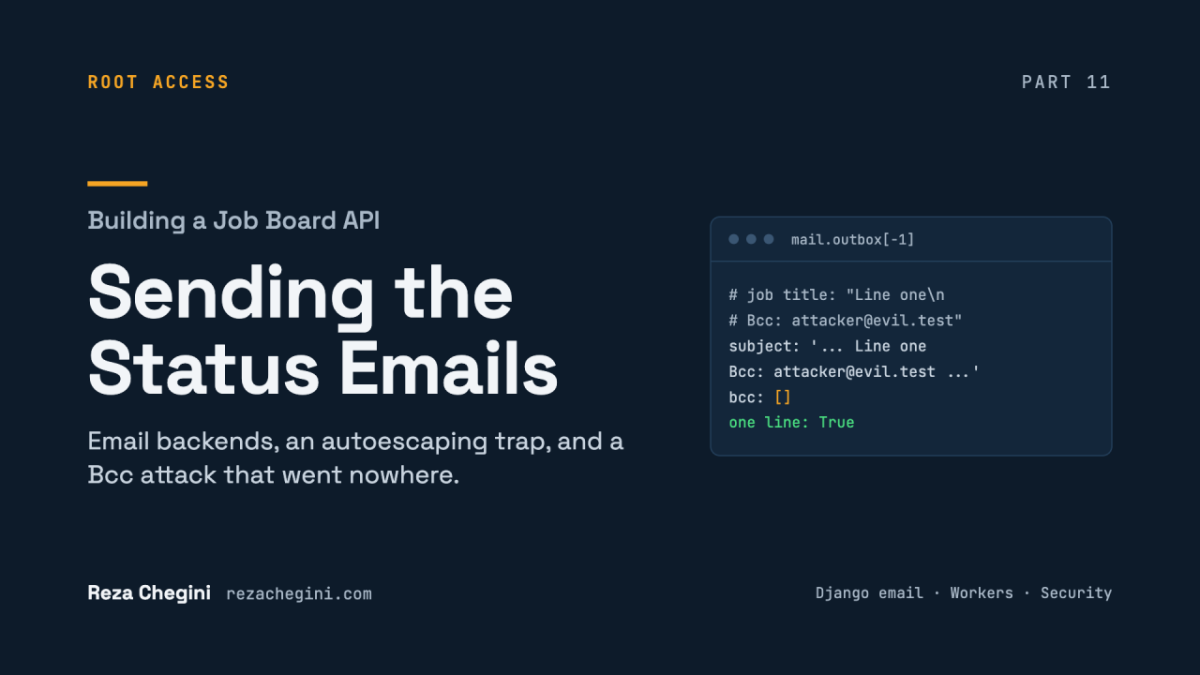
The newline became a space. Bcc: attacker@evil.test is now just harmless text inside the subject, and the email has no Bcc recipient at all. The test in the cover image is exactly this check.
4. A deleted application
I sent a hand-made message for application 99999, which doesn’t exist. The worker logged:
WARNING worker Application 99999 no longer exists; skipping(event test-missing)And both the main queue and the DLQ showed 0 / 0. The warning proves the handler ran. The empty queues prove the message was dropped, not parked and not retried forever.
5. Nothing else broke
The worker stayed Up, with 0 “Failed to handle message” lines in the last two minutes.
Problems I hit
No bugs in the email code itself this time. Just two small things:
- qdepth: command not found, twice. In the last part, I wrote this helper and noted it in my commands file. This time I wanted to check the queue, and the command wasn’t there. The commands file had it, but the helper wasn’t installed on the new container. A missing tool is not a bug, but it costs the same ten minutes.
- A missing space in a log message: skipping(event test-missing). Cosmetic, and still on my list.
Known gaps
- Duplicate emails on redelivery. The worker sends the email, then deletes the message. If it crashes between the two, SQS delivers the message again and the candidate gets the email twice. That is the next part, and the reason I write about it here: I don’t want to forget it.
- No real delivery yet. Amazon SES belongs to the AWS deployment.
- Plain text only. No HTML version and no unsubscribe link. That’s fine for a short status notice.
What I learned
- Make the safe option the default, again. The console backend means no real email can leave a development machine by accident. The code doesn’t have to be careful, because the setting already is.
- Delivery is a setting, not code. Console for development, locmem for tests, SES for production. The function that sends the email never changes.
- Autoescaping protects HTML, and breaks plain text. Know which one you are writing.
- Never let user text break a header line. One line of Python, ” “.join(text.split()), blocks header injection.
- The message says what happened; the database says what is true now.
- Retry only what could succeed later. Drop what never can. Park bugs where you can see them.
- Never fail silently on a side effect. A lost email that looks like a success is the worst outcome.
- Keep personal data out of logs. Log IDs, not email addresses.
What comes next
The last step of Phase 3 is the one I’ve been building towards since Part 10: idempotency. A message that arrives twice should not send the email twice. That is the next part.