$ cat job-board-api/part-17.md
Building a Job Board API, Part 17: A Production Image with gunicorn
I’m sharing one of my projects here from the beginning, step by step. It’s a Job Board API built with Django, Django REST Framework, PostgreSQL and Docker Compose, with S3 and SQS (through LocalStack), Redis, and a background worker.
I’m a junior engineer looking for my first role in DevOps, SRE or Cloud. That’s why I build projects like this and write about them in public. It shows how I think, and writing it down helps me really understand it.
This is the last step of Phase 4. In Parts 13 to 16 I added health checks, metrics, JSON logs, and config from environment variables only. But until now, everything ran on Django’s development server, runserver. Its own startup banner says it clearly: “Do not use it in a production setting.”
So in this part I built a real production image:
- Two stages. A builder stage uses uv to install the dependencies. The runtime stage gets only the finished virtualenv and the code. No uv, no build tools.
- A non-root user. The process runs as app (uid 1000), and the code is owned by root, so the app can’t change its own files.
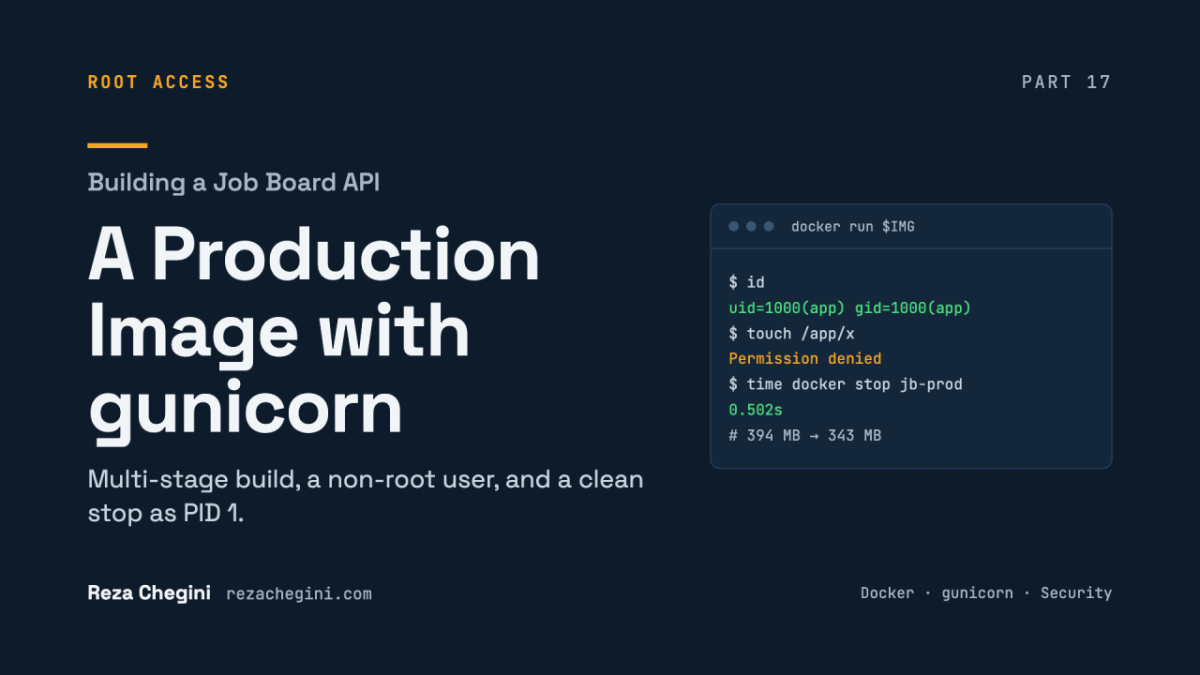
- gunicorn, with 1 process and 4 threads, running as PID 1. It receives SIGTERM and stops cleanly in half a second.
The results, each measured in a single run on thor, my home lab machine:
- The image went from 394 MB to 343 MB.
- Logs: 24 JSON lines, 0 other, including gunicorn’s own lines.
- Metrics are consistent between scrapes.
- With DEBUG=False, a 400 error page is 143 bytes. With DEBUG=True it was 68,243 bytes.
And development didn’t change at all. Compose still runs runserver with my source folder mounted. I’ll explain how one image does both.
There’s one more thing that’s different about this part: every check passed on the first run. No problems section this time, only one result that looked wrong.
Why gunicorn?
uv add gunicornThis locked gunicorn 26.2.0. It’s a production WSGI server.
WSGI is the standard interface between a Python web app and a server. On Django’s side, it’s the application object in config/wsgi.py. Any WSGI server can run it.
runserver is a development server. It reloads when you save a file, which is great while coding. But it isn’t built for many requests at once, and it isn’t hardened for the internet. gunicorn is.
gunicorn.conf.py: how the server runs
gunicorn reads its config file as Python. So its settings can come from environment variables, which is the rule from Part 16 applied to the server too.
Where it listens
import os

bind = f"0.0.0.0:{os.environ.get('PORT', '8006')}"
0.0.0.0 means “listen on all interfaces inside the container”. 127.0.0.1 would only accept connections from inside the container itself, so Docker’s port mapping and Kubernetes Services couldn’t reach it. This is the bind address from Part 16’s ALLOWED_HOSTS question, now from the server’s side.
PORT defaults to 8006, which matches my dev port and the EXPOSE line in the Dockerfile.
The process model
worker_class = "gthread"
workers = int(os.environ.get("GUNICORN_WORKERS", "1"))
threads = int(os.environ.get("GUNICORN_THREADS", "4"))
gunicorn uses a master/worker model. The master process (PID 1) doesn’t handle requests itself. It starts worker processes and replaces any that die. docker top showed both: one master and one worker.
gthread means each worker process runs a pool of threads. Here that’s 1 process × 4 threads = 4 requests at a time.
Why threads? Python has the GIL, so only one thread runs Python code at a time. But most of my request time is spent waiting: for Postgres, Redis, SQS and S3. Python releases the GIL while it waits, so threads give real concurrency for this kind of work.
int(…) is needed because environment variables are always strings. If someone sets GUNICORN_WORKERS=abc, the server fails at startup. That’s fail fast again.
Why only one process?
This is the most important decision in the file, and it connects back to Part 14.
Prometheus counters live in process memory. With two or more processes, each process has its own counters. Each scrape reaches one random process and shows its numbers, so the metrics jump around.
With one process, /metrics is simply correct. I proved it: after 10 requests, two scrapes in a row both showed 11.0.
The alternative is prometheus_client’s multiprocess mode: a shared directory (PROMETHEUS_MULTIPROC_DIR) and a cleanup hook when a worker exits. It works, but it adds moving parts.
So how do I scale? With more pods, each with one process. In Kubernetes that means more replicas, and later an autoscaler (HPA). This is the “one process per container” rule.
The cost: because of the GIL, one container uses about one CPU core for Python code. That’s fine when scaling happens at the pod level.
Warning for future me: setting GUNICORN_WORKERS above 1 doesn’t fail. It silently breaks /metrics.
Timeouts
timeout = int(os.environ.get("GUNICORN_TIMEOUT", "30"))
graceful_timeout = 30
timeout: if a worker is silent for 30 seconds (a stuck request), the master kills it and starts a new one. It’s a safety net, so a hung request can’t hold a thread forever.
graceful_timeout: when the server gets SIGTERM, workers get up to 30 seconds to finish the requests they’re handling. Kubernetes’ default terminationGracePeriodSeconds is also 30, so the two match.
Logs
accesslog = "-"
errorlog = "-"
loglevel = os.environ.get("LOG_LEVEL", "info").lower()
“-” means stdout and stderr. No log files inside the container, the same rule as Part 15.
accesslog turns on one line per request. Under gunicorn, the django.server request lines from runserver don’t exist anymore. This replaces them.
It uses the same LOG_LEVEL variable as Django, lowercased because that’s the form gunicorn expects.
gunicorn’s own logs as JSON
In Part 15, I made every Django log line a JSON object. But gunicorn has its own logging, and by default it prints plain text. Without this section, production logs would be a mix of JSON and text again.
_json = {
    "()": "pythonjsonlogger.json.JsonFormatter",
    "fmt": "%(levelname)s %(name)s %(message)s",
    "rename_fields": {"levelname": "level", "name": "logger"},
    "timestamp": True,
}
This is the same formatter as in settings.py, so gunicorn’s lines have the same keys as Django’s: level, logger, message and timestamp.
The _ at the start marks it as a private helper. gunicorn ignores names in the config file that it doesn’t know.
It’s a small duplicate, on purpose. I could import it from config.settings, but that would load all of Django, and require every environment variable, in gunicorn’s master process before it even starts the workers.
logconfig_dict = {
    "version": 1,
    "disable_existing_loggers": False,
    "formatters": {"json": _json},
    "handlers": {
        "stdout": {
            "class": "logging.StreamHandler",
            "stream": "ext://sys.stdout",
            "formatter": "json",
        },
    },
    "root": {"handlers": ["stdout"], "level": "INFO"},
    "loggers": {
        "gunicorn.error": {"handlers": ["stdout"], "level": "INFO", "propagate": False},
        "gunicorn.access": {"handlers": ["stdout"], "level": "INFO", "propagate": False},
    },
}
logconfig_dict is gunicorn’s hook for configuring its logging with dictConfig. It’s the same mechanism Django uses for LOGGING, so everything from Part 15 applies.
gunicorn.error, despite its name, is gunicorn’s general log: startup, workers and signals. gunicorn.access is the per-request log.
Why root is here: gunicorn merges this dict over its own defaults, and those defaults point root at a handler named console. My handlers section replaces theirs. Without my own root, the config would point at a handler that no longer exists.
propagate: False: these loggers have their own handler, so nothing is printed twice. Same rule as Part 15.
When Django loads inside the worker, its LOGGING configures root the same way. So it doesn’t matter which config “wins” for root.
The result: 24 JSON lines, 0 other. That includes lines like this:
{"logger": "gunicorn.error", "message": "Starting gunicorn 26.2.0", ...}The Dockerfile, stage 1: the builder
A multi-stage Dockerfile has more than one FROM line. Each one starts a new stage. Only the last stage becomes the image you ship. Everything else is thrown away, unless you explicitly copy it forward.
# ---------- builder: install dependencies with uv ----------
FROM python:3.12-slim AS builder
AS builder gives the stage a name, so a later stage can copy from it.
COPY --from=ghcr.io/astral-sh/uv:0.13.0 /uv /bin/uvThis copies the uv binary straight out of the official uv image, pinned to version 0.13.0. There’s no pip install uv.
I copy only /uv now. The old Dockerfile also copied /uvx, which I never used.
It lands in the builder only. I proved it: command -v uv in the final image returns no uv.
ENV UV_PROJECT_ENVIRONMENT=/opt/venv \
    UV_COMPILE_BYTECODE=1 \
    UV_LINK_MODE=copy \
    UV_PYTHON_DOWNLOADS=never
Four settings for uv, each with a reason:
- UV_PROJECT_ENVIRONMENT=/opt/venv creates the virtualenv outside /app. In development, my bind mount covers /app. A venv inside it would be hidden, or would mix with a .venv on my host.
- UV_COMPILE_BYTECODE=1 precompiles the dependencies to .pyc files at build time. Startup is faster, and the runtime user couldn’t write .pyc files anyway.
- UV_LINK_MODE=copy copies files into the venv instead of hard-linking them from uv’s cache. The cache doesn’t go to the next stage, so the venv must be self-contained.
- UV_PYTHON_DOWNLOADS=never tells uv to use the image’s own Python 3.12 and never download another one. The venv must point at the same interpreter that the runtime stage has.
WORKDIR /app
COPY pyproject.toml uv.lock .python-version ./
RUN uv sync --locked --no-dev --no-install-project
Only the dependency files first. Docker caches each layer. As long as pyproject.toml and uv.lock don’t change, this slow RUN is reused. A code change only rebuilds the cheap COPY . . at the end. My second build showed CACHED for these layers.
–locked fails the build if uv.lock doesn’t match pyproject.toml. The image gets exactly the locked versions.
–no-dev skips the dev dependency group, like test tools later. Production doesn’t need them.
–no-install-project installs the dependencies but not the project itself. My code arrives as plain files in the runtime stage.
The Dockerfile, stage 2: the runtime
# ---------- runtime: Python, the venv and the code; nothing else ----------
FROM python:3.12-slim AS runtime
A fresh start from the same base image. The same base is on purpose: the venv’s python is a link to /usr/local/bin/python3.12, and that file must exist here, with the same version. A different base would break the venv.
Because it’s the last stage, it’s the image that docker build and Compose produce by default.
The Python environment
ENV PATH="/opt/venv/bin:$PATH" \
    PYTHONUNBUFFERED=1 \
    PYTHONDONTWRITEBYTECODE=1
PATH puts the venv’s bin folder first. So python and gunicorn resolve to /opt/venv/bin/…, as docker top showed. This is the same as “activating” the venv, without a shell.
PYTHONUNBUFFERED=1 writes output immediately. Without it, log lines sit in a buffer and appear late, or get lost in a crash. I double-checked this name carefully, because back in Phase 1 I had a typo here: PYTHONBUFFERED.
PYTHONDONTWRITEBYTECODE=1 stops Python from trying to write .pyc files for my code. The folder is read-only for the app user anyway.
A non-root user
RUN useradd --uid 1000 --no-create-home --shell /usr/sbin/nologin appBy default, containers run as root. If a bug lets an attacker run commands, those commands would run as root inside the container. That makes it easier to tamper with files, or to use a kernel or runtime bug to escape the container.
–uid 1000 is a fixed number. Kubernetes’ securityContext settings (runAsUser and runAsNonRoot) work with numbers, and a fixed uid makes file ownership predictable. It also matches my own uid on the host, so files in the dev bind mount are readable and writable without permission problems.
–no-create-home because no home folder is needed, and –shell /usr/sbin/nologin so nobody can log in as this user.
It’s placed before the COPY lines. It never changes, so its layer stays cached.
Copying only what’s needed
WORKDIR /app
COPY --from=builder /opt/venv /opt/venv
COPY . .
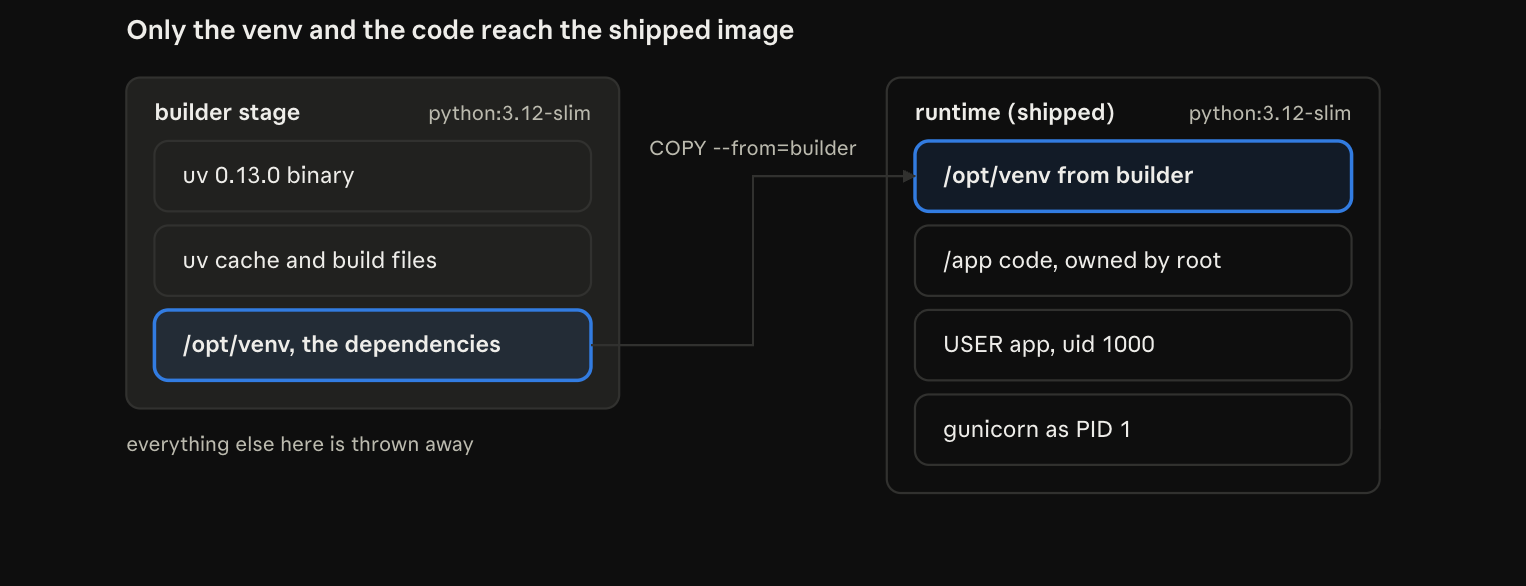
COPY –from=builder takes the finished venv out of the builder stage. This is the line that makes it multi-stage. Everything else in the builder (uv, its cache, build files) is left behind. That’s where the 51 MB went.
COPY . . adds the code. .dockerignore keeps .env, .env.*, .venv, .git and caches out. ls -a /app shows only .env.example.
There’s no –chown, on purpose. The files stay owned by root. The app user can read them, but not change them. I proved it: touch /app/x gave Permission denied. So a compromised process can’t rewrite the code or plant files next to it.
Here are the two stages side by side. Only one thing crosses from the builder to the runtime: the finished venv.
The user, the port and the command
USER app
EXPOSE 8006
CMD ["gunicorn", "config.wsgi:application", "--config", "gunicorn.conf.py"]
USER app: everything after this line, and the running container, runs as uid 1000. id printed uid=1000(app), and docker inspect showed user=app.
EXPOSE 8006 is only documentation of the port. It doesn’t publish anything. -p and ports: do that.
config.wsgi:application is the application object in config/wsgi.py.
Exec form and PID 1
The […] style of CMD is called the exec form, and it matters a lot.
Exec form runs gunicorn directly as PID 1, the first process in the container.
Shell form (CMD gunicorn …) runs /bin/sh -c instead. Then the shell is PID 1, and it doesn’t forward SIGTERM to gunicorn. docker stop waits 10 seconds, then sends SIGKILL, which cuts off any requests in progress.
I proved it worked. gunicorn’s startup line said Listening at: … (1), so its PID was 1. And docker stop took 0.50 seconds, with a clean sequence in the logs: Handling signal: term, then Worker exiting (pid: 7), then Shutting down: Master. No 10-second wait, no SIGKILL.
In Kubernetes this is exactly what happens on every rolling update: the old pod gets SIGTERM and must stop cleanly.
One image for development and production
The image’s default command is gunicorn, for production. For development, Compose overrides it in the api service:
command: ["python", "manage.py", "runserver", "0.0.0.0:8006"]One image, two ways to run it. In development, runserver reloads when I save a file, and the bind mount .:/app puts my working copy over the image’s code.
The worker service already had its own command, so it wasn’t affected.
The alternative would be a separate Dockerfile for development. But two images slowly drift apart, and then “it works on my machine” comes back.
I checked: docker compose ps showed “python manage.py ru…”, docker compose exec api id showed uid=1000(app), and readiness and the email flow still worked.
How I tested it
As in Part 16, the real test is the image alone, with no mount and only environment variables. I started it like this:
docker run -d --name jb-prod --network 00-job-board-api_default --env-file .env -e DJANGO_DEBUG=False -p 127.0.0.1:8016:8006 $IMG- Smaller image. Before rebuilding, I tagged the old image as jobboard:before-step5. docker image ls then showed 394 MB → 343 MB. The build tooling isn’t shipped anymore.
- Not root. docker run –rm $IMG id printed uid=1000(app) gid=1000(app).
- No build tools. command -v uv in the image printed no uv.
- Read-only code. touch /app/x gave Permission denied.
- The server is there, the secrets aren’t. gunicorn –version printed 26.2.0, and ls -a /app | grep env showed only .env.example.
- Runs from env vars only. The container was up after 2 seconds, with 0 mounts, user=app.
- The process model is right. docker top jb-prod showed 2 gunicorn processes: the master and 1 worker.
- Health and metrics work. /healthz returned {“status”: “ok”}, /readyz said ready with 3 checks ok, and /metrics and /api/jobs/ both returned 200.
- No debug page. Host: evil.example with DEBUG=False returned 400 in 143 bytes. With DEBUG=True, the same error was a 68,243-byte debug page.
- Consistent metrics. After 10 requests, two scrapes both showed 11.0. One process, one set of counters.
- All JSON. Every container log line parsed: 24 JSON, 0 other, including gunicorn’s “logger”: “gunicorn.error” lines.
- Clean shutdown. time docker stop jb-prod took 0.502s: Handling signal: term → Worker exiting (pid: 7) → Shutting down: Master.
- Development still works. Both Compose services were Up, id showed app, readiness returned 200, and an interview → reviewing change was emailed.
Image sizes come from docker image ls, the stop time from time docker stop, and the response size from curl’s %{size_download}. Every number is from a single run on thor.
These commands repeat the main checks:
docker compose up -d --build
IMG=00-job-board-api-api
docker run --rm $IMG id                                                   # uid=1000(app)
docker run -d --name jb-prod --network 00-job-board-api_default --env-file .env -e DJANGO_DEBUG=False -p 127.0.0.1:8016:8006 $IMG
docker inspect -f '{{len .Mounts}} mounts, user={{.Config.User}}' jb-prod # 0 mounts, user=app
curl -s http://localhost:8016/healthz                                     # {"status": "ok"}
curl -s -o /dev/null -w "%{http_code}\n" http://localhost:8016/metrics    # 200
time docker stop jb-prod; docker rm jb-prod                               # well under 10 s
The result that looked wrong
Nothing broke this time. But one result looked wrong: docker top listed the gunicorn processes as user reza, not app. Was the container running as my own user?
No. This is expected:
- The Linux kernel only knows numbers (uids), not names. A name is just a lookup in a system’s /etc/passwd file.
- docker top runs on thor, so it looks up uid 1000 in thor’s /etc/passwd. On thor, uid 1000 is reza.
- Inside the container, id looks it up in the container’s /etc/passwd, where uid 1000 is app.
Without Docker’s user-namespace remapping, the uid is the same number on both sides. Only the name lookup is different. The security property that matters is that it’s not uid 0, not root.
Why I chose this way
- 1 process × 4 threads (gthread). In-process metrics stay correct, the app mostly waits on I/O, and I scale with pods. The alternative, 2+ processes with Prometheus multiprocess mode, means more CPU per pod and more moving parts.
- uv only in the builder. A smaller image, and fewer tools for an attacker.
- Code owned by root, running as app. The app can’t modify itself. COPY –chown=app would make the code writable.
- A fixed uid, 1000. It works with Kubernetes’ runAsUser and matches my host uid for the dev mount. A user with no fixed uid gets an unpredictable number.
- Exec-form CMD. gunicorn is PID 1 and gets SIGTERM. The shell form loses the signal, waits 10 seconds, then gets SIGKILL.
- gunicorn logs as JSON. One log format for everything. gunicorn’s default text logs would undo Part 15 in production.
- A duplicated formatter dict. gunicorn’s master doesn’t need to load Django.
- One image, with Compose overriding the command. The same image in dev and prod, instead of two images drifting apart.
- The same python:3.12-slim in both stages. The venv’s link to the interpreter stays valid.
Known gaps
- Static files for the admin and the browsable API aren’t served by gunicorn. runserver serves them in development only. The JSON API isn’t affected. If I need the admin in production, the options are collectstatic with WhiteNoise, or object storage.
- No dev dependencies in the image (–no-dev). So pytest won’t be in it. In Phase 5 I need to choose: a separate dev or test stage, or running the tests with uv outside the image.
- The base image is pinned by tag (3.12-slim), not by digest. A build can pick up a newer patch release without me knowing. In my next project’s CI, I’ll pin the digest and update it on purpose with Renovate or Dependabot, and Trivy will scan the image.
- No HEALTHCHECK in the Dockerfile. Kubernetes ignores it anyway and uses the probes (/healthz and /readyz) from Part 13.
- GUNICORN_WORKERS above 1 breaks /metrics. Keep it at 1 unless multiprocess mode is added.
What I learned
- A multi-stage build ships only the last stage. Build tools stay behind, and COPY –from picks what moves forward.
- Layer order matters for speed. Dependency files first, code last, so code changes rebuild fast.
- Least privilege applies inside containers too. A non-root user, a fixed uid, read-only code, and no login shell.
- The kernel knows uids, not names. reza on the host and app in the container can be the same uid 1000.
- PID 1 must receive signals. Exec-form CMD means SIGTERM reaches gunicorn and it stops cleanly, with no SIGKILL.
- gunicorn has a master and workers, and gthread workers use threads, which work well for an app that mostly waits.
- One process per container keeps in-process metrics correct. Scale out with pods.
- One image can serve dev and prod. The default command is production; Compose overrides it for development.
- 12-factor applies to the server too. PORT, GUNICORN_* and LOG_LEVEL all come from the environment.
What comes next
This step completes Phase 4. The production image runs with only environment variables, and it exposes health and metrics. That was the phase’s goal from the start.
Phase 5 is about tests. That’s where I’ll have to decide how pytest fits with an image that has no dev dependencies. After that, in my next project, this image goes to Kubernetes on EKS and AKS, where its non-root user, its probes and its clean shutdown will really matter.