$ cat job-board-api/part-18.md
Building a Job Board API, Part 18: Tests in a Container
I’m sharing one of my projects here from the beginning, step by step. It’s a Job Board API built with Django, Django REST Framework, PostgreSQL and Docker Compose, with S3 and SQS (through LocalStack), Redis, and a background worker.
I’m a junior engineer looking for my first role in DevOps, SRE or Cloud. That’s why I build projects like this and write about them in public. It shows how I think, and writing it down helps me really understand it.
Phase 4 ended with a production image. Now Phase 5 is about tests. Until now, every check in this series was a curl command I typed by hand. From here on, checks are code that runs in seconds.
The testing work became four articles:
- This one: the test setup, and the first unit tests.
- Permission tests and API tests.
- Faking AWS, the worker and Redis.
- 100% coverage, and why the gate is 80%.
By the end of this part, one command runs the whole test suite:
docker compose run --rm testWhy the tests run in a container
Running pytest directly on my machine doesn’t work, for two reasons:
- The models use PostgreSQL’s ArrayField (for skills). So I can’t swap in SQLite for tests. The tests need a real Postgres.
- POSTGRES_HOST=db only resolves inside the Compose network. From my host, the name db means nothing.
And the production image can’t run them either. In Part 17 I built it with –no-dev, so pytest isn’t inside it, on purpose.
So the answer is a separate image with the dev tools, running on the same network as db.
The tools
uv add --dev pytest pytest-django pytest-cov–dev puts them in a separate group in pyproject.toml ([dependency-groups] dev). uv sync installs that group by default, and uv sync –no-dev skips it. My production builder uses –no-dev, and that’s exactly what keeps these tools out of production.
The locked versions are pytest 9.2.0, pytest-django 4.14.0 and pytest-cov 7.1.0.
- pytest is the test runner. You write plain assert statements, and it has fixtures and parametrize (more on both below).
- pytest-django connects pytest to Django: it loads the settings, creates the test database, and gives fixtures like client, db, settings and mailoutbox.
- pytest-cov runs coverage.py during the tests and prints a report.
pytest settings
[tool.pytest.ini_options]
DJANGO_SETTINGS_MODULE = "config.settings"
python_files = ["test_*.py"]
addopts = "--cov --cov-report=term-missing"- DJANGO_SETTINGS_MODULE tells pytest-django which settings to load. The test run prints it: settings: config.settings (from ini).
- python_files: only files named test_*.py are collected as tests, so helper files like conftest.py aren’t mistaken for tests.
- addopts adds options to every pytest run. –cov turns coverage on, and –cov-report=term-missing prints a table with the line numbers that never ran. For quick runs, –no-cov on the command line turns coverage off.
Coverage settings
[tool.coverage.run]
source = ["jobs", "cloud", "worker", "config"]
omit = ["*/migrations/*", "*/tests/*", "config/asgi.py", "config/wsgi.py"]- source measures my packages only. Without it, coverage would include Django, DRF and boto3, and the number would mean nothing.
- omit leaves out three things: migrations, because they’re generated code; the tests themselves, because tests testing themselves would inflate the number; asgi.py and wsgi.py, the server entry points that tests never import. gunicorn uses wsgi.py, and that was tested in Part 17.
The Dockerfile: from two stages to five
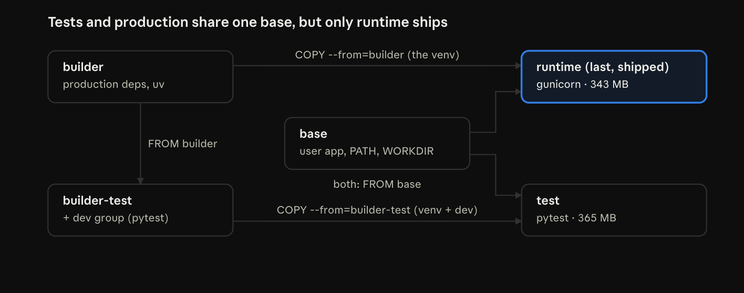
In Part 17 the Dockerfile had two stages: builder and runtime. Now it has five. The builder stage didn’t change: it installs the production dependencies into /opt/venv with uv sync –locked –no-dev –no-install-project.
builder-test: the dev tools on top
FROM builder AS builder-test
RUN uv sync --locked --no-install-project- FROM builder starts from the finished production install, not from scratch. It inherits /opt/venv, uv and the UV_* settings.
- uv sync without –no-dev adds the dev group on top. –locked still enforces the lockfile.
- The build log showed this layer taking 0.7 seconds, because only the difference is installed.
base: what test and runtime share
FROM python:3.12-slim AS base

ENV PATH="/opt/venv/bin:$PATH" \
    PYTHONUNBUFFERED=1 \
    PYTHONDONTWRITEBYTECODE=1

RUN useradd --uid 1000 --no-create-home --shell /usr/sbin/nologin app
WORKDIR /app
These lines used to be in the runtime stage. Now they’re written once, and both the test image and the production image start from them. So the tests run as the same user, with the same settings, as production.
test: the image that runs pytest
FROM base AS test
COPY --from=builder-test /opt/venv /opt/venv
COPY . .
USER app
CMD ["pytest"]- It gets the venv with the dev tools, plus the code.
- USER app: tests run as uid 1000, like production. With the bind mount (below), /app is my working copy, owned by uid 1000 on thor, so pytest can write .coverage and .pytest_cache there.
- CMD [“pytest”] is the default command, so docker compose run –rm test alone runs everything. Any words after the service name replace the command, as in docker compose run –rm test pytest -v ….
- It’s 365 MB, compared with 343 MB for runtime. It’s never deployed.
runtime: unchanged, and still last
FROM base AS runtime
COPY --from=builder /opt/venv /opt/venv
COPY . .
USER app
EXPOSE 8006
CMD ["gunicorn", "config.wsgi:application", "--config", "gunicorn.conf.py"]
This is the same production image as Part 17, now built FROM base.
It must stay the last stage. docker build . with no –target builds the last stage. If test were last, a careless build would ship pytest to production. I proved runtime is unchanged: still 343 MB, and command -v pytest in it prints no pytest.
Here are all five stages. Each image gets its venv from its own builder, and both start from the same base:
Compose: picking the stage, and a test service
For api and worker, build: . became:
build:
  context: .
  target: runtime
target: runtime names the stage explicitly instead of relying on “the last stage wins”. The intent is obvious, and it still works if someone reorders the stages.
And a new service:
test:
  build:
    context: .
    target: test
  profiles: ["test"]
  env_file: .env
  volumes:
    - .:/app
  depends_on:
    db:
condition: service_healthy- profiles: [“test”]: a service with a profile is not started by docker compose up. It only runs when you call it by name. Without this, every up -d would run the whole suite.
- env_file: .env: the same settings as the app. Since Part 16, required variables must exist, or config.settings refuses to import.
- volumes: – .:/app: the tests run against my working copy. Editing a test or the code doesn’t need a rebuild. Only new dependencies do.
- depends_on with service_healthy: Compose starts db if needed and waits for its health check. The run logs show Container …-db-1 Waiting, then Healthy.
- Only db. Redis, S3 and SQS are replaced inside the tests (an in-memory cache, and a library called moto, in the next articles). So the suite doesn’t need them running.
docker compose run –rm starts a one-off container, with its dependencies, and removes it afterwards.
The first two tests: does the setup work?
Before testing the app, I tested the test setup itself. jobs/tests/ is a package (it has an empty __init__.py), and the first file is test_smoke.py:
from django.contrib.auth import get_user_model


def test_healthz(client):
    response = client.get("/healthz")

    assert response.status_code == 200
assert response.json() == {"status": "ok"}- client is a fixture: an argument pytest fills in by name. This one is pytest-django’s Django test client.
- It proves the test setup can serve a real request through Django’s URL routing and middleware.
- It checks the status and the body. A 200 with the wrong body would mean the wrong view answered.
- /healthz touches nothing, so this test doesn’t ask for the database.
def test_test_database_starts_empty(db):
    assert get_user_model().objects.count() == 0
This test protects my real data.
- The db fixture. pytest-django only allows database access when a test asks for it. Without db, you get RuntimeError: Database access not allowed.
- A separate database. pytest-django creates a database called test_jobboard for each run, migrates it, and drops it at the end. My dev data is never touched.
- Each test is rolled back. A test with db runs inside a transaction that’s rolled back at the end, so nothing leaks into the next test.
- Why 0 is the right check: my dev database has 7 users. If the tests ever hit the dev database, this test fails.
After the run, I checked: the dev database still had 7 users, and psql -l showed 0 databases starting with test_.
The 58% surprise
The first run printed 2 passed in 0.77s, and a coverage table with a total of 58%.
Two tiny tests, and more than half the code “covered”? That’s not real. Coverage counts imports. When Python imports a module, it runs every top-level line: the imports, the class definitions, the function definitions. Loading Django loads my models, views and serializers, and all those lines count as “executed”.
So the total number can lie, especially early on. The useful part of the report is the Missing column: the exact line numbers inside functions that never ran. That’s what I followed in the next parts.
Two small cleanups
- The old jobs/tests.py stub. startapp creates an empty tests.py. It had the same name as my new jobs/tests/ package, and Python picks the package, so the stub was dead and confusing. It even showed in the coverage report as jobs/tests.py 1 1 0%. I deleted it with git rm.
- Ignore the test output. Coverage writes .coverage (and htmlcov/ for an HTML report), and pytest writes .pytest_cache/. I added them to .gitignore with a loop that doesn’t add duplicates:
for p in .coverage htmlcov/ .pytest_cache/; do grep -qxF "$p" .gitignore || echo "$p" >> .gitignore; donegrep -qxF checks for an exact whole-line match (-x), as plain text (-F), quietly (-q). So running the loop twice changes nothing.
Factory fixtures: each test builds its own data
Before the real unit tests, I needed a way to create users, companies, jobs and applications. pytest has a special file for this: conftest.py. Fixtures defined there are available to every test in that folder and below, without importing them.
import pytest

from jobs.models import Application, CandidateProfile, Company, Job, User

PASSWORD = "test-pass-123"
PASSWORD is the same throwaway password I used in the manual checks, so the JWT tests in the next article can log in.
make_company
@pytest.fixture
def make_company(db):
    def _make(username="acme", verified=True, name=None):
        user = User.objects.create_user(
            username=username,
            email=f"{username}@example.test",
            password=PASSWORD,
            role=User.Role.COMPANY,
        )
        return Company.objects.create(
            user=user, name=name or username.title(), is_verified=verified
        )

    return _make
This is a factory fixture: the fixture returns a function, and each test calls it with only the details it cares about, like make_company(“globex”, verified=False).
- Why not one shared dataset for all tests? Because then you can’t see what each test depends on. And a plain fixture that returns one object could only make one company per test.
- db as an argument. Creating users needs the database, so the fixture asks for it. Any test that uses make_company gets database access automatically.
- create_user, not create. create_user hashes the password. create would store it as plain text, and login would fail.
- A unique email per username (sam@example.test), because User.email is unique=True.
- name or username.title() turns acme into Acme, unless a name is given.
- verified=True by default. Most tests need a company that can post jobs. Tests about verification pass False.
make_candidate
@pytest.fixture
def make_candidate(db):
    def _make(username="sam", skills=None):
        user = User.objects.create_user(
            username=username,
            email=f"{username}@example.test",
            password=PASSWORD,
            role=User.Role.CANDIDATE,
        )
        return CandidateProfile.objects.create(user=user, skills=skills or [])

return _make- It returns the profile, not the user, because applications point at profiles. Tests reach the user through .user.
- skills=None, then skills or []. This is a classic Python trap: never write skills=[] as a default. A default list is created once and shared between every call, so one test could change another test’s data.
make_job and make_application
@pytest.fixture
def make_job(db):
    def _make(company, title="Junior DevOps Engineer", required_skills=None, location="Vancouver", **fields):
        return Job.objects.create(
            company=company,
            title=title,
            description="Build and run things.",
            location=location,
            required_skills=required_skills or [],
            **fields,
        )

    return _make


@pytest.fixture
def make_application(db):
    def _make(job, candidate, **fields):
        return Application.objects.create(job=job, candidate=candidate, **fields)

return _make- **fields collects any other keyword arguments, like is_open=False or job_type=”contract”, and passes them on. The fixture doesn’t need to list every model field.
- location is a parameter with a default. That wasn’t true at first, and it caused 14 errors in the next part. I’ll tell that story in the next article.
- For applications, **fields lets a test set status, cover_letter, or a resume name (resume=”resume/job-1/abc.pdf”) without uploading anything.
I didn’t use factory_boy. Four small functions cover everything, and it’s one dependency fewer. For bigger models, it would be worth it.
Unit tests 1: the match score
The match score from Part 6 is pure logic, so its tests don’t need the database at all.
def test_normalize_skills_strips_lowercases_and_drops_blanks():
    assert normalize_skills([" AWS ", "aws", "Terraform", "", "   ", None]) == {"aws", "terraform"}
One input that hits every rule at once: spaces around a skill, different case, a duplicate after normalising, an empty string, a spaces-only string, and None. The function returns a set, so the comparison ignores order, and the duplicate disappears.
One test, many cases
@pytest.mark.parametrize(
    ("required", "candidate", "expected"),
    [
        (["aws", "terraform", "python"], ["aws", "terraform", "python"], 100),
        (["aws", "terraform", "python"], ["aws", "terraform"], 67),
        (["aws", "terraform", "python"], ["aws"], 33),
        (["aws", "terraform"], ["go", "rust"], 0),
        (["aws", "terraform"], [], 0),
        (["AWS", " Terraform "], ["aws", "TERRAFORM"], 100),
        (["aws", "AWS", "aws "], ["aws"], 100),
        (["aws"], ["aws", "go", "rust", "k8s"], 100),
    ],
)
def test_match_score(required, candidate, expected):
    assert match_score(required, candidate) == expected
@pytest.mark.parametrize runs the same test once per row. Each row is reported separately, so one bad case doesn’t hide the others. Each row checks one rule:
- full match, 2 of 3 (round(66.67) = 67) and 1 of 3 (round(33.33) = 33);
- no overlap, and a candidate with no skills;
- case and spaces are ignored;
- duplicates in the job’s list count once: [“aws”, “AWS”, “aws “] is one required skill, so 1 of 1 = 100, not 1 of 3;
- extra candidate skills don’t push the score over 100.
None is not zero
@pytest.mark.parametrize("required", [[], ["", "   "])
def test_match_score_is_none_when_job_requires_no_skills(required):
    assert match_score(required, ["aws"]) is None
“This job requires no skills” isn’t a “0% match”, so the API shows null. The second case matters most: a list that becomes empty after normalising. A simple if not required_skills: check would miss it, and the code would then divide by zero.
Python’s rounding surprise
def test_match_score_rounds_halves_to_even():
    eight = [f"skill{i}" for i in range(8)]
    assert match_score(eight, eight[:1]) == 12   # 12.5 → 12
    assert match_score(eight, eight[:3]) == 38   # 37.5 → 38
Python’s round() uses banker’s rounding: exact halves go to the even neighbour. So round(12.5) is 12, but round(37.5) is 38. It reduces bias when you add up many rounded numbers. Eight skills is the smallest set that produces exact halves. If the rule ever has to be “always round .5 up”, this test is where that change happens, on purpose.
Unit tests 2: the resume validator
PDF = b"%PDF-1.4\nfake resume\n%%EOF\n"
DOCX = b"PK\x03\x04fake docx"
These start with the real file signatures (“magic bytes”): %PDF- for PDF, and PK\x03\x04 for DOCX, which is really a ZIP archive. SimpleUploadedFile is Django’s in-memory stand-in for an uploaded file.
The tests check each rule on its own:
- Valid files pass first (cv.pdf, cv.docx, CV.PDF). Each negative test only means something if a valid file passes.
- Wrong extensions are rejected (cv.txt, cv.doc, cv, cv.pdf.exe), each with real PDF content, so only the name is wrong. cv.pdf.exe is a classic disguise: only the last suffix counts.
- Content must match the extension. A DOCX named .pdf, a PDF named .docx, plain text, and an empty file are all rejected with Invalid file signature. A renamed file is the cheapest way to sneak something past an extension check.
pytest.raises(ValidationError, match=”…”) passes only if that exception is raised and its message matches. So the test checks which rule rejected the file, not just that something did.
Boundary tests
def test_exactly_5_mb_is_allowed():
    content = PDF[:5] + b"0" * (MAX_RESUME_SIZE - 5)
    assert validate_resume(upload("cv.pdf", content)) is None


def test_one_byte_over_5_mb_is_rejected():
    content = PDF[:5] + b"0" * (MAX_RESUME_SIZE - 4)
    with pytest.raises(ValidationError, match="5 MB"):
        validate_resume(upload("cv.pdf", content))
Exactly the limit is allowed, and one byte more is rejected. The code says file.size > MAX_RESUME_SIZE. If someone changed it to >=, a legal 5 MB file would be rejected, and only the “exactly 5 MB” test would catch it. MAX_RESUME_SIZE is imported from the code, not retyped, so the tests follow the real limit if it changes.
The rewind test
def test_file_is_rewound_after_validation():
    file = upload("cv.pdf", PDF)
    validate_resume(file)
    assert file.tell() == 0
    assert file.read() == PDF
The validator reads 5 bytes to check the signature, then calls seek(0). Why does that matter? The same file object is uploaded to S3 after validation. Without the rewind, the upload would start at byte 5, and the stored resume would be missing its header, so it would be corrupt.
Unit tests 3: the model rules
The model tests check rules that the rest of the app depends on:
- Role properties work in both directions: a company user isn’t a candidate, and the reverse. A property that always returned True would fail.
- Defaults: a new job is open, full time, with no skills, and a new application starts at submitted.
- Ordering: companies by name, jobs newest first. I created them in the “wrong” order on purpose, so alphabetical order is different from creation order.
- __str__ methods: the text the admin, the shell and log messages show.
- Cascades: deleting a company user deletes its company, jobs and applications. No orphan rows. (The resume file in S3 isn’t deleted by a cascade; that’s a known gap.)
- The upload path is random: two calls give different keys, the original filename is gone, and the extension is lowercased. re.fullmatch(r”resume/job-7/[0-9a-f]{32}\.pdf”, first) checks the whole string.
Testing database constraints, and the savepoint trick
def test_one_application_per_job_per_candidate(make_company, make_candidate, make_job, make_application):
    company = make_company()
    job, other_job = make_job(company), make_job(company, title="SRE Intern")
    sam = make_candidate()
    make_application(job, sam)

    with pytest.raises(IntegrityError), transaction.atomic():
        make_application(job, sam)

    make_application(other_job, sam)          # same candidate, different job: allowed
    assert Application.objects.filter(candidate=sam).count() == 2
This tests the UniqueConstraint on job and candidate. It’s the last line of defence in the database, behind the serializer check and the view’s race handling.
Why transaction.atomic()? pytest-django runs each test inside one transaction. After a database error, PostgreSQL marks that transaction as broken: current transaction is aborted, commands ignored until end of transaction block. Every later query in the test would fail. atomic() creates a savepoint, so the error rolls back only to that point, and the test’s transaction stays usable. The order matters: pytest.raises is outside, so it catches the error after atomic() has rolled back.
The second half is a positive twin: the same candidate can apply to a different job. A constraint on candidate alone would also block the duplicate, and only this second half catches that mistake.
The same pattern tests that emails are unique (different username, same email, so the right constraint fires) and that a ProcessedEvent’s event_id is unique. The worker’s idempotency from Part 12 is built on that one.
How do I know these tests work?
A test that never fails proves nothing. So after writing the tests, I broke the code on purpose and checked that the right tests failed. This is called mutation testing, and I did it by hand for each group of tests in Phase 5.
This time I changed one line in the match score:
if not required:        # the real code
if required is None:    # the deliberate bug
The result: exactly the 2 “no skills” cases failed, with ZeroDivisionError. Nothing else failed. That’s the best possible outcome: the bug was caught, and the failures point straight at it. After git checkout, everything passed again.
The numbers for this part: 36 tests. matching.py, validators.py and models.py are at 100%, and the total went from 58% to 62%.
Things I found along the way
- A typo in the code. While reading resume_upload_path, I found a variable called extentsion. It was a local variable, so it was harmless, but I fixed it with sed -i ‘s/extentsion/extension/g’ jobs/models.py. Reading code carefully to test it finds small problems like this.
- Tests that seemed to run twice. In the full run, test_models.py and test_smoke.py appeared twice in the output. They didn’t run twice. pytest-django reorders tests so database tests run first, so files show up out of order. I counted: 9 + 1 + 12 + 1 + 1 + 14 = 38 tests, none run twice.
What I learned
- Tests need the same environment as the app. For me that means a container on the Compose network, not my host.
- A shared base stage makes the test image and the production image run as the same user, with the same settings.
- The last Dockerfile stage is the default build. Keep the production stage last, and name it with target: anyway.
- Compose profiles make a service opt-in, so up doesn’t start it.
- Coverage counts imports. The total can lie early on. Read the Missing column.
- Factory fixtures let each test build exactly the data it needs.
- Never use a mutable default argument like skills=[].
- Parametrize gives one test many cases, each reported on its own.
- Test the boundary: exactly the limit, and one byte over.
- After a database error in a test, use transaction.atomic() to keep the test’s transaction usable.
- Python’s round() rounds halves to even.
- Break the code on purpose to prove the tests can fail.
What comes next
The next article is about the permission tests: a who-can-do-what matrix through the real endpoints, why denied writes must change nothing, and how one small fixture made the suite 29 times faster. Then the API tests: signup, the real JWT flow, filters and ordering.