$ cat job-board-api/part-29.md
Building a Job Board API, Part 29: One Ansible Role for Every Project
Where we are
Hi, I’m Reza. In my newsletter, Root Access, I am sharing one of my projects from the very beginning: a Job Board API built with Django, Postgres, Docker, AWS and Azure. I am a junior engineer looking for my first SRE, DevOps or Cloud job, and that is why I build my projects in public. You can see how I think, what breaks, and how I fix it.
This part is a bit different. The Job Board API has a Setup checklist, and its first item is a list of local tools that every developer machine needs:
- Python 3.12
- Docker and Compose
- the PostgreSQL client
- redis-cli
- the AWS CLI
- LocalStack and awslocal
- Azurite
- pre-commit
I could write these steps in a README and install them by hand. But my portfolio plan has seven projects, and each one needs the same tools, so hand-installing would drift. Instead, I wrote one Ansible role that installs the tools on every machine, the same way, and proves they work.
The rule for this role: run it twice, and the second run must change nothing (changed=0). That is idempotency, and it is the acceptance test.
This article covers the role’s structure and its first five tools. The next part covers the rest, and how the project uses the published role.
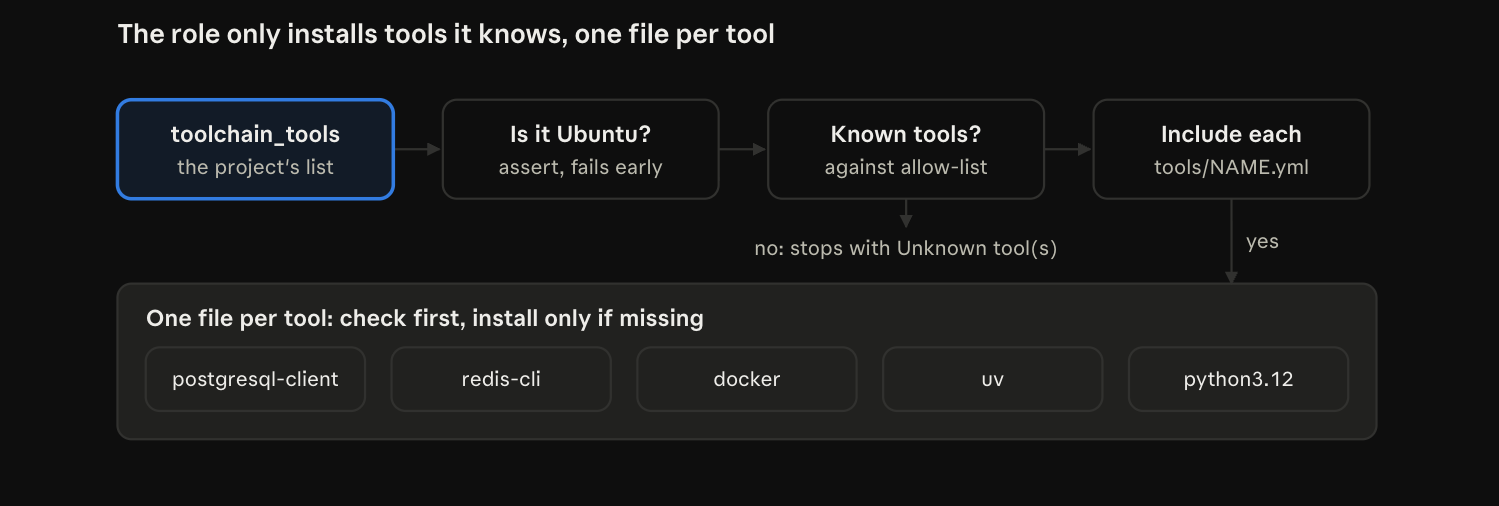
A project asks for tools by name. The role checks two things before anything changes, then runs one small file per tool. Each file checks if its tool is already there before it installs anything.
Ansible itself, on thor
thor is my home lab machine. First, I installed Ansible:
uv tool install "ansible-core>=2.17"- uv tool install puts a command-line tool in its own isolated environment and links its commands (ansible-playbook, ansible-galaxy, ansible-lint) into ~/.local/bin. No sudo, no system Python packages.
- Why not apt install ansible? Distribution packages are often behind. This way I get a current ansible-core, and I control the version.
- ansible-core, not ansible. ansible-core is the engine plus the ansible.builtin modules, and that is all this role needs. The full ansible package adds collections I don’t use.
Then a quick pre-check:
/usr/bin/python3 -c "import apt; print('python3-apt ok')"Ansible runs modules on the target, with the target’s Python. The apt module needs the python3-apt library. I come back to this below, because it caused my first failure.
The repo layout
ansible-role-dev-toolchain/
├── defaults/main.yml          ← the role's inputs (projects override them)
├── meta/main.yml              ← what the role is, who made it, which platforms
├── tasks/
│   ├── main.yml               ← validate, then include one file per tool
│   └── tools/
│       ├── postgresql-client.yml
│       └── redis-cli.yml
└── tests/
    ├── inventory              ← localhost, local connection, Ubuntu's Python
    ├── roles/dev-toolchain    ← symlink to ../.. (the repo itself)
    └── test.yml               ← a playbook that uses the role
A role has a fixed folder layout. Ansible finds each part by its folder name: tasks/main.yml runs first, defaults/main.yml holds the inputs, and meta/main.yml describes the role. There is nothing to configure: the folders are the interface.
The role lives in its own repo, because projects 00 to 06 will all use it. Each project pulls it in as a dependency. That is the portfolio plan: build the shared pieces once, then reuse them.
defaults/main.yml
---
# Tools this machine should have. Each project's bootstrap.yml sets its own list.
toolchain_tools: []

# Every tool the role knows how to install (one file per tool in tasks/tools/).
toolchain_supported:
  - postgresql-client
- redis-cli- toolchain_tools is the role’s main input, an empty list by default. defaults/ has the lowest variable precedence, so a project’s own list replaces it.
- Empty means “install nothing”. If a project forgets the variable, nothing installs and nothing fails. That is the safe default.
- toolchain_supported is the allow-list. Each name here must have a matching tasks/tools/<name>.yml.
meta/main.yml
---
galaxy_info:
  role_name: dev_toolchain
  author: mohammadrezachegini
  description: Installs a project's local development tools, idempotently, and verifies them.
  min_ansible_version: "2.17"
  platforms:
    - name: Ubuntu
versions: [<thor's codename>]- role_name: dev_toolchain uses an underscore, because Galaxy role names don’t allow hyphens. Projects refer to it by this name.
- “2.17” is quoted, so YAML keeps it as text. Unquoted, 2.10 would become the number 2.1.
- platforms is documentation only. Ansible does not enforce it. I first wrote [noble] (Ubuntu 24.04). Then thor’s psql version, 18.6-0ubuntu0.26.04.1, showed me that thor runs Ubuntu 26.04. I fixed it from /etc/os-release with sed.
tasks/main.yml: check first, then install
The entry point has three tasks. The first two only check. Nothing changes until both pass.
1. Is this Ubuntu?
- name: Check the operating system is supported
  ansible.builtin.assert:
    that:
      - ansible_facts['distribution'] == 'Ubuntu'
      - ansible_facts['distribution_major_version'] | int >= 24
fail_msg: "Unsupported OS: {{ ansible_facts['distribution'] }} {{ ansible_facts['distribution_version'] }}. This role supports Ubuntu 24.04+."- ansible.builtin.assert fails the play if a condition is false. I use the fully qualified name everywhere, so there is no doubt which module runs.
- ansible_facts[‘distribution’] is gathered automatically at the start of the play.
- Why check: every tool file uses apt. On Fedora or macOS, the role would fail halfway with an obscure error. This check fails early, with a clear message.
2. Does the role know every requested tool?
- name: Check every requested tool is known
  ansible.builtin.assert:
    that:
      - toolchain_tools | difference(toolchain_supported) | length == 0
fail_msg: "Unknown tool(s): {{ toolchain_tools | difference(toolchain_supported) | join(', ') }}. Supported: {{ toolchain_supported | join(', ') }}"- difference is a Jinja2 filter: items in the first list that are not in the second. Here, that means requested tools the role doesn’t know.
- The message names the bad tools and lists the good ones.
- I tested it with a typo: -e ‘{“toolchain_tools”: [“psql”]}’ gave Unknown tool(s): psql. And it failed before any sudo task ran, which is exactly the point.
- Without this check, a typo would only fail when include_tasks couldn’t find the file, with a much less helpful error.
3. Install each tool
- name: Install each requested tool
  ansible.builtin.include_tasks: "tools/{{ tool }}.yml"
  loop: "{{ toolchain_tools }}"
  loop_control:
loop_var: tool- include_tasks loads a task file at run time, once per item in the loop. The other option, import_tasks, loads its files when the playbook starts, before Ansible knows the loop items. include_tasks is the one that works with a loop.
- loop_var: tool names the loop variable tool instead of the default item. The tool files may have loops of their own, so a clear name avoids confusion.
This design works like plugins. To add a tool, I add one file and one name in the allow-list. Nothing else changes. That is the point of the role: the tools are data, not code.
The first two tools
- name: "postgresql-client | install psql"
  ansible.builtin.apt:
    name: postgresql-client
    state: present
    update_cache: true
    cache_valid_time: 3600
  become: true
Every word here matters for idempotency:
- The task name starts with the tool (postgresql-client | …), so a long run’s output shows which tool each line belongs to.
- postgresql-client is only the client, psql, not the server. The database runs in Docker. psql is for connecting to it, and for the health checks in the Setup list.
- state: present means “install it if it is missing, and leave it alone if it is there”. That is what makes the second run report changed=0.
- update_cache: true + cache_valid_time: 3600 run apt update first, but only if the package lists are older than an hour. Without the cache time, every run would update the lists, and every run would report changed.
- become: true on the task, not on the play. Only the steps that need root get sudo. That is least privilege, even on my own machine.
The redis-cli file is the same, with one difference: it installs the package redis-tools. That package holds redis-cli, plus the tools redis-benchmark and redis-check-aof, which I don’t need yet. One tool, one file, one package: the pattern holds.
Testing the role inside its own repo
Three small files let me run the role without installing it anywhere.
A symlink:
ln -sfn ../.. tests/roles/dev-toolchainAnsible looks for roles in a roles/ folder next to the playbook. This link points tests/roles/dev-toolchain at the repo root. -s makes a symbolic link, -f replaces an existing one, and -n stops a rerun from creating a link inside the target. The path is relative, so it still works after a clone.
An inventory:
localhost ansible_connection=local ansible_python_interpreter=/usr/bin/python3This is the line that fixed my first failure. While testing the role before running it on thor, the apt task failed with:
Could not import the python3-apt moduleThe Python that ran the module didn’t have python3-apt. Here is the confusing part: Ansible itself runs on my laptop’s Python, with python3-apt installed, so it could check the apt package lists. But the module runs on the target’s Python, /usr/bin/python3, and that one had no python3-apt. The inventory line names the target’s Python, and the apt module then runs with the library it needs. I had read this before writing the role, and I still forgot it once.
A test playbook:
---
# Run from the role repo:  ansible-playbook -i tests/inventory tests/test.yml -K
- name: Test the dev-toolchain role on this machine
  hosts: localhost
  roles:
    - role: dev-toolchain
      vars:
        toolchain_tools: [postgresql-client, redis-cli]
The test always asks for every tool the role supports, so every tool file runs on every test. -K asks for the sudo password at the start, because the apt tasks need it. The -i flag points at the local inventory, so nothing touches thor yet.
First results
- Run 1: both tools installed, ok=7 changed=2 failed=0.
- Run 2: ok=7 changed=0 failed=0. This is the important one. A playbook that keeps reporting changed on every run is not idempotent, and I would not trust it.
- The tools work: psql (PostgreSQL) 18.6 (Ubuntu 18.6-0ubuntu0.26.04.1) and redis-cli 8.0.5.
- The typo test: Unknown tool(s): psql, before any sudo task.
Three more tools: Docker, uv and Python 3.12
For apt packages, state: present makes idempotency easy. These three tools are different. Their installers are not idempotent by themselves, so each file uses a pattern called check, then act: a read-only check, then an install that runs only if the check says the tool is missing.
Docker: check for a working Docker first
- name: "docker | check for Docker with the Compose v2 plugin"
  ansible.builtin.command: docker compose version
  register: toolchain_docker_compose
  changed_when: false
failed_when: false- register saves the result (rc, stdout, …) in a variable.
- docker compose version checks two things at once: the docker CLI exists, and the Compose v2 plugin is installed.
- changed_when: false. Ansible can’t know what a program did, so command always reports changed. A check must never report changed.
- failed_when: false. “Docker is missing” is a normal answer, not an error.
- name: "docker | install Docker Engine and Compose v2 (Ubuntu packages)"
  ansible.builtin.apt:
    name:
      - docker.io
      - docker-compose-v2
    state: present
    update_cache: true
    cache_valid_time: 3600
  become: true
  when: toolchain_docker_compose.rc != 0
Why not just install with state: present every time? Because a machine’s Docker may come from Docker’s own repository (docker-ce and friends). Ubuntu’s docker.io package conflicts with those, so apt would try to remove one to install the other. By checking for a working Docker first, the role never fights an existing install, whatever its source.
On a fresh machine, it uses Ubuntu’s own packages, so there is no extra repository or signing key to manage. That means less to maintain and less to break.
The docker group, and a classic way to lock yourself out
- name: "docker | let {{ ansible_facts['user_id'] }} run docker without sudo"
  ansible.builtin.user:
    name: "{{ ansible_facts['user_id'] }}"
    groups: docker
    append: true
become: true- append: true is critical. Without it, the user’s other groups would be replaced by just docker. That means your sudo access is gone.
- A security note: being in the docker group is effectively root on that machine, because a container can mount the whole filesystem. Only add users you trust.
- A new group membership only works after the next login.
uv: pinned to the same version as my Dockerfile
toolchain_uv_version: "0.13.0"
toolchain_uv: "{{ ansible_facts['user_dir'] }}/.local/bin/uv"
My project’s image is built with ghcr.io/astral-sh/uv:0.13.0, so local and container tools match. Every version is pinned, on purpose.
- name: "uv | is uv already installed?"
  ansible.builtin.stat:
    path: "{{ toolchain_uv }}"
  register: toolchain_uv_stat
- name: "uv | download the installer for uv {{ toolchain_uv_version }}"
ansible.builtin.get_url:
url: "https://astral.sh/uv/{{ toolchain_uv_version }}/install.sh"
dest: "/tmp/uv-{{ toolchain_uv_version }}-install.sh"
mode: "0755"
when: not toolchain_uv_stat.stat.exists- name: "uv | run the installer (installs into ~/.local/bin)"
ansible.builtin.command: "sh /tmp/uv-{{ toolchain_uv_version }}-install.sh"
args:
creates: "{{ toolchain_uv }}"- The stat check means the role doesn’t contact astral.sh on every run. That would be slow, and it would fail on an offline machine.
- The version is in the URL. The plain install.sh would install “latest”, so every fresh machine could get a different uv.
- get_url downloads to a file, not curl | sh. The script lands on disk first, where it could be inspected before it runs.
- “0755” is quoted, because YAML reads an unquoted 0755 as a number and turns it into a different value.
- creates: skips the command if that file already exists. It is Ansible’s built-in idempotency for command tasks.
- No become. uv belongs in my home. Run as root, it would go to /root/.local/bin, where I can’t see it and my shell can’t find it.
Python 3.12, next to Ubuntu’s Python 3.14
Ubuntu 26.04’s system Python is 3.14, and my project needs 3.12. Replacing the system Python would break the system tools that depend on it, and a later upgrade could remove my Python. So I install 3.12 next to it, with uv, and let the project’s .python-version point at it.
- name: "python3.12 | make sure uv is installed (it manages the Python)"
  ansible.builtin.include_tasks: tools/uv.yml
- name: "python3.12 | look for a Python 3.12 that uv can use"
ansible.builtin.command: "{{ toolchain_uv }} python find 3.12"
register: toolchain_py312
changed_when: false
failed_when: false- name: "python3.12 | install Python 3.12 with uv (next to the system Python)"
ansible.builtin.command: "{{ toolchain_uv }} python install 3.12"
when: toolchain_py312.rc != 0- A dependency between tools. python3.12 first includes uv.yml, so a project can ask for Python alone and still get uv.
- I checked the exit codes before writing the when:. uv python find returns 0 when it finds Python, and 1 when it doesn’t.
- The full path to uv. On a fresh machine, uv was just installed, and ~/.local/bin may not be on Ansible’s PATH yet.
- My project already has .python-version with 3.12, so uv sync and uv run pick this interpreter.
Results for Docker, uv and Python
Before running, I checked what thor already had:
- docker compose version: Docker Compose version v5.5.0
- the docker group: I was already a member
- ~/.local/bin/uv –version: uv 0.13.0
- uv python find 3.12: a uv-managed Python 3.12, rc=0
So every install step should skip, and that is what happened:
- Run 1: ok=18 changed=0 failed=0 skipped=4
- Run 2: ok=18 changed=0 failed=0 skipped=4
- docker run –rm hello-world: Hello from Docker!, without sudo.
The 4 skips are all “missing, so install” steps that were not needed: the Docker install, the uv download (twice, once through the Python file’s include), and the Python install. Every check ran, and every install correctly did nothing.
An honest gap
On thor, everything was already there, so these runs only proved the check path. The install path for these three tools has not run anywhere yet: the uv download, uv python install 3.12, and apt install docker.io docker-compose-v2. My test environment couldn’t reach astral.sh either. I will prove these paths on a clean Ubuntu 26.04 machine in the Setup’s final “Done when” check. I also still need to confirm that both Docker package names exist in the 26.04 archive.
What I learned
- Idempotency is the acceptance test. state: present and cache_valid_time for apt. Check, then act, for everything else.
- Read-only checks need changed_when: false and failed_when: false. Otherwise a check looks like a change, or a missing tool looks like an error.
- The controller’s Python and the module’s Python are different. Name the module’s interpreter in the inventory.
- Validate input before any sudo task. A clear Unknown tool(s) message beats an obscure error halfway through a run.
- become per task, not per play. Least privilege, even on my own machine.
- append: true on group changes. Never replace a user’s groups.
- Never replace the OS Python. Install the version you need next to it.
- Check exit codes without a pipe. | tail hides them.
What is next
The role now has 5 tools, which covers 4 of the 8 in the Setup list, plus uv. In the next part, I add the last four: the AWS CLI, LocalStack and awslocal, Azurite, and pre-commit. Then the Setup checklist is complete, and the role becomes a dependency that every project pulls in.